-
Created by
 Jasperre, last updated on Jan 09, 2026
27 minute read
Jasperre, last updated on Jan 09, 2026
27 minute read
You can find how to input these on the page Console and Debug Panel.
Not all of the commands are locked behind debug mode, and so are categorized here for clarity. Search this page for one if you are unsure what it does.
Some of these are not so much commands as just variables the game reads, although that's not particularly important to note the main difference is that when used without an input, a variable will report what the current value is (eg: g_bShowAreaLoadTimes defaults to 0 so putting it in will print "0", and editing it will return the new value).
Trace Command
| Command | Valid Operators | Notes and Description |
|---|---|---|
trace <x> | x is another console command (plus if you want its parameters) | Will display the output of the console command at the bottom of the screen updating it frequently. More than one can be displayed by running it multiple times, it adds a new row at the bottom each time. Most commonly used with fps, eg: trace fps although there are better ways of displaying FPS in NWN:EE. Note there appears there is no way to turn off a trace line once started. |
untrace <x> | x is either a console command being traced, or leave blank to remove all traces | Removes traces in progress (although thier last output may persist on the screen) |
Player Commands
These can be run by players at any point. They are client specific and don't alter anything on the server or running module.
| Command | Valid Operators | Notes and Description |
|---|---|---|
d2 X | X is an positive integer number of dice (No value, or 0 or lower will default to 1) | Simply outputs in the console area the result of a dice role, eg; d4 10 rolls 4d10 for a value between 10 and 40. |
makesafe | Moves the current player to a valid, walkable space if they are stuck in a creature or a wall or similar | |
hidepartynames | Hides names on the partybar GUI | |
showpartynames | Shows names on the partybar GUI | |
keyholetoggle | Toggles the keyholing mode on and off. Also available in the options. Will report back on what it does. | |
ConvertPortrait <filename> | Converts a potential portrait jpg to a NWN compatible TGA format (in all the sizes), using this methodology:
While this procedure does produce files of the appropriate sizes, it is often not the best method for producing portraits. Many of the better portraits involve cropping the image for the smaller sizes, instead of simply scaling the full image down. Cropping allows for more detailed portraits at the larger sizes, while not overloading the smaller sizes with too much detail. For example, some portraits show the full body in the huge size, head and shoulders in the medium size, and just the face in the tiny size. | |
SetResolution <x> <y> | x is a the X resolution, y is the Y resolution | May not work correctly, but should set the resolution of the game. Really unnecessary and should use the options panel. |
Gamma <x> | x is the amount of Gamma to set (float value). No value means it displays the current Gamma. | Gamma can be also set in the game options, which is not altered by this command, so presumably it is session only. Default value is 2.2 |
cfg <key> <value> | key are Game Options in TML form value are the valid options (use 1 / true for turning on boolean ones, or some other value like 0 for turning off) | Sets a configuration option (will persist after exiting the game). Useful for quickbar (##cfg x y) Example this will turn on tilefade: cfg graphics.second-story-tiles.mode 2 This will turn it off: cfg graphics.second-story-tiles.mode 1 |
fps | FPS counter, use with trace for a "better" version although there is a persistent FPS counter in the options | |
setchatbuffersize X | X is a positive integer | Sets the chat buffer size, ie amount of messages in the message window that are retained. Unknown limits or what the default is, but setting it very low starts cutting off a lot of the chat window. Default value is 256 lines. |
| showpartynames | Enables party names in the GUI on the side panel (enabled by default). Oddly this isn't a game option. | |
| hidepartynames | Disables party names in the GUI on the side panel |
DebugMode and DM Login
The command that anyone can type in, but only works if you are a DM in an online module, or playing a singleplayer game, is debug mode. This is also available on the Debug Panel.
| Command | Valid Operators | Notes and Description |
|---|---|---|
DebugMode X | If X is 1 or -1 it enables debug mode. If it is any other number it disables it if it is enabled. | Debug mode allows advanced and game altering console commands to be entered. You gain access to several DM shortcuts even if you are not a full DM. To be a full DM properly use the commands dm_login and dm_logout In addition, hitting the period (.) key while in this mode calls up the "Chooser" window of the DM client, allowing the player to manipulate creatures, encounters, triggers, and waypoints. If you hit x then the game will popup a debug of the location chosen. The grid is useful for noting for light functions: SetTileMainLightColor and SetTileSourceLightColor (they're 0 indexed),
Furthermore, the plus key (+) can be used to instantly move the player's character to wherever the mouse cursor is pointing (provided it is pointing to a surface on which a creature can walk). To aid the person doing the debugging, all traps are made visible while debug mode is on, and those triggers that are normally hidden are shown as yellow shapes on the ground. (The latter is a rather noticeable indicator that debug mode had been accidentally left on.) |
dm_login <pw> | pw is the password that is needed for DM access set on the server | Become a sudo-DM, you gain all the DM powers temporarily (panels appear, you can go invisible, you become invincible etc.). This can be used instead of DebugMode if the server allows it (DebugMode on a server only works if you are already a DM). The password is set on the server so in singleplayer mode will not be set. |
dm_logout | Logs out of the sudo-DM mode, returning to being a player. If you are possessing a creature you're kicked out from it. |

Server Admin Commands
These might only work if you're hosting the server as a live client (ie through Mutliplayer → New Internet/LAN game. If someone tests these using a dedicated server it probably will require some form of permissions that even DM mode doesn't grant, however the dedicated server instance may allow these to be input in their console.
| Command | Valid Operators | Notes and Description |
|---|---|---|
setserveradminpassword <password> | password is a string for password, or blank to remove | "Success" sets the password for the server admin login. "Failure" means there are not the relevant permissions. |
setgamemasterpassword <password> | password is a string for password, or blank to remove | "Success" sets the password for the DM login. "Failure" means there are not the relevant permissions. |
banplayername <name> | name is a players name (not their character name) | "Success" adds the name to the banned player list (although it doesn't doesn't kick the player that has to be done separately). "Failure" means there are not the relevant permissions. |
banplayerip <ipaddress> | ipaddress is a standard IP address like 10.0.0.1 | "Success" adds the ip to the banned IP list (although it doesn't kick the player that has to be done separately). "Failure" means there are not the relevant permissions. |
bancdkey <cdkey> | cdkey is a players public CD key | "Success" adds the cd key to the banned CD key list (although it doesn't kick the player that has to be done separately). "Failure" means there are not the relevant permissions. |
unbanplayername <name> | name is a players name (not their character name) | "Success" removes the name from the banned player list. "Failure" means there are not the relevant permissions. |
unbanplayerip <ipaddress> | ipaddress is a standard IP address like 10.0.0.1 | "Success" removes the ip from the banned ip list. "Failure" means there are not the relevant permissions. |
unbancdkey <cdkey> | cdkey is a players public CD key | "Success" removes the cd key from the banned cd key list. "Failure" means there are not the relevant permissions. |
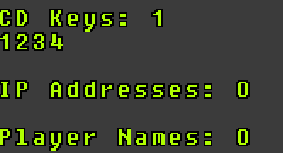
getbannedlist | None | This shows the amount of banss for each category and thier contents, eg adding CD key 1234:
|
Builder Commands
These should work regardless of debug mode and may be useful for builders.
| Command | Valid Operators | Notes and Description |
|---|---|---|
WorkshopUpload <full path to your mod directory> | The path must be something like C:\Path\To My Modification | See guide here and illustrated guide here. Uploads a mod to the workshop - will be hidden by default. Not entering anything uploads a blank one with no title! |
MakePano <yaw_steps=18> <pitch_steps=4> <view_angle=40> | <yaw_steps=18> <pitch_steps=4> <view_angle=40> | Used to generate panoramic source data, for use in stitching programs Outputs TGA files to Documents\Neverwinter Nights\screenshots By default creates 90 files called "MakePano_pAA_yBBB.tga" where pitch "AA" value is 0, 45, 90, 135 and 180 and yaw "BBB" value is 0, 20, 40, 60, 80, 100, 120, 140, 160, 180, 200, 220, 240, 260, 280, 300, 320, 340. Overwrites the old ones if you run this command again. |
renderaabb <x> | x is 1 for mode on, 0 for mode off | This function produces visual information about the current tileset's walkmesh. Available in the Debug Panel which has other advanced render options. |
rendertilepathnodes <x> | x is 1 for mode on, 0 for mode off | This function produces visual information about the edges of tiles and tile features. Available in the Debug Panel which has other advanced render options. |
shadowfliporder <x> | 1 to turn on the shadow flip order | From 1.85.8193.31: Fixed some common shadow rendering issues related to "behind" stencil tests. It does not fix every issue, however, and in rare cases, some issues may become more apparent - but all in all, the benefits should outweigh the drawbacks. The old approach can be restored with using "shadowfliporder 1" in the console. |
printvertextdata | n/a | From 1.85.8193.31: Added a new console command ‘printvertexdata’. Prints an overview of the amount of memory currently used for vertex data (model geometry) to the client log. |
dm_enablecombatdebugging <x> | x is either 0 or 1. | This function will enable and display additional information about how attacks, damage, and saving throws are computed. It's probably not a in-game toggle option due to the amount of information shown. Gets very spammy, example below - the extra white text is the combat debugging. Not tested to see if it includes absolutely everything - NWN's combat engine is quite complex.
|
dm_enablehitdiedebugging <x> | x is either 0 or 1. | If enabled it will display in the top left the dice rolls for level up dice. Only really useful for builders to confirm the classes.2da level up hit dice work correctly.
|
displaystrref <start> <end> <gender> | start and end are the string ref ID start and end gender is the gender (0 is male, 1 is female). | Prints the given string references from the TLK file to the chat window (so won't work on the main menu). |
| setglobalwind <yaw> <pitch> | yaw and pitch are floating values | Equivalent to SetAreaWind script command |
| setglobalwindvariation <yaw> <pitch> | yaw and pitch are floating values | I think this is to do with the magnitude setting of SetAreaWind |
| g_bShowAreaLoadTimes <x> | x is either 0 to disable or some other integer to enable | Shows the area load time in miliseconds in the top left console area after loading. Can check how long area times take as you add more static objects and tiles to an area.
|



Model Compiler
There is also a command line compiler option but these are recommended to use once a model is loaded in the game. These all output to a new folder in your user data folder: Documents\Neverwinter Nights\modelcompiler
| Command | Valid Operators | Notes and Description |
|---|---|---|
compileloadedmodels | Compiles all loaded models, including binary | |
compileloadedasciimodels | Compiles all loaded models, only ASCII. | |
compilemodel <name> | <name> is a resref name, eg; "mymodel" for "mymodel.mdl" | Specific model, will load and unload it for you even if it is not currently loaded. Note like the command line this will not work with skinmesh models unless the model is loaded and visible to the client (and in those cases just use compileloadedmodels instead). |
Performance Stats
These commands record FPS information and outputs it back. Now generally replaced by the much more in depth Tracy.
| Command | Valid Operators | Notes and Description |
|---|---|---|
| perfstats <toggle> | toggle is either "on" or "off" | Other commands cannot work without it being turned on |
| perfstats_show <id> | id is a 0+ integer of stats to show. Defaults to 0. | Shows the current recorded perfstats after starting:
|
| perfstats_list | Frame or Second are options not entirely sure how this works. | |
| perfstats_start <id> | id is a 0+ integer for which to start. Defaults to 0. | Starts performance stat collection |
| perfstats_stop <id> | id is a 0+ integer for which to stop. Defaults to 0. | Stops performance stat collection and deletes it |
| perfstats_threshold <threshold> | threshold is a floating variable for the threshold to record stats. Default is 1.0. |

Debug Mode
These require being a DM or in DebugMode to execute, and are considered cheats.
Dungeon Master Commands
| Command | Valid Operators | Equivalent Script Command | Notes and Description |
|---|---|---|---|
dm_visualeffect <id> <duration> | id is the visualeffects.2da line reference durration is the duration of the effect, in seconds (float value) | EffectVisualEffect | Selection mode comes up (using ir_wave as the cursor if you wondered), and will tell the server to play a VFX at the given location or on the given creature for the given duration. eg: "dm_visualeffect 11 10.5" will play the barkskin VFX on a given object for 10.5 seconds VFX requiring a source object have it play from will not work (eg MIRV VFX, like magic missiles). |
dm_allspells <X> | x is either 0 or 1. | This function will enable all spells from all classes to be cast by the player if a value of 1 is specified. Specifying 0 will disable this and the player will only be allowed to cast spells his/her character is permitted according to that character's class/abilities. This command is only functional for ordinary players if debug mode is active at the moment of casting. | |
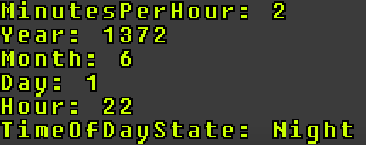
dm_gettime | HoursToSeconds, GetCalendarYear, GetCalendarMonth, GetCalendarDay, GetTimeHour, GetTimeMinute, GetTimeSecond. | This function will display the current game time of the module on screen. It retrieves the values MinutesPerHour, Year, Month, Day, Hour, and TimeOfDayState (Dawn, Day, Dusk, Night). Most of this can also be checked by mousing over the compass in the bottom right.
It does not display minutes, seconds, or microseconds. To get those values you will need to script for them. | |
dm_settime <h> <m> <s> <ms> | h is the hour to set the time to.m is the minutes to set the time to.s is the seconds to set the time to.ms is the milliseconds to set the time to. | SetTime(int nHour, int nMinute, int nSecond, int nMillisecond); | This function will set the game time in the module to the specified hour, minute, second, and millisecond. The <m> minute argument is dependent on the module's MinutesPerHour setting (default 2) so value's over that setting (ie 2-59) will give unexpected results so it's important to keep your minutes below the MinutesPerHour setting. i.e. for 10 seconds before Dusk using the default you can type dm_settime 17 1 50 0. Use dm_gettime above to retrieve the module's MinutesPerHour setting. |
dm_giveXP <x> | X is an integer value indicating the amount of experience points to give. | GiveXPToCreature(oObject, x); | This function will activate target mode. The target you click will be given the specified amount of experience points. Need to test if it takes into account multiclass penalties. |
dm_givegold <x> | X is an integer value indicating the amount of gold to give. | GiveGoldToCreature(oObject, x); | This function will activate target mode. The target you click will be given the specified amount of gold. |
dm_givelevel <x> | x is an integer value indicating the number of experience levels to give or take away. | SetXP(oObject, x); - you can calculate the XP needed for the next level from the 2da file exptable.2da | This function will activate target mode. The target you click will be given enough experience points to advance the specified number of experience levels, or the amount of experience is taken away and delevels them. If they are already ready to level up, adding just 1 level won't do anything. For instance GiveLevel 1, then GiveLevel 1 - the second does nothing. While GiveLevel 1 then GiveLevel 2 will make them 2 levels higher (if they missed levelling up in between the commands). |
dm_god | SetPlotFlag(OBJECT_SELF, TRUE); | This function will make the player invulnerable (essentially sets the plot flag) using it again toggles it off. | |
dm_heal | ApplyEffectToObject(OBJECT_SELF, EffectRessurection()); ApplyEffectToObject(OBJECT_SELF, EffectHeal(GetMaxHitPoints(OBJECT_SELF))); | This function will ressurect and restore the player back to full hitpoints. Can be used when dead. | |
dm_jumptopoint <x> <y> <area> | x and y are floating point values indicating the (x,y)-coordinates to jump to within the target area.area is the tag of the area to jump to. | This function will send the player to the specified x,y coordinate in the area specified. Given debug mode and DM mode has the chooser menu under using the period (.) key this is a little unnecessary. Also debug mode and DM mode has a Jump To in the same area - press + on the number pad, or as a DM right click a spot. | |
dm_levelup | SetXP(OBJECT_SELF, x); - you can calculate the XP needed for the next level from the 2da file exptable.2da | This function will advance the player by one level of experience, unless they are already waiting to level up in which case it does nothing. | |
dm_movetoarea <area> | area is the area tag of the area to move to. | This function will move the player to the specified area. | |
dm_runscript <script> | script is the name of the script to run. | This function will run the specified script. | |
dm_showarea | This function will reveal all the tiles in the current area by removing the 'fog of war'. | ||
dm_spawncreature <creature> | creature is the ResRef of the creature to spawn in. | This function will effectively cause the player to summon the specified creature. | |
dm_spawnitem <item> | item is the ResRef of the item to create. | This function will create the specified item on the ground under the mouse cursor. | |
dm_mylittlepony | This function will enable a cool visual treat! Typing it again will toggle the effect off. | ||
dm_cowsfromhell | This function will summon, well... cows from hell! Should be used with care (or only if one does not care) as it can kill plot characters. |
Creature Statistic Modification
These will almost absolutely invalidate a character when ELC is turned on (DMs are obviously exempt from this check).
To do:
- Do these changes get saved to the BIC if exported?
- Which are permanent and which are temporary?
- If things are modified does it count for level up purposes?
Setting it will do an absolute value.
| Command | Valid Operators | Equivalent Script Command | Notes and Description |
|---|---|---|---|
dm_setCHA <x> | x is an integer value indicating the value to set the ability score to. | This function will activate target mode. The target you click will have its base Charisma set to the value specified. | |
dm_setCON <x> | x is an integer value indicating the value to set the ability score to. | This function will activate target mode. The target you click will have its base Constitution set to the value specified. | |
dm_setDEX <x> | x is an integer value indicating the value to set the ability score to. | This function will activate target mode. The target you click will have its base Dexterity set to the value specified. | |
dm_setINT <x> | x is an integer value indicating the value to set the ability score to. | This function will activate target mode. The target you click will have its base Intelligence set to the value specified. | |
dm_setSTR <x> | x is an integer value indicating the value to set the ability score to. | This function will activate target mode. The target you click will have its base Strength set to the value specified. | |
dm_setWIS <x> | x is an integer value indicating the value to set the ability score to. | This function will activate target mode. The target you click will have its base Wisdom set to the value specified. | |
dm_setage <x> | x is an integer value indicating the value to set the age to. | This function will activate target mode. The target you click will have its age set to the value specified. | |
dm_setattackbase <x> | x is an integer value indicating the value to set the base attack bonus to. | This function will activate target mode. The target you click will have its base attack bonus set to the value specified. | |
dm_setspellresistance <x> | x is an integer value indicating the value to set the spell resistance to. | You cannot set the inherent spell resistance using scripts. | This function will activate target mode. The target you click will have its spell resistance set to the value specified. Appears in the character sheet. If no value is entered it uses 0, but there is a minimum of 10 if you use a number lower than 10. You cannot seem to remove it once set unless you possess and unpossess a creature (which seems to remove it entirely?). |
| Special | |||
dm_setrace <x> | x is usually an integer, line from appearance.2da OR x can be one of these values which uses the related hardcoded ID number: human - 6 halforc - 5 elf - 1 halfling - 3 dwarf - 0 gnome - 2 halfelf - 4 | SetCreatureAppearanceType(OBJECT_SELF, x); | Instantly will set the current creature (or the creature being possessed) to a given line in appearance.2da. Will not change the portrait, soundset etc. and doesn't change the actual race of the creature. Meant for DMs who want to quickly change appearance as per a polymorph effect or similar reveal. |
dm_setCR <x> | x is an float value indicating the challenge rating. | This function will activate target mode. The target you click will have its challenge rating set to the value specified. Challenge ratings should only apply to NPC objects (will alter the experience given by the default XP system when killed, and the Examine screen will have a different "difficulty classification" but nothing else functionally will change), doesn't seem to do anything to PCs who's "challenge rating" is always equal to their hit dice. |
Modifications can alter the amount:
| Command | Valid Operators | Equivalent Script Command | Notes and Description |
|---|---|---|---|
dm_modifyCHA <x> | x is an integer value indicating the amount to adjust the skill by. | This function will activate target mode. The target you click will have its base Charisma adjusted by the value specified. Positive values will cause an increase, while negative values will cause a decrease. | |
dm_modifyCON <x> | x is an integer value indicating the amount to adjust the skill by. | This function will activate target mode. The target you click will have its base Constitution adjusted by the value specified. Positive values will cause an increase, while negative values will cause a decrease. | |
dm_modifyDEX <x> | x is an integer value indicating the amount to adjust the skill by. | This function will activate target mode. The target you click will have its base Dexterity adjusted by the value specified. Positive values will cause an increase, while negative values will cause a decrease. | |
dm_modifyINT <x> | x is an integer value indicating the amount to adjust the skill by. | This function will activate target mode. The target you click will have its base Intelligence adjusted by the value specified. Positive values will cause an increase, while negative values will cause a decrease. | |
dm_modifySTR <x> | x is an integer value indicating the amount to adjust the skill by. | This function will activate target mode. The target you click will have its base Strength adjusted by the value specified. Positive values will cause an increase, while negative values will cause a decrease. | |
dm_modifyWIS <x> | x is an integer value indicating the amount to adjust the skill by. | This function will activate target mode. The target you click will have its base Wisdom adjusted by the value specified. Positive values will cause an increase, while negative values will cause a decrease. | |
dm_modifyage <x> | x is an integer value indicating the amount to adjust the age by. | This function will activate target mode. The target you click will have its age adjusted by the value specified. Positive values will cause an increase, while negative values will cause a decrease. | |
dm_modifyattackbase <x> | x is an integer value indicating the amount to adjust the base attack bonus by. | This function will activate target mode. The target you click will have its base attack bonus adjusted by the value specified. Positive values will cause an increase, while negative values will cause a decrease. | |
dm_modifysavefortitude <x> | x is an integer value indicating the amount to adjust the save value by. | This function will activate target mode. The target you click will have its fortitude save value adjusted by the value specified. Positive values will cause an increase, while negative values will cause a decrease. | |
dm_modifysavereflex <x> | x is an integer value indicating the amount to adjust the save value by. | This function will activate target mode. The target you click will have its reflex save value adjusted by the value specified. Positive values will cause an increase, while negative values will cause a decrease. | |
dm_modifysavewill <x> | x is an integer value indicating the amount to adjust the save value by. | This function will activate target mode. The target you click will have its will save value adjusted by the value specified. Positive values will cause an increase, while negative values will cause a decrease. | |
dm_modifyspellresistance <x> | x is an integer value indicating the amount to adjust the spell resistance by. | You cannot set the inherent spell resistance using scripts. | This function will activate target mode. The target you click will have its spell resistance adjusted by the value specified. Positive values will cause an increase, while negative values will cause a decrease. Appears in the character sheet. If no value is entered it uses 0, but there is a minimum of 10 if you use a number lower than 10. You cannot seem to remove it once set unless you possess and unpossess a creature (which seems to remove it entirely?). |
Local Variable Manipulation
These help do some debugging and some very simple variable manipulation in case quests are stuck etc.
For the object commands you can select these in game objects:
- Creatures
- Objects (on the ground or in inventories)
- Current Area (select an empty patch of ground)
- Placeables
- Doors
You cannot seem to select triggers or encounters - they are greyed out even if Display Triggers in DM mode is on.
| Command | Valid Operators | Equivalent Script Command | Notes and Description |
|---|---|---|---|
| Dump All Variables | |||
dm_dumparealocals | None | This command will print out all local variables set on the area you are currently in into chat. Your chat window must be combined to see the printed results. | |
dm_dumplocals | None | This command will print out the tag and all local variables set on the target into chat. Your chat window must be combined to see the printed results. | |
dm_dumpmodulelocals | None | This command will print out all local variables set on the module into chat. Your chat window must be combined to see the printed results. | |
| Module Get | |||
dm_getmodulevarfloat <varname> | varname is the name of the variable to get. | GetLocalFloat(GetModule(), "varname"); | This function will retrieve and display on screen the specified local variable from the module. |
dm_getmodulevarint <varname> | varname is the name of the variable to get. | GetLocalInt(GetModule(), "varname"); | This function will retrieve and display on screen the specified local variable from the module. |
dm_getmodulevarobject <varname> | varname is the name of the variable to get. | GetLocalObject(GetModule(), "varname"); | This function will retrieve and display on screen the specified local variable from the module. Objects are referred to by integer IDs, and will return 2130706432 as "Invalid Object" (not set or object no longer exists). |
dm_getmodulevarstring <varname> | varname is the name of the variable to get. | GetLocalString(GetModule(), "varname"); | This function will retrieve and display on screen the specified local variable from the module. |
dm_getmodulevarvector <varname> | varname is the name of the variable to get. | There is no vector local type | This doesn't do anything, since setting a vector then getting it doesn't return anything. Precursor to full "locations" perhaps. |
| Module Set | |||
dm_setmodulevarfloat <varname> <value> | varname is the name of the variable to set.value is a floating point value that varname will be set to. | SetLocalFloat(GetModule(), "varname", value); | This function will set a local variable on the module with the specified name and value. |
dm_setmodulevarint <varname> <value> | varname is the name of the variable to set.value is an integer value that varname will be set to. | SetLocalInt(GetModule(), "varname", value); | This function will set a local variable on the module with the specified name and value. |
dm_setmodulevarobject <varname> <value> | varname is the name of the variable to set.value is an object id value that varname will be set to. | SetLocalObject(GetModule(), "varname", value); | This function will set a local variable on the module with the specified name and value. Objects are referred to by integer IDs, and will return 2130706432 as "Invalid Object" (not set or object no longer exists). |
dm_setmodulevarstring <varname> <value> | varname is the name of the variable to set.value is a string that varname will be set to. | SetLocalString(GetModule(), "varname", value); | This function will set a local variable on the module with the specified name and value. |
dm_setmodulevarvector <varname> <x> <y> <z>
| varname is the name of the variable to set.x, y, and z are floating point values indicating the x, y, and z components of the vector. | There is no vector local type | This doesn't do anything, since setting a vector then getting it doesn't return anything. Precursor to full "locations" perhaps. |
| Object Get (select an object, or the ground for the area) | |||
dm_getvarfloat <varname> | varname is the name of the variable to get. | GetLocalLocation(oObject, "varname"); | This function will activate target mode. The specified local variable will be retrieved from the target you click and be displayed on screen. |
dm_getvarint <varname> | varname is the name of the variable to get. | GetLocalInt(oObject, "varname"); | This function will activate target mode. The specified local variable will be retrieved from the target you click and be displayed on screen. |
dm_getvarobject <varname> | varname is the name of the variable to get. | GetLocalObject(oObject, "varname"); | This function will activate target mode. The specified local variable will be retrieved from the target you click and be displayed on screen. Objects are referred to by integer IDs, and will return 2130706432 as "Invalid Object" (not set or object no longer exists). |
dm_getvarstring <varname> | varname is the name of the variable to get. | GetLocalString(oObject, "varname"); | This function will activate target mode. The specified local variable will be retrieved from the target you click and be displayed on screen. |
dm_getvarvector <varname> | varname is the name of the variable to get. | There is no vector local type | This doesn't do anything, since setting a vector then getting it doesn't return anything. Precursor to full "locations" perhaps. |
| Object Set (select an object, or the ground for the area) | |||
dm_setvarfloat <varname> <value> | varname is the name of the variable to set.value is a floating point value that varname will be set to. | SetLocalFloat(oObject, "varname", value); | This function will activate target mode. The target you click will have a local variable set with the specified name and value. |
dm_setvarint <varname> <value> | varname is the name of the variable to set.value is an integer value that varname will be set to. | SetLocalInt(oObject, "varname", value); | This function will activate target mode. The target you click will have a local variable set with the specified name and value. |
dm_setvarobject <varname> <value> | varname is the name of the variable to set.value is an object id that varname will be set to. | SetLocalObject(oObject, "varname", value); | This function will activate target mode. The target you click will have a local variable set with the specified name and value. Objects are referred to by integer IDs, and will return 2130706432 as "Invalid Object" (not set or object no longer exists). |
dm_setvarstring <varname> <value> | varname is the name of the variable to set.value is a string that varname will be set to. | SetLocalString(oObject, "varname", value); | This function will activate target mode. The target you click will have a local variable set with the specified name and value. |
dm_setvarvector <varname> <x> <y> <z> | varname is the name of the variable to set.x, y, and z are floating point values indicating the x, y, and z components of the vector. | There is no vector local type | This doesn't do anything, since setting a vector then getting it doesn't return anything. Precursor to full "locations" perhaps. |
Faction Commands
| Command | Valid Operators | Equivalent Script Command | Notes and Description |
|---|---|---|---|
dm_getfactionreputation <x> <y> | X and Y are the names of factions. | Not possible by faction name, but is possible if you have two creatures to test. | This function will retrieve the reputation value for how faction2 feels about faction1 and display it. You cannot run faction commands by faction name in scripts. |
dm_setfaction <faction> | faction is the name of the faction to set the target to. | Not possible by faction name, but is possible if you have a creature in the target faction to add them to. | This function will activate target mode. The target you click will have its faction set to the one specified. |
dm_setfactiondefender | ChangeToStandardFaction(oObject, STANDARD_FACTION_DEFENDER); | This function will activate target mode. The target you click will have its faction set to be in the defender standard faction. | |
dm_setfactionenemy | ChangeToStandardFaction(oObject, STANDARD_FACTION_HOSTILE); | This function will activate target mode. The target you click will have its faction set to be in the hostile standard faction. | |
dm_setfactionreputation <faction1> <faction2> <x> | faction1 and faction2 are the names of factions.x is an integer value indicating the value to set the reputation value to. | Not possible by faction name, but is possible if you have two creatures to test. | This function will set the reputation value for how faction2 feels about faction1 (0 is hostile, 100 is friendly) |
Other Commands
Advanced Developer Commands
These are rarely needed by modders, but might be useful in rare cases. Mostly they are from development of the engine.
| Command | Valid Operators | Notes and Description |
|---|---|---|
PleaseCrash | None | Instantly crashes the game. Used for testing/generating crash reports. |
setmousemode <modetype> | modetype can be 0 or 1, for software versus hardware mouse | For quickly changing mouse type without using the options panel. |
glenablelight0 <x> SetGLLight0 <x> | x should be 1 to enable or 0 to disable | Enabled a global set of lights, presumably used by Bioware to test darker areas in a pinch |
setheadlightproperties <diffuse rgb> <ambient rgb> | diffuse rgb / ambient rgb are floating point values (0.0 - 1.0) and need to be formatted with spaces between each rgb value, eg: setheadlightproperties 1.0 0.2 0.1 0.8 0.8 0.2 | Defaults are: diffuse: 0.8f, 0.8f, 0.8f ambient: 0.2f, 0.2f, 0.2f |
| controlpart <gob> <part> <attributename> <value> | Can be used to control parts of a model. <gob> is usually the name of a model (although it might be different as per the example in the description, where the model "gidy_sun" is loaded as a gob object "sun") <part> is the name of a node/part on that model (eg: "gidy_sun_amb") <attributename> is an attribute of that part (eg "color") <value> is some kind of value to set the attribute to. Could be a vector (rgb value for instance) if so separate by spaces. | Oddly used by the engine itself to change the sun and global illumination so provides some examples: controlpart sun gidy_sun_amb color r g b controlpart sun gidy_sun_diff color r g b (r / g / b in these instances are 0.0 - 1.0 floats). Note these now can be controled by scripting in EE with SetAreaLightColor / Direction, and since this is a client side only command is only useful for brief testing if you're willing to type out a lot of text. |
| printpooldata | None | Will print out to log some information on the geometry of the currently rendered scene, eg: GEOMETRY MEMORY POOL OVERVIEW Number of pools: 6400, Free: 2868 Total pool size: 2211668 Allocated: 21 Uploaded: 21, Size: 1443584 Element arrays: 890 |
| printvertexdata | None | Will print out to log some information on the vertex data of the currently rendered scene, eg: VERTEX SHARED DATA STORE OVERVIEW Vertex data objects: Index Type Static attrib Attribs size Dynamic attrib Attribs size Num items Verts alloc Verts used Elements alloc Elements used Total mem alloc 1 2 204 16 0 0 1543 32768 14944 0 0 524288 2 1 886 36 0 0 1756 16384 11684 32768 19764 655360 3 1 806 32 0 0 34 128 52 256 78 4608 4 1 2 12 804 20 592 2048 216 4096 336 73728 5 0 804 20 0 0 2 8 8 0 0 160 6 1 802 20 4 12 12 2048 619 4096 1932 73728 Element stream memory allocated: 8192 Total vertex memory allocated: 1331872 Vertex stream data objects: Index Attrib Attribs size Verts alloc Elements alloc Total mem alloc 0 804 20 1024 0 20480 1 5 16 11 0 176 2 805 24 6 0 144 3 5 16 32 0 512 4 805 24 1024 0 24576 5 805 24 2048 0 49152 Total vertex stream memory allocated: 95040 Total memory allocated: 1435104 |
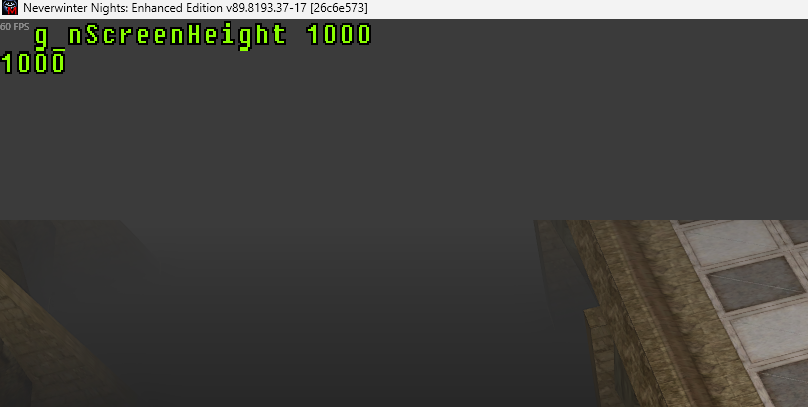
| g_nScreenHeight <x> | x is the number of pixels the screen has to render | This will change the rendering size - but not the Window size, and outside it usually is just the fog colour. Likely used for testing.
|
| g_nScreenWidth <x> | x is the number of pixels the screen has to render | As above |
| g_nFullScreenRefreshRate <x> | x is the refresh rate (eg 60) | This doesn't seem to work - but presumably set the refresh rate before modern EE changes to the renderer. |
| Shader related | ||
| g_nHDRFramebuffers<x> | integer | Various shader-related variables for testing. |
| g_nUseRenderbuffers <x> | ||
glFinishBeforeFBO <x> | ||
| enableFBeffects <x> | ||
| bloom_downscale_offset<x> | ||
| bloom_downscale_steps<x> | ||
| bloom_multiplier<x> | ||
| bloom_softness<x> | ||
| bloom_threshold<x> | ||
| dof_amount<x> | ||
| dof_deadzone<x> | ||
| dof_vignette<x> | ||
| dynamic_contrast_intensity<x> | ||
| dynamic_contrast_midpoint<x> | ||
| levels_blackpoint<x> | ||
| levels_whitepoint<x> | ||
| ssao_color<x> | ||
| ssao_intensity<x> | ||
| ssao_radius<x> | ||
| Model / Rendering Related | ||
| g_fShadowAlphaCutoff | ||
| g_HitCheckBoxExpansion | ||
| g_bEnableLOD | ||
| g_bOrphanBuffersBeforeWrite | ||
| glCacheTextureBinds | ||
| g_BindDefaultFramebuffersBeforeSwap | ||
| usenew | ||
| maxshadowdist | ||
| shadowfliporder | ||
g_bNonCharacterDynamicShadows | ||
g_nRenderShadowVolumes | ||
hitcheck_static_bsp_parts | ||
hitcheck_static_trimesh_parts |
Scene GUI
The scene GUI things all start with SceneGUI. Then an underscore, then the name below.
They represent the scene - ie GUI elements and the like that are not loaded tiles/creatures/effects in the world view.
If you have any success using these for something practical edit this description - else assume these just report the given member values for debugging purposes and don't allow edits.
| Scene GUI Name | Notes and Description |
|---|---|
| Overlay | |
| MouseOverlay | |
These are the modifiers for the above parameters. Therefore SceneGUI_Ingame.ambient is valid.
| Scene Members | Type | Notes and Description |
|---|---|---|
| ambient | vector | |
| fog | boolean (int) | |
| fogcolor | vector | |
| fogstart | float | |
| fogend | float | |
| focus | vector |
Model Parsing Commands
These are actually used by the engine to interpret MDL ASCII - the game sees "newanim" then runs the relevant section. Why they are publicly exposed is anyones guess since there is literally no point in trying to "construct a model" using these via. console commands since some bits just won't work right (since the surrounding code parsing the ascii model is not setup).
Basically ignore these commands they are specifically for the model parser and are useless for players or modders. But hey, some may just crash your game!
| Command | Notes and Description |
|---|---|
newanim | |
newmodel | |
donemodel | |
beginmodelgeom | |
classification | |
ignorefog | |
| setsupermodel | |
| setanimationscale |
Broken Commands
You never want to use these, they're basically broken, or just not do anything.
| Command | Valid Operators | Notes and Description |
|---|---|---|
GOGInvite | If running through GoG should popup the invite overlay, but NWN doesn't support it so presumably left in just for testing purposes. | |
| g_bNiceClient | Technically an integer, the game simply doesn't use this at all for anything. Presumably used for older Bioware debugging maybe testing cheat commands. | |