-
Created by
 Jasperre, last updated on Mar 16, 2026
27 minute read
Jasperre, last updated on Mar 16, 2026
27 minute read
This is a summary of what the different game options do. Most are accessible in game as of later NWN:EE patches, if not then the settings.tml file in the documents folder will contain the settings which is simply a text file.

The Options Menu has a search box in the top left for finding any setting named below.
Settings.tml
settings.tml is generated by the game on first load with some sane defaults (noted below and in the schema section of the file). The structure is a simple formatted file with all the headers to options being in square brackets, and setting elements underneath with tabs indenting them. For instance it should look like this:
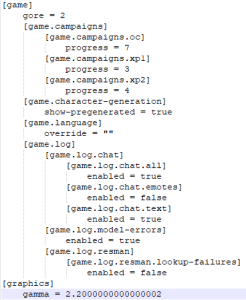
Below the "settings.tml name" is not formatted with all the relevant whitespace since some settings include a lot of whitespace.
Changing options in settings.tml
A note that you should only edit settings.tml when nothing is open - no game or server instance - since on exit those will write their current config to the file overriding any changes you make.
So to make proper edits shut the server/game down, edit settings.tml, and start it up again.
Game
Several of these settings are actually there primarily for servers, but may affect singleplayer as well. Others are singleplayer only.
| In Game Setting Name | settings.tml name | Default Value | Options Panel Values | settings.tml values | Description and Notes |
|---|---|---|---|---|---|
| General | |||||
| Language | [game] [game.language] override = "" | Auto Detect | Auto Detect English French German Spanish Italian Polish | "" en fr de es it pl | Auto detect should detect the OS language and use that. Some languages change the audio, text and subtitles on movies. Some just change the text and subtitles on movies and keep English voices. Needs a game restart to fully take effect. Relates to the games \steamapps\common\Neverwinter Nights\lang\XX folder name if you want to find the files it swaps out. This also applies to the NWServer eg; when you call GetStringByStrRef it will use the right TLK file. Note a server can only have one local language. |
| Difficulty | [ruleset] difficulty = 1 | 1 (Easy) | Very Easy** Easy Normal D&D Hardcore Rules Very Difficult ** Not singleplayer accessible - server only | 0 1 2 3 4 | See NWN Difficulty Settings page for more information. Note servers have this set on the server end of course overriding this setting. In singleplayer you can change it at anytime during gameplay. |
| General - Advanced | |||||
| Show Pregenerated Characters | [game] [game.character-generation] show-pregenerated = true | true | Enabled (Ticked) Disabled (Unticked) | true false | Shows the .BIC files referenced in pregen.2da if ticked/true, else will not disaply them |
| Violence Level | [game] gore = 1 | 1 (Full) | Low Full Special | 0 1 2 | Low - removes blood VFX (see visualeffects.2da) and replaces some placeables with "lower violence" versions (see placeables.2da) Full - usual setting, normal visuals and placeables Special - Certain deaths are now "gory" and explode the creature into chunks with additional blood VFX Note the 1.69 "Violence Password" is no longer accessible in the game options panel. |
| Ruleset | |||||
| Show Challenge Ratings | [game] show-challenge-ratings = true | true | Enabled (Ticked) Disabled (Unticked) | true false | Shows the challenge rating of monsters. This is calculated as:
If false the CR is hidden, making it harder for players to assess monster difficulty but may help RP / being more thematic especially if CR is not used for anything else. |
| Show Active Effects | [game] show-active-effects = true | true | Enabled (Ticked) Disabled (Unticked) | true false | Shows active effects (as per effecticons.2da) on creature descriptions. If false it will hide them (making it more difficult for players to see what spells and immunities are on them). |
| Natural Ones Fail Saving Throws | true | If true it will mean a saving throw can fail on a 1 regardless of the positive values. If false then it will save. This being true does make a 1 in 20 chance anyone will fail a particular save - in higher levels this means instant death saving throws can fail if you roll one on average 20 times. | |||
| Always Roll Max Hitpoints On Levelup | false | This will make it so a character who would roll, say, 1d10 to get HP that level, instead just gets 10. Since you can see the roll before cancelling the levelup, this is a timesaver in SP and in many cases can be enabled in MP as well to balance PCs who roll badly versus those who don't. | |||
| Hide Hitpoints Gained on Levelup | false | This will hide the notification of what HP is gained during a levelup, so it can't be cancelled and started again if too low, if you really want random HP on a MP server. | |||
| Combat Sticky Modes | false | Determines whether combat modes are turned off by movement. The standard behaviour is false, movement turns off combat modes. When the value is true, combat modes become sticky and not interrupted by movement. Combat modes are things like Power Attack, Expertise, etc. and this can help streamline combat. | |||
| Ruleset - Advanced | |||||
| Encounters Always Reset | [ruleset] | false | This setting fixes a bug when resetting non-continuous encounters through scripting (SetEncounterActive). With the default value of false, the calculated "party" CR will not be reset, and instead be additive. Consider this example: A CR 5 party triggers a single-fire encounter, exhausting it. The encounter spawns creatures matching a CR 5 party, regardless of this setting. | ||
| Validate Spells | true | This will check the servers list of spells ie spells.2da against what the client is saying. For instance if the client says that their Wizard can cast Harm, can they really? Should always be left enabled and is even set by default. | |||
| Combat Max Attack Bonus | 20 | Maximum bonuses from effects, the default values are what Bioware previously hardcoded. | |||
| Combat Max Damage Bonus | 100 | Maximum bonuses from effects, the default values are what Bioware previously hardcoded. | |||
| Combat Max Saving Throw Bonus | 20 | Maximum bonuses from effects, the default values are what Bioware previously hardcoded. | |||
| Combat Max Ability Bonus | 12 | Maximum bonuses from effects, the default values are what Bioware previously hardcoded. | |||
| Combat Max Ability Penalty | 30 | Maximum bonuses from effects, the default values are what Bioware previously hardcoded. | |||
| Combat Max Skill Bonus | 50 | Maximum bonuses from effects, the default values are what Bioware previously hardcoded. | |||
| Logging | |||||
| Game Log Chat Text | false | The game log has all the text chat said, such as when you type in the text box and say "Hello!" | |||
| Game Log Chat All | false | The game log has all the chat - presumably also things like the combat log? Need to test if this is going to override the other two options. | |||
| Game Log Chat Emotes | false | The game log has emotes such as when people bow presumably. | |||
| Game Log Debug Assert | false | Logs engine asserts to the nwengineLog.txt file. Usually not required unless you are seeing issues (eg crashes). Resets to 0 at game start must be enabled during runtime. | |||
| Game Log Debug Network | false | Logs network debug to the nwengineLog.txt file. Usually not required unless you are seeing issues. Resets to 0 at game start must be enabled during runtime. | |||
| Game Log Debug Scriptvm | false | Logs every script being run and, if applicable, if they have an error occur (either due to a runtime issue like an overflow, underflow or TMI, or due to AbortRunningScript being called) to the nwengineLog.txt file. Usually not required unless you are script issues. Resets to 0 at game start must be enabled during runtime. Replaces previous "Log Script Execution" and "Vm Profiling" options since it reports script execution times which you can parse (but no auto summary, Tracy however is better for checking script performance data now). | |||
| Game Log Debug Nui | false | Logs nui debug to the nwengineLog.txt file. Usually not required unless you are seeing issues. Resets to 0 at game start must be enabled during runtime. | |||
| Logging - Advanced | |||||
| Server Log Rotation | true | When a server starts it will have a new log file if an existing log file already exists. | |||
| Server Log Creature Deaths | false | Logs creature deaths, as if WriteTimestampLogEntry(GetName(OBJECT_SELF) + " Died"); was added to each creatures OnDeath script. Can be useful for some servers to track issues/crashes/bugs/abuse although annoyingly doesn't log the tag or resref or area they were killed or what killed them. | |||
| Server Log Debug Mode Sends To Players | true | Will send to every player on the server any contents of a call to the nwscript command WriteTimestampedLogEntry - you wouldn't enable this on a production server it's more for easier testing! | |||
| Game Log Resman Lookup Failures | false | This logs if a file is not found when referenced by something such as a script event, or a texture or model file that is referenced to be loaded. This happens a lot in cases even when the game can find the file - eg PLT files are loaded after TGA/DDS so it checks for them first thus logs an error when (correctly) none are found. It can spam the log quite a bit so only really useful for debugging and content creators. | |||
| Scripts - Advanced | |||||
| (Debugger) Enabled | false | Ticked (true) Unticked (false) | Enables the script debugger See here for more information. | ||
| Debugger Address | 127.0.0.1 | IP address | The IP address of of the debugger server, ie DebugServer.exe, for use with SpawnScriptDebugger. In the modern day with 2 monitors and easy alt-tab without crashing, leaving this as localhost (127.0.0.1) should be sufficient. | ||
| Debugger Port | 5122 | Integer | The port of the debugger server, ie DebugServer.exe, for use with SpawnScriptDebugger. You'd usually leave this on the default port which matches the default in DebugServer.exe | ||
| SQLite Tracing - Advanced | Added in 1.84.8193.23 | ||||
| Profile | Off | On Off | 1 0 | If enabled then the game will write to nwclientLog1.txt every time a nwscript sqlStep() takes more then the Profile Threshold Msec amount of time to run. | |
| Profile Threshold Msec | 800 | 0 - 60000 | If the time taken by a statement is over this amount it will log it to nwclientLog1.txt. Setting to 0 doesn't display every statement, only those taking 1ms or higher. | ||
| Stmt | Off | On Off | 1 0 | Enable all Sqlite Statement logging. This will print every SQL statement run through sqlStep() to nwclientLog1.txt prefixed with "stmt: ". Do not enable in a production environment, but it can be handy to quickly trace malformed SQL in a pinch. | |
| Other | |||||
| Campaign Progress | [game] [game.campaigns] [game.campaigns.oc] progress = 7 [game.campaigns.xp1] progress = 3 [game.campaigns.xp2] progress = 4 | OC - up to 7 XP1 - up to 3 XP2 - up to 4 | This is how you unlock progress without actually ending the modules. If you want to access the last chapter of the OC set the progress to 7. The example settings.tml has them all unlocked. |
Graphics
Note on the top buttons: Low is tremendously low spec, as in almost every option off, which is not recommended. Good or Best is recommended to select, most modern systems can run Best or higher.
| Option Panel Name | settings.tml name | Default Value | Default Value Low | Default Value Good | Default Value Best | Options Panel Values | settings.tml values | Description and Notes |
|---|---|---|---|---|---|---|---|---|
| Anti Aliasing | 0 | 2 | 4 | 0 - 16 | ||||
| Video Anisotropic Filtering Mode | 1 | 4 | 16 | 1 - 16 | ||||
| Window Mode | windowed | exclusive borderless windowed | Type of window mode the game uses. | |||||
| Video Vsync Mode | adaptive | adaptive on off | Adaptive works to apply vsync when above your monitors refresh rate, GPU and drivers dependant On forces vsync always on Off forces vsync always off | |||||
| Lighting | ||||||||
| Lighting Enhanced | Enabled | Disabled | Enabled | Enabled | Enabled / Disabled | Enhanced lighting in EE which is more dynamic | ||
| Lighting Max Lights | 32 | 8 | 16 | 32 | 3 / 8 / 16 / 32 / 64 / 128 | Amount of lights that are enabled in your view of the game. 32 was the usual maximum, but 64 and 128 can really push your system if enabled. | ||
| General Shader Quality | Performance | Minimal | Performance | High Quality | Minimal / Performance / High Quality | Anything that can run EE can run High Quality fine usually | ||
| Gamma | 2.2 | Set to taste | ||||||
| Environment Mapping on Creatures | Enabled | Disabled | Enabled | Enabled | Enabled / Disabled | This is a very old game option which should be always left enabled on modern systems that can run EE. | ||
| Enable Environment Shadows | Enabled | Disabled | Enabled | Enabled | Enabled / Disabled | |||
| Creature Shadow Detail | Best | Off | Best | Best | Off / Fast / Best | Off turns all creature shadows off, Fast does a small radius VFX at the creatures feet, and Best does stencil shadows affected by the other shadow options. | ||
| Shadow Casting Lights | 3 | 1 | 2 | 3 | 1 / 2 / 3 | Amount of lights that can add shadows to a scene. | ||
| Visual Effects High Enabled | Enabled | Disabled | Enabled | Enabled | Enabled / Disabled | This is a very old feature of the game to supply low quality VFX in some instances if the setting is disabled. Modern systems should always leave this enabled. | ||
| Lighting - Advanced | ||||||||
| Lighting Cutoff Range Multiplier | 2.0 | 1.0 | 1.0 | 2.0 | 1.0 - 10.0 | These 3 lighting options affect how bright/intense/cutoffs of the enhanced lighting | ||
| Lighting Max Intensity | 1.5 | |||||||
| Lighting Intensity at Range | 0.2 | |||||||
| Shadows All Types Can Cast Dynamic | Enabled | |||||||
| Textures | ||||||||
| Enable Texture Animations (water,lava,etc.) | Enabled | Disabled | Enabled | Enabled | Enabled / Disabled | Enables water/lava look and feel in the game, no reason to disable it on EE. | ||
| Advanced Frame-Buffer Effects | ||||||||
| LOD | ||||||||
| Facelifts | ||||||||
| Graphics Facelifts Mode | Enabled | |||||||
| Movies | ||||||||
| Movies - Advanced | ||||||||
| Frame Limiter | ||||||||
| Enabled | Off | On, Off | If enabled the FPS limiter settings below are used. If disabled it'll use the most FPS possible. This is not recommended nowadays and instead use vsync options. | |||||
| Foreground Target Fps | 60 | 1 - 255 | FPS limit when the game is in the foreground and no radials or menus are open | |||||
| Background Target Fps | 10 | 1 - 255 | FPS limit when the game is in the background - eg; you've clicked on your web browser (this usually pauses in SP) | |||||
| Non Interactive Target Fps | 48 | 1 - 255 | FPS limit when:
It'd be recommended to set this to the same as Foreground Target FPS to keep a consistent FPS. | |||||
| Tweaks | ||||||||
| Enable Shiny Water | Enabled | Disabled | Enabled | Enabled | Enabled / Disabled | Shiny water (and in EE much better shader water) can be toggled off with this. Recommended to leave on. | ||
| Enable Sky Boxes | Enabled | Disabled | Enabled | Enabled | Enabled / Disabled | Skyboxes are used to show the sky, obviously. A later NWN addition so not all modules have them but most do. Leave enabled since the performance loss is negligable for a better look to the game. | ||
| Grass | Full Grass | Disabled | Fast Grass | Full Grass | Full Grass / Fast Grass / Disabled | Modern systems can run full grass fine | ||
| Graphics Creature Wind Mode | Player Creature Wind (grass) | Creature Wind Off (Grass) | Player Creature Wind (grass) | Creature Wind On (grass) | Player Creature Wind (grass) | If a creature moves through grass does it respond? If off, it won't. If player only, only the players avatar affects it. If creature wind is on all creatures will affect it as they move through. | ||
| Graphics Stats | Disabled | Enabled / Disabled | General FPS stats. Can also be toggled on and off in the Debug Panel. | |||||
| Graphics Grass Render Distance | 900.0 | 900.0 - 30,000 | This is the radius, squared, to render grass in based on camera distance. Default 900 means 30M distance. Maximum 30,000 is around 173M distance which is usually sufficient for zoomed out camera to the usual fog distances. | |||||
| Enable Tile Border | Enabled | Enabled / Disabled | Tile borders extend the map into an unplayable area with repeated visual tiles which generally is the usual way to play the game (else levels just "stop" in mid air). | |||||
| Tweaks - Advanced | ||||||||
| Debug Panel Visible | Disabled | Enabled / Disabled | If enabled will bring up the Debug panel. Can be also brought up with CTRL + SHIFT + F12. | |||||
| Graphics Experimental Render Cloaks | Enabled | Enabled / Disabled | If disabled cloaks will not be visible when equipped | |||||
| Graphics Experimental Gl Finish Before Fbo | Disabled | Enabled / Disabled | ||||||
| Graphics Experimental Render Grass Sorted | Enabled | Enabled / Disabled | ||||||
| Graphics Experimental Orphan Buffers Before Write | Enabled | Enabled / Disabled | ||||||
| Graphics Experimental Generate Plt With Shaders | Enabled | Enabled / Disabled | If enabled PLT files (generally player race model bodies, armor, cloaks) should render faster by using the GPU to help generate the necessary graphics files from PLT source. |
UI
| Option Panel Name | settings.tml name | Default Value | Options Panel Values | settings.tml values | Description and Notes |
|---|---|---|---|---|---|
Sound
| Option Panel Name | settings.tml name | Default Value | Options Panel Values | settings.tml values | Description and Notes |
|---|---|---|---|---|---|
| Voices Volume | [sound.voices] volume = 0.50000000000000000 | 0.50 | 0.0 - 1.0 | 0.0 - 1.0 | Volume of voices in the game. These are sound effects played during conversation dialog with the player and the voicesets that are used by creatures. |
| Music Volume | [sound.music] volume = 0.50000000000000000 | 0.50 | 0.0 - 1.0 | 0.0 - 1.0 | Volume of music in the game. See Sounds and Music. |
| main-menu-theme = "mus_theme_main" | mus_theme_main | Music file name | Not available in the Options panel, setting this can change the default music played by the main menu - it should be a bmu file name (without the file extension). Examples that may be suitable in the NWN:EE files (find them in the "mus" directory and play with any MP3 software to listen in advance):
It's not probably a good idea to use a battle theme here, those tend to get loud. | ||
| Sound Effects Volume | [sound.effects] volume = 0.50000000000000000 | 0.50 | 0.0 - 1.0 | 0.0 - 1.0 | Volume of sounds played in the game. Presumably also UI elements as well. See Sounds and Music. |
| 2D/3D Bias | [sound.3d] bias=1.0000000000 | 1.00 (as of 8193.18) | 0.10 - 1.90 | 0.10 - 1.90 | There are two types of sound sources in the game, and they're kind of like the two different models in the game, there's the 3d models, like game objects, that are positioned in a space that you can detect while you move the camera because of the illusion of depth, and 2d models in the game, like the UI elements, which are frozen front-facing and flat.(edited) The "3d" sounds are "environmentalized", and "imaged" to reflect their world positions relative to the camera, usually. Slider is volume bias of Environmental sounds (like voice lines, spell sounds etc) - the "3D" versus more direct sounds (UI Button clicks) which are "2D". |
Input
Note for keybindings see the separate Change Key Settings option menu.
| Option Panel Name | settings.tml name | Default Value | Options | settings.tml values | Description and Notes |
|---|---|---|---|---|---|
Multiplayer
While you'd think "server" under this section meant "must be multiplayer" really the game will start a "singleplayer server" when you load a singleplayer module. Some of these settings apply equally to that environment and hopefully will note below if it is only a MP server.
In the latest versions of NWN:EE many of these are now available in the Options menu making it a lot easier to tinker with the core settings.tml for your server - you can do it on the client and copy the file over to your server. It also makes doing simple co-op runs a lot easier.
Also note: Many settings that are not in this section do affect servers, weird isn't it? See sections above for more info.
| Option Panel Name (if available) | settings.tml name | Default Value | Options | settings.tml values | Description and Notes |
|---|---|---|---|---|---|
| Client | |||||
| Player Name | [client] [client.identity] name | "" | Text field | Text field | Your player name to join servers with |
| Server | |||||
| Server Name | [server] [server.identity] name | "" | Text field | Text field | Sets the server name |
[server] [server.identity] game-region | 0 | The server region. Unused in NWN:EE server browser. | |||
[server] [server.identity] game-type | -1 | The server type. Used when examining a server in the browser.
| |||
| Post Game To Internet | [server] [server.identity] public | true | Enabled (Ticked) Disabled (Unticked) | true false | If ticked (on) it will post the game to Beamdogs centralised server list. |
| Server Port | [server] [server.net] port | 5121 | 1 - 65535 | 1 - 65535 | The TCP port your server will initiate connections on. UDP firewall punching is used as well by the game. |
| Player Pausing | [server] allow-player-pausing | false | Enabled (Ticked) Disabled (Unticked) | true false | If true it will allow players to have DM-like powers to pause a server. In singleplayer mode always set to: Enabled |
| Server Restore Spell Uses On Login | [server] restore-spell-uses-on-login | false | Enabled (Ticked) Disabled (Unticked) | true false | If false (default) it will act as if the player had rested if they rejoin and restore all their limited spell and feat uses. It's not recommended to enable this usually on a normal server. If true a players spells and feats used will be saved and will be reapplied on login for server vault characters. |
| Only One Party | [server] one-party-only | true | Enabled (Ticked) Disabled (Unticked) | true false | All players will join the first players party (first real player - DMs cannot run a party). Very useful for DM or coop playthroughs where there is only one expected party. Obviously disable this on any server where there may be more than one party travelling around. |
| Player Party Control | [server] player-party-control | false | Enabled (Ticked) Disabled (Unticked) | true false | Allows players to control their non-PC party members in the same way as DMs do (drag, ctrl+click, etc). This is off by default, and can be enabled in server settings |
| PVP Setting | [server] pvp-mode | 1 - Party | None Party Full | 0 1 2 | Changes the Player versus Player setting allowing or disallowing what you can attack with a hostile action. This is still dependant on the area PvP settings. Full PvP: When full PvP is in effect, a PC can take hostile actions against any other PC. This includes outright attacks, pick pocket attempts, and (presumably accidentally) affecting party members with harmful area of effect spells that do not specifically exclude friends (such as fireball). That is, the full range of Player versus Player actions are available. This setting is only available under the "D&D hardcode rules" and "very difficult" difficulty settings. Party PvP: When party PvP is in effect, a PC can take hostile actions against any PC not in the same party. This is similar to the full PvP setting, but protects party members from hostile actions. This setting is only available under the "D&D hardcode rules" and "very difficult" difficulty settings. No PvP: When no PvP is in effect, a PC cannot take hostile actions against any other PC. |
| Item Level Restrictions | [ruleset] item-level-restrictions | false | Enabled (Ticked) Disabled (Unticked) | true false | If enabled it enforces Item Level Restrictions, ie the character level can only equip things based on the value limit set in itemvalue.2da In singleplayer mode always set to: Disabled |
| Enforce Legal Characters | [ruleset] enforce-legal-characters | true | Enabled (Ticked) Disabled (Unticked) | true false | Known as "ELC". In multiplayer if enabled it checks that suibmitted characters (new and levelups) adhere to the game rules, since both character generation and levelup are technically done client side and sent to the server for validation. It is highly recommended to leave this enabled and use NWNX to alter its behaviour for special things, unless you run a friends only game. In singleplayer mode always set to: Disabled |
| Ruleset Min Character Level | [ruleset] min-character-level | 1 | 1 - 40 | 1 - 40 | Minimum level to play on the the server. This only realistically works with Local Vault characters, since all Server Vault characters created start at level 1. In singleplayer mode always set to: Disabled |
| Ruleset Max Character Level | [ruleset] max-character-level | 40 | 1 - 40 | 1 - 40 | Maximum level to play on the server and presumably an enforced maximum level you can obtain on any one character by levelling - once there it won't award any more XP. In singleplayer mode always set to: Disabled |
[server] reload-when-empty | true | true false | If the server is empty, reload the module. Usually you'd have this set to false to disable your server reloading as one person logs in and one out, since modern servers take some time to spawn in all things and reload the module (sometimes several minutes). | ||
[server] savegames-store-characters | true | true false | For co-op this is useful since it stores the players in the save game, retaining their relevant quest and XP and item progression (no need to export them each time) Persistent worlds don't (or shouldn't) use save games so this is irrelevant for them. | ||
[server] savegames-vault-characters-only | false | true false | Untested. Likely will only save to save games vault characters, which obviously can be a thing you do - DM run session with vault-only characters or somesuch. Needs some testing to work out how exactly it interacts with the above setting (likeiy if savegames-store-characters is false, this won't do anything regardless). | ||
| Server - Advanced | |||||
| Server Disallow Shouting | [server] disallow-shouting | false | Enabled (Ticked) Disabled (Unticked) | true false | Stops the yellow-coloured server wide shouts from being possible to do for players (DMs can always do them). You can also do a similar thing with OnPlayerChat which can alter the volume of a sent message (so you can convert it to a normal chat). |
| Server Show Dm Join Messages | [server] show-dm-join-messages | true | Enabled (Ticked) Disabled (Unticked) | true false | If enabled it will show in grey a message "So and so joined as a DM." to all players. Set to false to hide this. |
| Server Tweaks Use Threaded Timers | [server] [server.tweaks] use-threaded-timers | true | Enabled (Ticked) Disabled (Unticked) | true false | This is meant to allow NWN to utilise a second core to do a second thread for reading the hardware timer, essentially: while(true) {
read_hw_timer();
sleep(config.timer_interval);
}
In SP it tends to make combat messages to wonky with damage messages commonly appearing before the attack rolls. This needs further testing however. In MP it may benefit from leaving it enable and decreasing the resolution number if things mess up, the setting just below. |
| Server Tweaks Threaded Timers Resolution | [server] [server.tweaks] threaded-timers-resolution | 100 | 1 - 1000 | 1 - 1000 | The resolution (timing) of the tweak above. It should be in milliseconds and decreasing it would lower the time between timer reads. If you run a server with 2 cores, and want the threaded timers set to true, lowering this value to 1 is potentially a good idea see Server Performance Settings |
| Server Tweaks resman Max Memory Usage | [server] [server.tweaks] [server.tweaks.resman] max-memory-usage | 0.125 | 0.01 - 0.8 | 0.01 - 0.8 | The memory assigned to resman - the games memory cache of objects. Obviously servers don't load textures or models but they do load a lot of other things. This should be a % of system memory, and given the game is now 64bit could be increased to suitably use more memory on a server. You should monitor the memory usage on the server if you increase this value to make sure the game and OS still has sufficient memory to run. Also note while the default value is 0.125 (12.5%) the in game options panel displays only 0.XX increments meaning it gets rounded to 0.13. |
| Server Tweaks 2da Engine Cache Size | [server] [server.tweaks] 2da-engine-cache-size | 11 | 1 - 1000 | 1 - 1000 | This should affect the amount of engine 2da caching the game does. The main 2da files that are not permanently cached in memory are things like iprp_ files and the packages.2da related files. Increasing this number should lead to less loading hiccups on larger servers. You may need to alter Server Tweaks resman Max Memory Usage if you increase this value significantly. |
| Server Tweaks 2da User Cache Size | [server] [server.tweaks] 2da-user-cache-size | 10 | 1 - 1000 | 1 - 1000 | The amount of non-engine 2das cached for use with Get2DAString. Most of the engine 2da files (eg; spells.2da, or classes.2da) are automatically cached at game load, but as noted above some are a not, and all of the non-standard 2da files (des_* files, or custom ones) will use this cache. You may need to alter Server Tweaks resman Max Memory Usage if you increase this value significantly. |
| Server Tweaks Game Object Cache Size | [server] [server.tweaks] game-object-cache-size | 16 | 12 - 20 | 12 - 20 | This is the 2^n amount of objects to store in game cache. If running in singleplayer this is bumped up one (since it is essentially running a server and client in one).
The amount of entries are not equivalent strictly to amount of memory, since different objects have different sizes. Increasing it should improve performance on higher memory systems (which nowadays is everything) especially persistent worlds. 18 or 20 would be useful to set it to. Make sure to monitor your RAM usage if you increase this. You may need to alter Server Tweaks resman Max Memory Usage if you increase this value significantly. |
| Server Tweaks Power Saving Clients Required To Disable | [server] [server.tweaks] [server.tweaks.power-saving] clients-required-to-disable | 1 | 1 - 255 | 1 - 255 | Do not increase this number. The old server would sleep for 10ms each game update. This was fine on small servers but caused severe performance issues on large servers. We added a new config option called Clients Required To Disable CPU Sleep (under Game Options) with an integer value which can be used to toggle this behaviour back on. By default, the server will retain the old behaviour until one or more players join, then it will enter high performance mode without any sleeping. You can change this value to something that is greater than the maximum players allowed on your server if you never want the server to enter high performance mode. It is recommended this is set to 1 in the modern age of processors else can cause server lag and stuttering for players. |
| Server Net accept Relayed Connections | [server] [server.net] accept-relayed-connections | true | Enabled (Ticked) Disabled (Unticked) | true false | Allows the UDP firewall punching via. master server. Leave it on for maximum benefits for connectivity. |
| Server Tweaks Message Limit | [server] [server.tweaks] message-limit = 400 | 400 | 400 - 65535 | 400 - 65535 | Amount of message data to send, in bytes. This amount is sent and if there is more data it gets sent "Server Tweaks Game Obj Update Interval" microseconds later (200,000 is 200ms, or every 1/5th of a second). Message data includes "A creature is new, and looks like this" "a creature you already know about has moved" "a creature has disappeared", "a placeable has appeared", "a VFX has gone off" and so forth. The priority of updates are roughly in the order of importance (ie placeables don't change much): GAMEOBJECTUPDATE_CATEGORY_CREATURE_IN_COMBAT, GAMEOBJECTUPDATE_CATEGORY_CREATURE_ASSOCIATES, GAMEOBJECTUPDATE_CATEGORY_CREATURE_PARTY_MEMBERS, GAMEOBJECTUPDATE_CATEGORY_CREATURE_NOT_IN_COMBAT, GAMEOBJECTUPDATE_CATEGORY_TRIGGERS, GAMEOBJECTUPDATE_CATEGORY_DOORS, GAMEOBJECTUPDATE_CATEGORY_ITEMS, GAMEOBJECTUPDATE_CATEGORY_PLACEABLES, GAMEOBJECTUPDATE_CATEGORY_AOEOBJECTS, In EE the messages are larger than 1.69 due to additions to them for new features (such as visual transforms, or things the client gets updates on they didn't used to). This means object changes can be delayed being displayed clientside if they don't fit in the default 400 size. With the default values it means that roughly every 200ms you send 400 bytes of updates to a client. If your updates are particularly complex, such as multiple new creatures, with a lot of VFX and whatnot, then only one will fit into the 400 byte window, so next one will come after another 200ms Tweak this carefully with testing. You might also want to tweak the Update Interval.
Singleplayer: This is not actually used, and instead 20,000 is used to just update lots of data each interval since there's no bandwidth to worry about. |
| Server Tweaks Message Limit Loading | [server] [server.tweaks] message-limit-loading = 2000 | 2000 | 400 - 65535 | 400 - 65535 | Message size limit during a loadscreen. Higher values mean clients get sent more data while they're sitting at the loadscreen. Loadscreens mask sending over the areas tile information, and all static placeables, and other static data (sounds etc.). Static placeables especially can be numerous and loading can sometimes wait for the server to tell the client all of them. The default value is higher than the normal message limit since loading events are rarer events and stuck the player in limbo until they're done. |
| Server Tweaks Game Obj Update Interval | [server] [server.tweaks] game-obj-update-interval = 200000 | 200000 | 0 - 500000 | 0 - 500000 | This is the update interval (in microseconds, 200,000 = 200ms) as described under Server Tweaks Message Limit. The game will check that an PC needs updates on objects it sees/interacts with and then sends that data to them. This means you obviously get delays when many objects change (running around areas, monsters spawning in etc.) but possibly more tied to the message limit itself. Tweak this carefully with testing. You might also want to tweak the Message Limit:
Singleplayer: This is used as the minimum update interval even if FPS is low. The 3 states in singleplayer are:
|
| Server Tweaks Game Obj Update Interval Loading | [server] [server.tweaks] game-obj-update-interval-loading = 20000 | 20000 | 0 - 500000 | 0 - 500000 | The loading interval for load screens. The default value is lower than the normal message limit since loading events are rarer events and stuck the player in limbo until they're done. |
| Login | |||||
| Player Password | [server] [server.login] player-password | Text field | Text field | The password needed to join if a player, or blank if no password. | |
| DM Password | [server] [server.login] dm-password | Text field | Text field | The password needed to join if a DM, or blank if no password. For proper servers you also may want to do validation of DM logins (or log it's happening) OnClientEnter or using NWNX. | |
[server] [server.login] admin-password | Text field | Text field | This might not be used in the EE version of the nwnserver application but in 1.69 it allowed some remote control of the server without logging in as a client. | ||
| Max Players | [server] [server.login] max-players | 6 | 1 - 255 | 1 - 255 | |
[server] [server.login] [server.login.player-dm] enabled | true | true false | If true it allows the "DM Login" feature in the debug menu to work allowing a player to sudo up to a DM role dynamically. | ||
| Autosave | |||||
| Enabled | [server] [server.autosave] enabled | false | Enabled (Ticked) Disabled (Unticked) | true false | This will make the game autosave as per the below setting timer. Possibly useful for DM run or coop games where you might forget to save for a bit and lose progress due to a crash or lots of dying. In singleplayer mode always set to: Disabled |
| Interval | [server] [server.autosave] interval | 5 | 1 - 30 | 1 - 30 | Amount of minutes between autosaves, if enabled above. |
| Vault Characters | |||||
| Vault Characters | [server] [server.vault] mode | 1 | Local Server | 1 0 | Set to 0 for server vault, which is where the BIC files are stored on the server, and a new player has to create a new character to join. In singleplayer mode always set to: 1 |
| Vault Characters - Advanced | |||||
| Suppress Base | [server] [server.vault] supress-base | false | Enabled (Ticked) Disabled (Unticked) | true false | Determines if characters in the root server vault directory are made available to players (in addition to characters in their subdirectories). An odd setting you'll probably never enable unless in a DM run game (where you provide some characters to all players to pick from). Although most server vaults won't have anything in the root by default so it essentially does nothing either way on a new server. |
| Sticky Player Names | [server] [server.vault] sticky-player-names | false | Enabled (Ticked) Disabled (Unticked) | true false | Maps players' multiplayer names to their public cdkey in knownservernames.2da, so an admin can reference the two by looking through server files. If the 2da doesn't currently exist in the override folder on the server, it'll be created there. Said to really screw things up if you're using EE's new method of linking cdkey to player vaults. See https://forums.beamdog.com/discussion/69795/organizing-the-servervault-and-sticky-player-names for more information. |
| By Player Name | [server] [server.vault] by-player-name | false | Enabled (Ticked) Disabled (Unticked) | true false | If true above, and true here, will map players' character names to the 2da instead of their multiplayer name. See https://forums.beamdog.com/discussion/69795/organizing-the-servervault-and-sticky-player-names for more information. |
| Backup Server Characters | [server] [server.vault] backup-server-characters | false | Enabled (Ticked) Disabled (Unticked) | true false | Determines if saved characters are backed up on calling ExportAllCharacters and similar functions, or when a PC leaves the server. This copies the current BIC on disk to a BAK file named the same. Then if the server crashes on saving that BIC there is a known good BAK file. These crashes may have been more common back in earlier versions of NWN before EE came out, and enabling it will decrease server performance due to the copying of BIC files to BAK files (with the servers process held up until this completes, on top of the usual BIC export work). With a regular backup or method of retaining old BIC files on the filesystem, this is made redundant and can be left disabled. |
| Privacy | |||||
| Client Privacy Advertise Device Capabilities | [client] [client.privacy] advertise-device-capabilities | true | Enabled (Ticked) Disabled (Unticked) | true false | Client only setting - if unticked then the client won't send information such as game version, window size and other pertinent information to the server for use in newer EE features. |
| [server.log] | |||||
[server] [server.log] [server.log.creature-deaths] enabled = false | false | true false | Logs all creature deaths to the server log. This can be replicated (with of course possibly more useful information) in a creatures OnDeath event. | ||
[server] [server.log] [server.log.debug-mode-sends-to-players] enabled = true | true | true false | Will send to every player on the server any contents of a call to the nwscript command WriteTimestampedLogEntry - you wouldn't enable this on a production server it's more for easier testing! | ||
[server] [server.log] [server.log.heartbeats] enabled = false | false | true false | Logs all OnHeartbeat event scripts firing. I mean I guess you might want to see how many are firing, but it also would add more lag since it of course is logging each one. | ||
[server] [server.log] [server.log.rotation] enabled = true | true | true false | Rotate the server log files when the server shuts down. Needs some testing such as when the server crashes, does it check at startup and rotate or rotate on clean shutdown? |
Masterserver
| Option Panel Name (if available) | settings.tml name | Default Value | Options | settings.tml values | Description and Notes | ||||||||||||||||
|---|---|---|---|---|---|---|---|---|---|---|---|---|---|---|---|---|---|---|---|---|---|
[masterserver] [masterserver.key-authentication] mode = "always" | always | Set options | always last-known if-reachable | This server setting changes how the master server is used for account validation, and if it is required during Master Server down time:
In most instances it is recommended to keep it set to "always" but you can swap it carefully if you notice the master server is down. | |||||||||||||||||
[masterserver]
    [masterserver.key-authentication]
        enforce-on-private-networks = false
| false | true/false | true false | If true the server will not let you log into a server on your local LAN (10.0.0.0 - 10.255.255.255, 172.16.0.0 - 172.31.255.255, 192.168.0.0 - 192.168.255.255) if the master server is down. If false it will let you in regardless, but will log a message if the master server is down. LAN counts for self-hosted MP sessions (eg new games in the DM client). |