-
Created by
 Jasperre on Aug 11, 2022
4 minute read
Jasperre on Aug 11, 2022
4 minute read
areag.ini (presumably "area generation information") is a file that relates all the default tileset information the game uses when an area is created with a specific tileset. Since only one can exist in the game, it usually only contains the games default tileset information. However for custom projects if you add a few tilesets it might be worth adding entries for these to save you time generating new areas with sensible defaults.
It's a simple text ini file, with headers and entries as per below layout. It is solely used by the toolset.
Toolset Defaults If No Entry
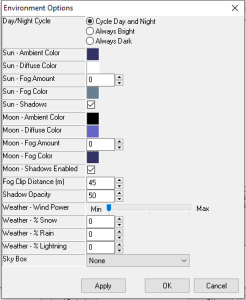
If the tileset you choose has no areag.ini information set it will default to:
- Cycle Day and Night
- Sun and Moon colours as default per Exterior, Clear as below
- No skybox or weather
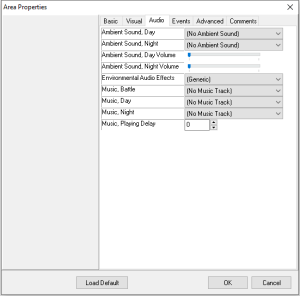
- No music or ambient soundtrack or playing delay or volume
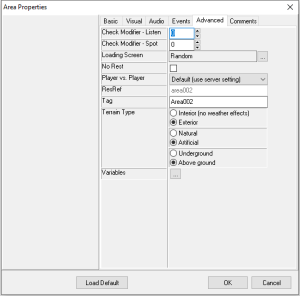
- It is Exterior, Artificial and Above Ground
areag.ini layout
The layout is in 2 general sections then 1 section for each named tileset.
There are a set of comments at the top of the file although this doesn't cover every field.
; AmbientSoundDay=from ambientsound.2da
; AmbientSoundNight=from ambientsound.2da
; EnvAudio=from soundeax.2da
; MusicBattle=0..48 from ambientmusic.2da
; MusicDay=0..48 from ambientmusic.2da
; MusicNight=0..48 from ambientmusic.2da
; MusicDelay=0..2,000,000,000 in milliseconds
; OnEnter=
; OnExit=
; OnHeartbeat=
; OnUserDefined=
; PlayerVsPlayer=0..3 from pvpsettings.2da
; Interior=0..1
; Natural=0..1
; Subterranean=0..1
; ListenCheck=-100..100
; SpotCheck=-100..100
; NoRest=0..1
; EnvScheme=0..24 from environment.2da
[GENERAL]
This simply defines a valid ini file header.
; Leave GENERAL alone
[GENERAL]
Type=SET
Version=V1.0
[ENTRIES]
This defines each tileset resref (default game examples here) that have information in this ini file.
Just make sure the Number=XX is the same as the amount of NameXXX entries, and add new NameXXX entries at the end.
[ENTRIES]
Number=26
Name001=tcn01
Name002=tdc01
Name003=tde01
Name004=tdm01
Name005=tds01
Name006=tic01
Name007=tin01
Name008=tms01
Name009=ttf01
Name010=ttr01
Name011=tdr01
Name012=ttd01
Name013=tts01
Name014=tib01
Name015=tid01
Name016=tii01
Name017=tti01
Name018=ttu01
Name019=ttz01
Name020=tdt01
Name021=tno01
Name022=tni01
Name023=tni02
Name024=twc03
Name025=tbw01
Name026=tsw01
[TILESETRESREF]
This section is added for each referenced tileset resref and has a number of fields to fill in on the area properties for new areas.
| Entry | Example | Notes |
|---|---|---|
| AmbientSoundDay | 12 | Track in ambientsound.2da for the daytime ambient sound |
| AmbientSoundNight | 14 | Track in ambientsound.2da for the night-time ambient sound |
| AmbientSoundDayVolume | 32 | 0 - 100 volume of ambient sound in the day |
| AmbientSoundNightVolume | 32 | 0 - 100 volume of ambient sound at night |
| EnvAudio | 104 | This is technically an entry into soundeax.2da. NWN:EE doesn't use EAX anymore so it can be left at 0 1.69 might use it...sorta. It adds echo and other ambient effects. |
| MusicBattle | 41 | Track in ambientmusic.2da used for battle |
| MusicDay | 15 | Track in ambientmusic.2da used for daytime |
| MusicNight | 21 | Track in ambientmusic.2da used for nighttime |
| MusicDelay | 90000 | The delay, apparently in milliseconds, until the music track plays again after finishing. The toolset more sensibly displays seconds however so 90000 is 90 seconds. |
| OnEnter | A script resref (16 characters maximum) to set as the OnEnter script. By default Bioware left these all empty. | |
| OnExit | A script resref (16 characters maximum) to set as the OnExit script. By default Bioware left these all empty. | |
| OnHeartbeat | A script resref (16 characters maximum) to set as the OnHeartbeat script. By default Bioware left these all empty. | |
| OnUserDefined | A script resref (16 characters maximum) to set as the OnUserDefined script. By default Bioware left these all empty. | |
| PlayerVsPlayer | 3 | The Player vs Player setting, as indexed in pvpsettings.2da:
Bioware defaulted this to 3 on all of their entries. |
| Interior | 0 | 0 - Exterior 1 - Interior (no weather effects) |
| Natural | 0 | 0 - Artificial 1 - Natural |
| Subterranean | 0 | 0 - Above ground 1 - Underground |
| ListenCheck | 0 | 0 for no change, or positive (eg: ListenCheck=3) or negative (eg: ListenCheck=-3) to alter the listen checks made in this area. |
| SpotCheck | 0 | 0 for no change, or positive (eg: SpotCheck=3) or negative (eg: SpotCheck=-3) to alter the spot checks made in this area. |
| NoRest | 0 | 0 - Rest allowed 1 - No Rest |
| EnvScheme | 0 | Entry into environment.2da which has the default lighting conditions for the area. Some generic ones for easy reference:
This can change the sun/moon settings (interior tends to disable them by using "Always Dark" with no Shadows enabled on the moon) and various colour settings for the source and point lighting used by tiles by default, and of course the general ambient light. There is no way however to set a skybox, or change the fog clip distances. |
Example for tcn01:
[tcn01]
AmbientSoundDay=12
AmbientSoundNight=14
AmbientSoundDayVolume=32
AmbientSoundNightVolume=32
EnvAudio=104
MusicBattle=41
MusicDay=15
MusicNight=21
MusicDelay=90000
OnEnter=
OnExit=
OnHeartbeat=
OnUserDefined=
PlayerVsPlayer=3
Interior=0
Natural=0
Subterranean=0
ListenCheck=0
SpotCheck=0
NoRest=0
EnvScheme=0