-
Created by
 Pstemarie, last updated by Merricksdad on Feb 02, 2025
8 minute read
Pstemarie, last updated by Merricksdad on Feb 02, 2025
8 minute read
SET files are text ini files defining every tile used in a tileset and how they fit together. See also Area and Tilesets for further information.
As explained by Velmar
| ; NEVERWINTER NIGHTS TILESET FILE ; DO NOT EDIT MANUALLY - UNLESS YOU KNOW WHAT YOU ARE DOING | |||||||||||||
| [GENERAL] | Begin of General Section | ||||||||||||
| Name=TTR01 | The "internal" name. Other files like "doortypes.2da" and "loadscreens.2da" reference to it. | ||||||||||||
| Type=SET | Seems obvious. | ||||||||||||
| Version=V1.0 | I edited this once and the toolset crashed. | ||||||||||||
| Interior=0 | Set this to "0" to have weather and day/night FX enabled by default | ||||||||||||
| HasHeightTransition=1 | If the tileset uses raise/lower and looks for height=1 in [TILE] description | ||||||||||||
| EnvMap=ttr01__ref01 | The default environment map (used for water textures and the like) | ||||||||||||
| Transition=5 | The height difference of model placed (in meters) at Height 0 and Height 1. This only describes the models height, and does Can be a decimal value. However, old set editors like SetEditor BETA 0.85 will not allow setting a decimal value and can set it to the nearest integer value on save. | ||||||||||||
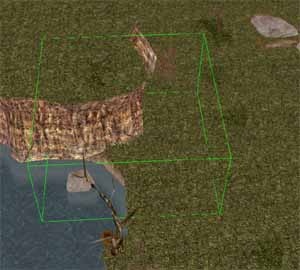
| SelectorHeight=5 | Defines the height of the green wireframe cube when using tile/group selections in the toolset. Visual only. | ||||||||||||
| DisplayName=1606 | The name displayed when selecting a tileset in the toolset. It references an entry in dialog.tlk. Change this to "-1" and add a line "UnlocalizedName=MY_TILESETS_NAME" to make that name appear instead. | ||||||||||||
| Border=Grass | The Terrain of the Area`s edges | ||||||||||||
| Default=Grass | The default terrain that is placed everywhere when creating a new area using this tileset. | ||||||||||||
| Floor=Grass | The terrain placed when using the "eraser". | ||||||||||||
| [GRASS] | The settings for the grass that appears if a walkmeshnode of the tilemodel is set to "3 / grass" | ||||||||||||
| Grass=1 | Set this to "0" to turn of grass completely. You can then remove the following lines. | ||||||||||||
| GrassTextureName=grass | Defines which image to use for areas covered with "grass". Convention is a tga split into 4 quads of sprites and these 'quad images' are randomly spread and rotated throughout the "grass" walkmesh. Default game uses "grass" and "ttz_grass". | ||||||||||||
| Density=5.000 | How strong the grass grows. | ||||||||||||
| Height=1.200 | The height of the grass in meters. | ||||||||||||
| AmbientRed=0.500 AmbientGreen=0.600 AmbientBlue=0.300 | The colour settings of the grass. RGB settings. | ||||||||||||
| DiffuseRed=0.500 DiffuseGreen=0.600 DiffuseBlue=0.300 | |||||||||||||
| [TERRAIN TYPES] Count=3 | The number of terrain types used in the tileset. | ||||||||||||
| [TERRAIN0] | First Terrain entry. Make sure ALL count entries in your tileset begin with "0" and the last entry is count-1 | ||||||||||||
| Name=Grass | The name of the terrain as it will be used in the [TILE] entries later. (CASE SENSITIVE !) | ||||||||||||
| StrRef=63635 | The reference to name-string in "dialog.tlk" leave this out if you create a custom terrain and use | ||||||||||||
| [CROSSER TYPES] Count=4 | Similar to [TERRAIN TYPES], just for crossers like road and stream | ||||||||||||
| [CROSSER0] | |||||||||||||
| Name=Stream | |||||||||||||
| StrRef=63302 | |||||||||||||
| [PRIMARY RULES] Count=28 | The primary rules section. Here is determined what terrain type is allowed to place, and what happens if a certain terrain type is placed on and next to another. | ||||||||||||
| [PRIMARY RULE0] | The first primary rule.Again, watch the count ! | ||||||||||||
The use of Primary Rules is hard to explain. You got to know that terrain is always determined I`ll explain it the way I read it: | |||||||||||||
| Placed=Grass | If "Grass" is placed.... | ||||||||||||
| PlacedHeight=0 | ...and the height of the Tile is 0 | ||||||||||||
| Adjacent=Grass AdjacentHeight=0 | ...and the adjacent tile`s corner is "Grass" with a height of "0" | ||||||||||||
| Changed=Grass ChangedHeight=0 | ...the terrain at the adjacent gets changed to "Grass" with a height of "0". | ||||||||||||
| [SECONDARY RULES] Count=0 | UNKNOWN - it`s never used in any tileset | ||||||||||||
| [TILES] Count=259 | Begin of the [TILE] section. The settings in this section mainly describe the looks and use of a given tilemodel. We`ll use "ttr01_a11_01" for this example. | ||||||||||||
 | |||||||||||||
| [TILE9] | The number of the tile entry | ||||||||||||
| Model=ttr01_a11_01 | The file reference to "ttr01_a11_01.mdl" and it`s walkmesh file "ttr01_a11_01.wok" | ||||||||||||
| WalkMesh=msb01 | |||||||||||||
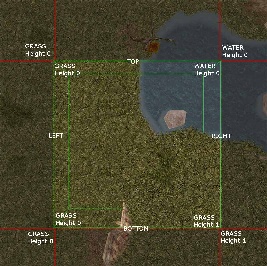
| TopLeft=Grass TopLeftHeight=0 TopRight=Water TopRightHeight=0 BottomLeft=Grass BottomLeftHeight=0 BottomRight=Grass BottomRightHeight=1 | The tile-description section. Take a look at above picture and you`ll understand how it`s read. Remember tiles are always read over corners and if you place a tile, adjacent corners are placed, too. This starts a "snowball system" of placing tiles. Note the edges that are left out. It looks like they aren`t affected if you place something, but in fact the tiles there are affected by the tiles placed at the corners. | ||||||||||||
| Top= Right= Bottom= Left= | Here are the entries for crossers. Crossers are additionally used over edges, not only over corners. | ||||||||||||
| MainLight1=1 MainLight2=1 SourceLight1=1 SourceLight2=1 AnimLoop1=1 AnimLoop2=1 AnimLoop3=1 | This section appears to be the index into tilecolor.2da that the tile should default to. The issue is that the toolset will apply the areas lighting choice to every tile added or removed or swapped in an area making this section basically moot since it never has a chance to use the default values. All being 0 should be fine and won't affect you being able to choose colours or set area-wide lighting. If there are no "sl" nodes in the model , no sourcelight (torches) will appear for example. You`ll see the checkboxes for this section if you rightclick on a tile. | ||||||||||||
| Doors=0 | The number of doors in the tile. I`ll do an door example further down.... | ||||||||||||
| Sounds=0 | |||||||||||||
| PathNode=Q | This is a descriptor for the walkmesh type and is used in the pathfinding routines. See Tile Path Nodes for the definitions. The value values now are A-Z and a-z (case sensitive) meaning 52 valid options although P shouldn't be used. | ||||||||||||
| Orientation=180 | Turn the Pathnodes with this (in +/- 90 degrees) to tell the engine how the tile can be passed through. Positive values are Counter-Clockwise Rotations, Negative Values are Clockwise. | ||||||||||||
| VisibilityNode=A | Same as PathNode, but for Line-Of-Sight only - Can be left out if same as PathNode Visibility nodes tell the game engine how Line-of-Sight (LOS) passes through a tile and into adjacent tiles. They are only required when passage through a tile may be blocked (i.e., pits or ravines) but LOS is unobstructed. For example, a cliff or ledge may use path node C, but uses visibility node A. The visibility node’s orientation should match the orientation of the path node. If the VisibilityNode parameter is missing from the SET file, the game engine defaults to using the path node to determine LOS. | ||||||||||||
| VisibilityOrientation=0 | Same as Orientation, but for Line-Of-Sight only- Can be left out if same as PathNode | ||||||||||||
| ImageMap2D=MITR01_A11 | This is the reference to the image that is displayed on the map for this tile. (MItr01_a11.tga in this case) The file can be DDS (preferably) or TGA, and be at least 16x16 px. Due to NWN:EE scaling higher sizes will get properly utilised. | ||||||||||||
ON DOORS | |||||||||||||
| Remember the Doors=0 entry above ? | |||||||||||||
| Let`s assume it would have been Doors=1 or more. | |||||||||||||
| In that case the [TILE] entry must be directly followed by | |||||||||||||
| [TILE9DOOR0] | This is the entry for the FIRST door in a given tile. The first part "[TILE9" references to the tile, while "DOOR0]" is the sequential number of the door. If there would be more than one door in the tile, the next would have to be [TILE9DOOR1] and so on. | ||||||||||||
| Type=65 | This references to the entry number in "doortypes.2da". If it`s not "=0" it is a TilesetSpecific door. Entries of "=0" let you place doors from "genericdoors.2da" (simple doors). Tileset specific doors get auto-placed when the tile is placed, while you have to place simple doors by hand. | ||||||||||||
| X=2.78 Y=0.00 Z=0.00 | The position of the door. Values are in meters. | ||||||||||||
| Orientation=-90.0 | The facing of the door. | ||||||||||||
| [GROUPS] Count=63 | The Groups section and it`s count. Groups are organized X, Y starting from the bottom left in the game, but are typically arranged in ascending order in the file set itself so be careful of this in game:
| ||||||||||||
| [GROUP3] | The FOURTH group entry (remember, 0 is the first !) | ||||||||||||
| Name=DragSkel_1x2 | The name of the group. It`s "for your eyes only" as it`s not used elsewhere. | ||||||||||||
| StrRef=63637 | The reference to dialog.tlk entry. You can leave this line out if you use a STRING NAME combination with ITP tools. | ||||||||||||
| Rows=1 Columns=2 | The size of the Group. When placing a group it first reads all row "Tile=" entries and then the collumns. (hope to be right on this) | ||||||||||||
| Tile0=127 | The first Tile to be placed with a group and the tile that you have to reference to | ||||||||||||
| Tile1=128 | The subsequent tiles. Once a tile is bound, it`s unavailable for Terrain/Crosser placement. | ||||||||||||
| A small trick: if you set a "Tile#=" to "-1" (example: Tile3=-1), a random tile will be placed, according to terrain. | |||||||||||||
Padding a Set File
When adding tiles to one of the vanilla tilesets, it is a good idea to pad the SET file, leaving room for any future expansion by Beamdog. Padding a SET file is simply adding a blank, or “padded”, entry to the list of tiles in the SET file.
Your padded entries should look like this, changing the tile numbers in the top field – [TILE####] to whatever numbers are required. Make sure there is no space between the word “TILE” and the tile number in the top field.
[TILE####]
Model=padding
WalkMesh=msb01
TopLeft=(null)
TopLeftHeight=0
TopRight=(null)
TopRightHeight=0
BottomLeft=(null)
BottomLeftHeight=0
BottomRight=(null)
BottomRightHeight=0
Top=
Right=
Bottom=
Left=
MainLight1=0
MainLight2=0
SourceLight1=0
SourceLight2=0
AnimLoop1=0
AnimLoop2=0
AnimLoop3=0
Doors=0
Sounds=0
PathNode=A
Orientation=0
ImageMap2D=(null)
Notes on SET File format
A set file uses the standard Windows INI format. Any function or program able to read INI files can also read a SET file.
Exporting is another issue.
When exporting an INI file, most programs will save only the modified parts by inserting the modified part over itself into the file, or will append all new content to the bottom of that section. In the case of new sections, they will always be put on the bottom.
The NWN Toolset cannot handle that. All sections must follow a specific order as shown in the tree structure below or the toolset will crash.
- General
- Grass
- Terrain Types
- Terrain 0
- Terrain n
- Crosser Types
- Crosser 0
- Crosser n
- Primary Rules
- Primary Rule 0
- Primary Rule n
- Secondary Rules
- Tiles
- Tile 0
- Tile 0 Door 0
- Tile 0 Door n
- Tile n
- Tile n Door 0
- Tile n Door n
- Tile 0
- Groups
- Group 0
- Group n
*Note there should be a newline at the end of the last group index or certain systems won't load the SET file correctly and can crash the toolset.
The problem was identified in at least Wine 9, however it does not occur on all Win11 machines. It does not appear to occur on Win11 Home 24H2 v26100.2894.