-
Created by
 Jasperre, last updated on Nov 26, 2023
3 minute read
Jasperre, last updated on Nov 26, 2023
3 minute read
Weather is (mostly) unhardcoded as of 1.80.8193.14. This will explain how weather works in relation to the limited existing weather types and new ones that could be added.
weathertypes.2da
See weathertypes.2da for how to add new weather lines. These can be activated with SetWeather.
Note there are stills some hardcoded aspects:
- Sound of rain plays when light (no lighting) or heavy (lighting) rain is being done, which is tied solely to line 1 ("Rain") in the 2da. The files are:
- al_wt_rainlight1 - played in light rain
- al_wt_rainhard1 - played in heavy rain
- Thunder sound effects are hardcoded (played when lightning, ie heavy rain, is activated). You also can't affect the % chance of lightning once a module is loaded as noted below. The file are:
- Thunder (ie when it flashes):
- as_wt_thundercl1
- as_wt_thundercl2
- as_wt_thundercl3
- as_wt_thundercl4
- Thunder, rolling (ie no flash)
- as_wt_thunderds1
- as_wt_thunderds2
- as_wt_thunderds3
- as_wt_thunderds4
- Thunder (ie when it flashes):
The former stuff can be replicated with a sound effect (that can be disabled/enabled on manually altering the weather). The thunder can't easily be replicated exactly due to it using a "flash screen" panel - called pnl_lightning - to load a mdl to flash white on the screen. However you could use shaders, VFX, or similar to have the lightning and play a sound effect.
Wind
You have 2 default Wind settings, "Low" and "High". These are hardcoded to automatically play sounds every few seconds (specifically (float)( rand() % 5000 ) / 1000.0f + 5.0f apart). The files are replaceable and are called:
- as_wt_gustsoft1
- as_wt_guststrng1
- as_wt_guststrng1
While you can set wind - with SetAreaWind - this removes the wind sounds from playing although you could have a sound effect in the area to replicate them.
When does Weather Change
The % Snow and % Rain amounts in the area properties will set WEATHER_SNOW or WEATHER_RAIN lines on if the % chance is met every time a player enters the area.
Alternatively you use SetWeather. If so it is suggested the chances for weather (except lightning, see below) are set to 0.
Lightning Note
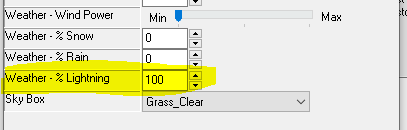
A quick note here: lightning will happen throughout a single weather cycle (ie until changed, eg; by entering the area again, or by scripting) if the % for lightning is met in the area properties - ie: If it is set to 50% it means if the random number generator says 25, this means lightning fires continually through that weather.
Therefore if this is set to 0% lightning will be impossible, in spite of what weather line is chosen. There is no way to script this. Basically if you want lightning to occur set it to 100%, if not then 0%. If you want to program this in it might be possible using progfx or attach_to_scene and the skybox, or having the lighting attached to the general weather animation.
New Weathers
The game doesn't include any proper "ready to fit" visual effects for new weathers. This is because the fx_rain and fx_snow setup a constant, looping animation of falling things around the player.
The game essentially has 4 spawn points that are fitted into the PC's vision, and follow the player around. They are relative to the player, so snow for instance looks like it is moving with the player. Keep this in mind when creating new ones and look at fx_rain and fx_snow for examples.