The nwmain program is the client / DM client of the game. You can run singleplayer and multiplayer sessions (host and client).
The game options are covered under Game Options. These are stored in a settings.tml that is generated on first run in your Documents\Neverwinter Nights folder.
You can run a headless NWServer for hosting a MP game without a player connected. That has it's own list of command line options.
See Troubleshooting for some options around recreating your documents folder and other troubleshooting tips. Make sure you run the latest version and you should probably not run OneDirve/Dropbox/Google Drive "Documents backup" options since this may cause read/write issues.
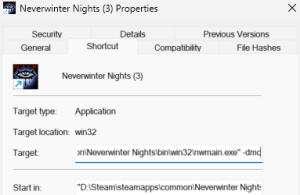
You can add these to a shortcut in Windows by altering the Target field, eg for the DM console use this as an example: "D:\Steam\steamapps\common\Neverwinter Nights\bin\win32\nwmain.exe" -dmc
You can have multiple options with a space between each. Use quotes when the option contains a necessary space in it.
| Option | Example | Notes |
|---|---|---|
-dmc | -dmc | Launches the DM client version, which can only host/connect to MP games and loads DM avatars. |
+connect_lobby <ID> | Used by Steam to connect you to a friends game | |
+gogfriend <ID> | Used by GOG to connect you to a friends game | |
+connect <IP:PORT> | +connect 10.0.0.1:5000 | Connects to the given IP and port |
+password <PASSWORD> | +password PASSWORD | Password to use to connect automatically to the given above automatic attempts |
+LoadNewModule <MODULENAME> | +LoadNewModule "module name" | Loads the given module name (as per it's name, not the filename) and gives you the character select screen. See also: Test Module. Won't work with conjunction with -dmc |
+TestNewModule <MODULENAME> | +TestNewModule "module name" | Loads the given module name (as per it's name, not the filename) and loads the first BIC in the character list. See also: Test Module. Won't work with conjunction with -dmc |
compilemodel <RESREF> | compilemodel c_badger | Loads the game and compiles the given model (if not skinmesh), output the binary MDL if there are no errors to modelcompiler folder. See log file for any errors. See also: Models |
-noaliases | Stops loading aliases from nwn.ini [Alias] section and instead use the games default ones. It also won't write out the default Alias section if none is present. | |
-userdirectory <DIRECTORY> | -userdirectory "E:\nwn\neverwinter nights" | Loads the given new user directory instead of Documents\Neverwinter Nights. It will generate a basic folder setup and new settings.tml file if the folder isn't setup correctly. |