...
| Info |
|---|
| The SET file specifically indexes everything tiles by tile index, not by name. |
...
Including your own non-functional door dummies can help future SET file writers get the proper door positions.
Walkmesh and Walkmesh Rules
This is a separate mesh not seen by the clients. It guides units through the tile while within the tile's bounds.
...
There are many rules which apply to walkmesh construction, which can be very confusing:1)
Rule #1: A walkmesh should be very simple
. A mesh polycount of 100 is a good limit.
...
To compile correct AABB structures for more complex walkmesh, use a 3D editor program that is at least 64 bit.2)
Rule #2: A walkmesh cannot have more than eight faces associated with any given vertex
...
Most non-walkable face types do not count toward that limit, though you should still keep them to a minimum of 8 per vertex for future builders that might change your walkmesh surface types.3)
Rule #3: A walkmesh walkable portion must be single-planar non-complex
...
You cannot have multi-level walkable portions that actually work correctly. Any vertex from any face cannot therefore overlap any other walkable face. Non-walkable faces do not have this rule.
If you make multi-level walkable space in GMax, you will likely crash the exporter. In other programs, it may allows you to build the AABB structure, but units using that mesh will jump from level to level randomly.4)
Rule #4: A walkmesh walkable portion must point upward
. Downward facing walkable portions can crash GMax exporter, and will lead to jerking and hopping of players in the game.
...
| Info |
|---|
| Merricksdad uses surfacemat 21 "barebones", which prevents walking, blocks the camera, but allows a player to target the ceiling with spells and pathing. |
...
Rule #5: Walkmesh must be a single model node
. Supplying more than one AABB node in a model will have a lot of undesired consequences.
...
All previous rules still apply. No overlap of walkable faces and vertices. Only 8 faces per vertex. Etc.6)
Rule #6: Avoid straight vertical edges
. Straight vertical edges breaks the no-overlap rule. Even when one of the vertices are part of a non-walkable mesh, this can still crash the toolset or engine.
Any time you have a height change in the walkmesh, offset it on the XY plane at least 1 cm. on each axis.
Rule #7: Position at zero
7) A walkmesh should have its origin (aka pivot) set to the tile center (aka 0,0,0), sharing the exact position of the aurorabase node.
...
If the tile is a raised tile, this rule still applies.
Rule #8: No tile edge gaps
8) A walkmesh meant to allow travel off the tile must have an edge at exactly +/- 5 meters from the center of the tile. No decimal variation should be permitted.
...
Note that visual effect particles are still blocked by A-node transparent objects except where those textures have Alpha layer = 0, and where the shader uses the "discard" command to open a hole in the texture.
Tile Water Options
| Info |
|---|
Meshes that fall under the A-Node in hierarchy will not respond to tilefade or keyholing due to draw order. |
Tile Water Options
Water on tiles can be either walkable or Water on tiles can be either walkable or not walkable, as determined by the walkmesh.
...
Understanding SET File Parts
Path Nodes
Path nodes help help units move through the tile from another tile to another tile. These are used instead of the walkmesh on the tile, allowing distance pathing to see the tile as a single simple node in a route.
...
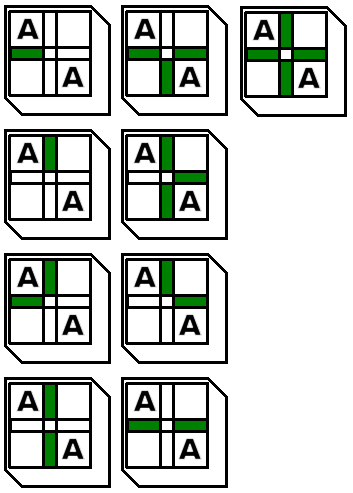
But if you want full diagonal raised terrain support, you also need these following tiles.
Common Issues Encountered With Tiles
Walking on a tile sends the player up to 15 meter elevation.
This is caused by a missing or broken walkmesh.
In network play, make sure that the walkmesh WOK file exists on the server.
If not in network play, check that the MDL file on the client includes an AABB section.
If the AuroraBase node is not set to Type = Tile, no walkmesh will be used. Additionally, when exporting from NwMax, no walkmesh will be produced.
If the issue only occurs at certain places of the tile, check that there are no gaps between faces of the walkmesh trimesh portion. Gaps are considered invalid space, 15 meter height, and surface material 0 = invalid.
If the issue only occurs at tile edges, check that the walkmesh goes all the way to 5 meters from center so that it touches the next tile exactly. No more, no less. Any gap can prevent walking to the adjacent tile, or make you fly up over the gap.
Corrupted walkmeshes can also have an AABB section which is invalid, missing entrynodes in the list and therefore sometimes throwing invalid index errors when trying to path over missing AABB branches, or index out of bounds errors when trying to read a later index.
My Walkmesh is visible during gameplay
If you can see your walkmesh during gameplay, that usually means you exported your walkmesh as Trimesh instead of AABB.
Make sure the AuroraWalkmesh modifier is applied in NwMax, or use the similar method in NeverBlender.
If you can walk on the tile and still see the walkmesh, make sure you don't have two copies of the walkmesh, one with a proper modifier and one as a Trimesh.
Walkmesh crashes GMax when I click on it
Gmax is a 16 bit system. It has very little ability to manage memory, and cannot use the full allotment on a modern machine. High complexity walkmeshes will kill GMax. Keep to 200 faces max. The program 3DSMax can handle more complexity than GMax.
If your walkmesh model is wrong in some ways, NwMax will hang while making the AABB data tree. If the process runs out of memory, it won't be able to muster the strength to tell you before it does.
When you click on the walkmesh, and the scene does not already have AABB data for that walkmesh calculated, NwMax for GMax will immediately attempt to make the AABB data. That's why it happens when you click on it.
Transparent parts are not transparent to players behind them
Tiles follow the rules for static geometry. They draw before all dynamic geometry.
You can get around this by using a few methods.
In NWN 1.69 you can use a-nodes (see above). Place your intended transparent parts under the a-node dummy.
In NWN EE a-nodes do not function until preview 8193.35.
In NWN EE preview 8193.35 you can either use a-nodes again, or you can use material commands to force transparency. Add these lines to your transparent texture material file at the top.
| Code Block |
|---|
transparency 1
sample_framebuffer 2 |
Common Issues Encountered With Tilesets
A tile group or feature does not show in the toolset
Your toolset options are defined by the ITP file paired with your SET file. If the ITP file was not updated after your group was added, then it won't contain the name of your new group.
Add the group to the ITP file manually using a GFF editor, or by importing the SET file into SetEditorBeta 0.85 and just hit the Save ITP button. (Do not hit the Save SET button, or it can corrupt your SET file in various ways).
| Note |
|---|
| Always make backups. |
Tile group or feature in the toolset cannot be painted into area
The ITP file stores the first tile filename related to the group as the handle to the group index. It doesn't store anything about the group otherwise.
If the ITP file does not have the correct filename, then it won't be able to find the group index associated with that filename, and therefore cannot paint the group because it doesn't exist.
Make sure to update your ITP file and try again.
Tile group or feature in the toolset works, but cannot be painted adjacent to other groups or features
Check that the SET file does not have Transition = 0 set. If it does, then an error is occurring when you try to paint the tile and it cannot identify the corner heights properly.
Even if you don't use a transition in your tileset, set the Transition value equal to at least 1.
When I place raised tiles, they are vertically offset from where I expect them
If you have merged or made tiles for your tileset which have a different transition value than the SET file, then the offset will be incorrect.
Measure the vertical offset in a model file, and then set that value in meters to the Transition value in the SET file header.
All offset tiles in a tileset share the same offset, so you can't mix different offsets.