...
When these parts match at corners and edges, the toolset will be able to pick and elevate tiles into the correct position for the builder to make an area.
Before we begin, you will need to have some form of organization, and you'll need to learn the terminology. You'll also need to grab some tools.
Basic Organization
With functional basics out of the way, you're ready to start taking down notes for your own tileset.
...
If you are working with models from 3rd party downloads, you may find that they're stored in a scale that is 1000x larger. This is commonly because they are working in millimeter scale for 3D printer software. In that case you will need to actually scale your models up or down before working them into NWN. Find how to do that using the help manuals for each 3D editor software.
Understanding Tileset Related Resources
To do all the work needed to build a custom tileset, you'll need to understand where the data comes from during gameplay. Below are some filetypes, specific files, and what they do.
...
| Info |
|---|
| The SET file specifically indexes everything tiles by tile index, not by name. |
...
Not all custom content has edgetiles. Not all tileset types can have fully functional edgetiles. And tilesets using edgetiles have a pattern of repeating tiles out from their edge that some builders do not like.
When edgetiles are used, they are indexed in a separate file from the SET file.
...
Edge tiles using the original content naming convention usually have row Z set aside for edgetiles. If you follow that convention, it will make finding edgetiles in your tileset hak HAK easier.
Edge tiles are not a requirement, and don't make sense in some situations.
...
Sourcelights are generally directional lights with a specific causative feature, like a torch or lantern or campfire on the tile. Sourcelights are also partially controllable with environment settings.
Sourcelights can also be bound to tile animations, so they can turn on and off by day and night settings, as well as activate and deactivate settings. For example, the forest tileset has torches and campfires that can turn on/off, allowing one tile to be used as multiple variants.
...
Tiles can make use of TGA and DDS textures. They can also make use of MTR material files, which can point to custom SHD shader files.
Understanding Tile Model Parts
Aurorabase
This is the specially dummy node underlying every model. It contains information about the tile name and supermodel linking, is the base for its tree structure, and contains the list of animations on the tile.
...
Including your own non-functional door dummies can help future SET file writers get the proper door positions.
Walkmesh and Walkmesh Rules
This is a separate mesh not seen by the clients. It guides units through the tile while within the tile's bounds.
...
There are many rules which apply to walkmesh construction, which can be very confusing:1)
Rule #1: A walkmesh should be very simple
. A mesh polycount of 100 is a good limit.
...
To compile correct AABB structures for more complex walkmesh, use a 3D editor program that is at least 64 bit.2)
Rule #2: A walkmesh cannot have more than eight faces associated with any given vertex
...
Most non-walkable face types do not count toward that limit, though you should still keep them to a minimum of 8 per vertex for future builders that might change your walkmesh surface types.3)
Rule #3: A walkmesh walkable portion must be single-planar non-complex
...
You cannot have multi-level walkable portions that actually work correctly. Any vertex from any face cannot therefore overlap any other walkable face. Non-walkable faces do not have this rule.
If you make multi-level walkable space in GMax, you will likely crash the exporter. In other programs, it may allows you to build the AABB structure, but units using that mesh will jump from level to level randomly.4)
Rule #4: A walkmesh walkable portion must point upward
. Downward facing walkable portions can crash GMax exporter, and will lead to jerking and hopping of players in the game.
...
| Info |
|---|
| Merricksdad uses surfacemat 21 "barebones", which prevents walking, blocks the camera, but allows a player to target the ceiling with spells and pathing. |
...
Rule #5: Walkmesh must be a single model node
. Supplying more than one AABB node in a model will have a lot of undesired consequences.
...
All previous rules still apply. No overlap of walkable faces and vertices. Only 8 faces per vertex. Etc.6)
Rule #6: Avoid straight vertical edges
. Straight vertical edges breaks the no-overlap rule. Even when one of the vertices are part of a non-walkable mesh, this can still crash the toolset or engine.
Any time you have a height change in the walkmesh, offset it on the XY plane at least 1 cm. on each axis.
Rule #7: Position at zero
7) A walkmesh should have its origin (aka pivot) set to the tile center (aka 0,0,0), sharing the exact position of the aurorabase node.
...
If the tile is a raised tile, this rule still applies.
Rule #8: No tile edge gaps
8) A walkmesh meant to allow travel off the tile must have an edge at exactly +/- 5 meters from the center of the tile. No decimal variation should be permitted.
...
In custom content, the A-node was also used as a method to force transparent textures to render above dynamic content, such as player models and visual effects. This allowed transparent walkable water, glass windows, and display cases.
During early EE versions, the A-node stopped working. It did not return until preview version 8193.35 [2070a8b9].
The new A-node functionality is similar to the old version with all the same uses. It allows stuff like static object glass transparency, transparent foliage, and water that does not block legsleg visibility.
To set up an A-node, simply make a dummy node with the same name as the aurorabase, suffixed with "a". Parent to the aurorabase dummy node.
Any mesh parented by the A-node will be rendered in the dynamic drawing phase after static meshes. This improves transparency ordering. It does require more processor time.
Tile Water Options
Water on tiles can be either walkable or not walkable, as determined by the walkmesh.
Note that visual effect particles are still blocked by A-node transparent objects except where those textures have Alpha layer = 0, and where the shader uses the "discard" command to open a hole in the texture.
| Info |
|---|
Meshes that fall under the A-Node in hierarchy will not respond to tilefade or keyholing due to draw order. |
Tile Water Options
Water on tiles can be either walkable or not walkable, as determined by the walkmesh.
Walkable default Walkable default water is set by surfacemat #6, whereas deep non-walkable water is set by surfacemat #17
...
Water texture has a few special options. The first and more common option is fancywater, which is started by using a TXI file, but uses a special shader. The second older method is to use a TXI file to run an Arturo Noise function on the water texture.
Understanding SET File Parts
Path Nodes
Path nodes help help units move through the tile from another tile to another tile. These are used instead of the walkmesh on the tile, allowing distance pathing to see the tile as a single simple node in a route.
...
Prior to some version of EE, height transitions needed to be integer values. In the current version, they can now be floating point decimals.
Terrain Types
Terrain types are your tile corners. They are the base terrain available in your tileset.
Terrain types are referenced in the SET and ITP file by name, not index.
Terrain types are required.
Crosser Types
The whole set can only have a single transition value. You can however make a separate terrain that uses half of the transition height and then mix it with other tiles using the full transition.
In general, a set can only use one height transition at a time per tile.
There are tilesets which use up to 3 per tile. They are more complex, take substantially more work to create, and cannot make full use of edgetiles. Multi-raise tilesets let a builder jump two or more transition increments over a single tile.
Terrain Types
Terrain types are your tile corners. They are the base Crosser types are your tile edge types. They are the secondary terrain available in your tileset.
Crosser Terrain types are referenced in the SET and ITP file by name, not index.
Crosser Terrain types are not required. The default crosser type is blank.
Tile Grass
Crosser Types
Crosser types are your tile edge types. They are the secondary terrain available in your tileset.
Crosser types are referenced in the SET and ITP file by name, not index.
Crosser types are not required. The default crosser type is blank.
Tile Grass
Tile grass is late-Tile grass is late-drawn dynamic grass added to parts of the walkmesh at runtime.
...
See the SET file writeup for more details.
Doors
Door instances are stored with the tile they are attached onto.
Original content tiles use height transitions of 5 meters. A more reasonable height transition for custom content tiles is usually 2 or 3 meters. But it depends on the intended appearance.
Doors
Door instances are stored with the tile they are attached onto.
In the SET file In the SET file INI structure, they will directly follow the tile INI structure, and will be referenced as [TILEX_DOORY] where X is the tile index, and Y is the door index.
| Warning |
|---|
| Beware some older tileset builder programs like SetEditorBeta 0.85 which can add incorrect door and sound index count to tile entries. |
Sounds
DOORY] where X is the tile index, and Y is the door index.
| Warning |
|---|
| Beware some older tileset builder programs like SetEditorBeta 0.85 which can add incorrect door and sound index count to tile entries. |
Sounds
Like doors, sounds can be added to tiles. This is not suggested.
Get to know your tools
You'll need various tools to build a tileset.
For making models, you'll need either Max/GMax or Blender.
To export NWN-ready models, you'll need NwMax or NeverBlender addon for that respective program.
To edit any model, 2DA or SET file by hand, you'll need a simple text editor, such as Notepad++.
To edit binary GFF file formats, such as to make a custom ITP file for your SET file, you'll need a GFF Editor.
To extract or view existing content locked in BIF files, you'll need NwExplorer or similar.
To extract material from custom content and to pack your own custom content for sharing, you will need a HAK editor.
Laying out your intended area
Estimating your terrain type needs
The first thing you want to examine is the number of terrains you intend to have in a single area.
Any time two or more terrains can meet on a tile will substantially increase the workload.
While tilesets exist which mix four terrains, it would be best to start with two and only work up as needed.
Commonly used options include Grass, Water, Mountain, and Forest for outdoor sets, while indoor sets have a terrain type per room but are separated by a shared wall terrain sometimes called "solid".
Mixing Two Terrains
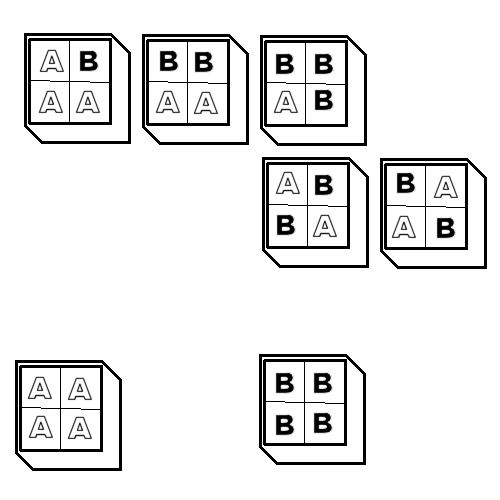
Imagine you have two terrains A and B. For each terrain you need one tile with all four corners being the same terrain. For any corner mixed with the other terrain, you need another 4-5 tiles as shown in the diagram below.
While ABBA and BAAB are technically the same pattern rotated, they represent options where the primary terrain is the one in the upper left corner. Imagine you have terrain A which is flat grass, and B which is raised rock. If you want a bridge of raised rock across the grass, then BAAB is the tile you would be making. Whereas if you want a grass path through two raised rocks, then ABBA is the tile you are making. We can think of these as inverse tiles.
Builders will commonly make three variant versions of ABAA, BBAA, and BBAB, but only one version of ABBA and BAAB. Some builders make six variants of AAAA and BBBB. Variation of individual tiles helps reduce repeating patterns in the client view.
With each terrain C or D added, the number of mixing tiles will increase with A, B, C and D. You would need A, B, C, D, AB, AC, AD, BC, BD, and CD.
Mixing Three Terrains
In addition to mixing C and D with A and B, you might also consider mixing three terrains at once. for each terrain C added, you will need 9 more tiles to complete the mixing options.
Having complete mixing options allows builders to keep painting without having to erase a tile to paint another terrain. However, more mixing options always increases the number of tiles needed, and the workload.
Note that this following set finishes the ABC combo, but omits D. So to complete ABCD, you would need ABD, ACD and BCD copies of the following.
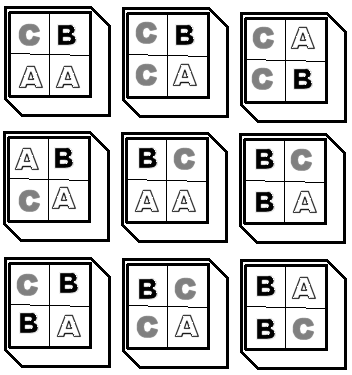
Mixing Four Terrains
If you wanted to mix in a fourth texture D with A, B and C so that each corner was another terrain, then you would need 6 more tiles adding terrain D. But, unlike other subsets, you already have all the tile you you need in this mixing type for the whole set ABCD.
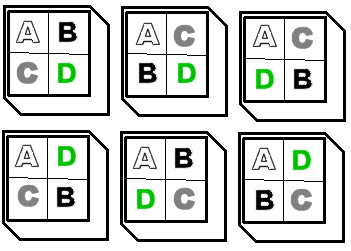
So you can see, with just four terrains the workload is building up. Adding terrains E thru Y would substantially increase the workload.
Standard tilesets have usually four terrains. Custom tilesets have tens of terrains with varying mixing capability.
Mixing only two terrains at once can seriously reduce total workload. Not all terrains need to be mixed. And in most cases, a lot of the mixing tiles will never be used in any given area, creating file bloat.
You can also make "graduated" terrains, where terrain B only appears inside terrain A, and where terrain C only appears inside terrain B. With such a graduated terrain system, you can transition from terrain to terrain with every tile, but you will need four tiles to make it to terrain D.
The maximum area size is 32 wide or long. So burning 4 tiles distance to transition over four terrain types might mean wasting some real estate.
Keep in mind that you can also start with max-2 mixing tiles. Build what you need, and then do anything special with tile groups. That method would allow you to skip making most mixing tiles and only make what you personally need.
Estimating your crosser type needs
Crossers are what goes on the edge of your tile and connects it to the adjacent tiles. In original content tiles, these are usually streams and roads outside, while inside they can be corridors or bridges over watery pits.
Like with corner terrains, you need so many tiles to complete a crosser set.
If we imagine that a tile has this structure:
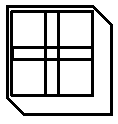
...then to compete a set you need three basic tiles to make a continuous road with a termination.
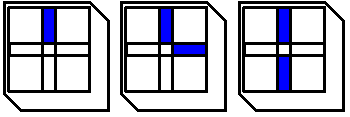
And to make intersections in your road, you need these two tiles:
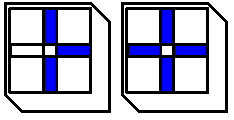
Keep in mind that this is ONLY to cover one corner terrain type with one crosser type.
Mixing Two Crossers
You can also mix up to four crosser types on a single tile, just like with corner terrains. Here's an example of two crosser types meeting in the middle, such as a road crossing a river.
Shown below is an early river system subset by Merricksdad.
|
|
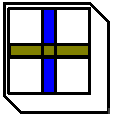
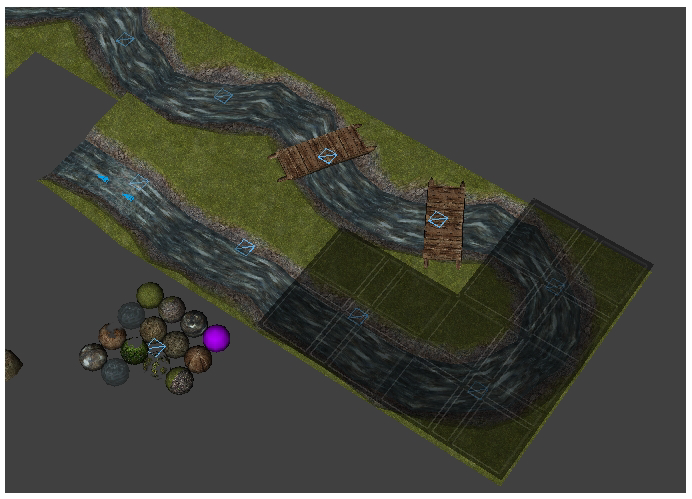
Notice in the river subset above, the river does not need to cross the tile at the tile edge center. It can be offset. However, in producing tiles like that, you then need extra tiles to snake the river across the tile, such as those shown with bridges.
Mixing Terrain and Crossers
Now imagine you want your river to empty into a lake. The tiles shown below would be needed to complete that transition set.
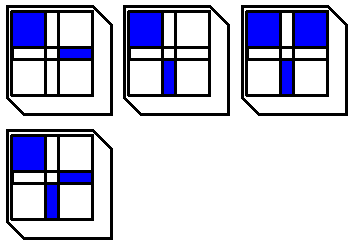
Mixing Height Transitions and Crossers
The following chart paints a clearer picture of the needed tiles for any given terrain-crosser mix where there is any height transition A, or where A is actually a different terrain than the blank portion.
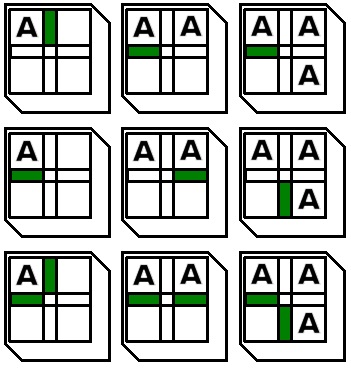
But if you want full diagonal raised terrain support, you also need these following tiles.
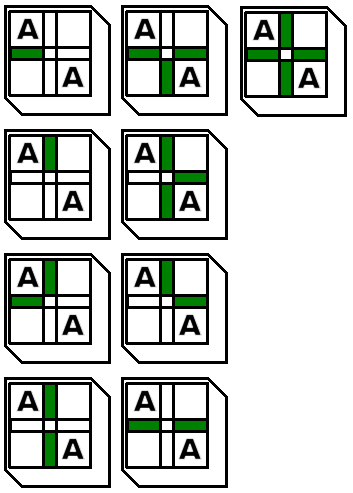 Like doors, sounds can be added to tiles. This is not suggested.