...
Open Project → Settings and find the entries for HAK folder and TLK folder and copy paste in your directories in the Documents folder for NWN, by default they look like this replacing USER with your username:
- HAK Folder: C:\Users\USER\Documents\Neverwinter Nights\hak\
- TLK Folder: C:\Users\USER\Documents\Neverwinter Nights\tlk\
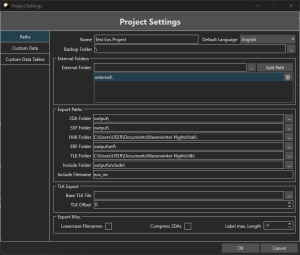
You can also set some other paths, here are some recommended values:
- Include Folder: C:\Users\USER\Documents\Neverwinter Nights\modules\MODULE NAME\
- You want to have "Always open module directories" in the options enabled, and when your module is open save it, rename the temp0 folder to be your module name (eg "my module.mod" → "my module" folder) and then close the toolset, and reopen.
- Include filename: Max 16 character filename. Recommended to have "eos" in the name as per the default "eos_inc"
- ERF Folder: C:\Users\USER\Documents\Neverwinter Nights\erf\
These other paths are for source files (that are put into the hakpack) so probably best to keep in source trees:
- 2DA Folder
- SSF Folder
Test Export Paths
Even with no data and no TLK strings, this should generate some blank hakpack and TLK files ready to be added to a module.
...