NWN and NWN:EE both have some quirks when it comes to transparency.
In the original game, there was a minimum limit of 20% opacity. Anything lower than 20% would be clipped away, which helped with draw speed when mixing many transparent planes over distances.
In the original game, static objects also had issues becoming transparent to dynamic objects. A trick where you could add an "a-node" to the model would let you fix the draw order, putting all transparent meshes later in the draw order.
To get the old trick to work, you would make a new dummy node. You would then place the dummy node at the location of the AuroraBase node underlying the model structure. The dummy node must be given the name exactly equal to the AuroraBase name + "a". As an example, a mesh with name "tmd_tile001" would have an A-node named "tmd_tile001a".
On this A-node you could then attach your parts that were supposed to be transparent. You could then also use transparencyHint on the trimesh modifier to help change the draw order, although you could also modify part of that order by changing the parentage order of the meshes. In NwMax for GMAX, you could use a function called Order "Children"
This method effectively moved portions of a static mesh into the realm of dynamic meshes to force how they were drawn. The only real detriment was that things using this method lost the ability to self-shadow.
When EE first came out, A-nodes stopped working as expected.
You could get around this issue by adding any other one mesh in front of the thing you wanted to become transparent. For example, under your A-node, you would put another dummy, and adjacent to the dummy in order you would put your transparent mesh.
This appeared to be an issue with subnode indexing. What was previously 0-based had potentially become 1-based, ignoring the first mesh node under the A-node. This is guesswork, as the issue inevitably got worse.
A-nodes stopped working altogether. Static objects could no longer become transparent to dynamic objects without fail.
With the advent of modifiable shaders in NWN:EE, we were given the "discard" command.
When drawing stuff to the screen, your screen space is basically a 3D array. You have width, height, and depth. So each pixel of your screen represents a line of pixels of each of the images sitting in that line from your viewpoint to the fog line.
Each pixel in the line is called a fragment. Discard statements let you skip a fragment if it's not worth drawing, or if you want to get rid of it for other reasons (special effects, etc.)
Inside the common shader file inc_common, the discard function is automatically defined for you. It is paired with a shader uniform called fAlphaDiscardValue which sets the minimum value limit.
This was by default 20% (0.2 as a float value).
Periodically within each shader section, a function called AlphaDiscard() will look at your fragment, and if the default value is actually set, and your pixel is below that value, then the fragment will be discarded.
If the engine for some reason tells the shader that discard won't be used, then it will set fAlphaDiscardValue to 0.0, effectively disabling discards.
You can override this by adding to the top of your shader this line:
#define FORCE_ALLOW_DISCARD 1
blending punchthrough
This had the effect of clipping low transparency values at or lower than almost 50% opacity. The opacity of any value higher than 50% was set to 100%.
The result is a paper cut-out appearance.
The method produced a binary render which was substantially faster than blending normal and also removed all skybox and fog related artifacts.
It worked well for more solid foliage, but ruined stuff like windows and water.
A drawback of TXI blending modes is that they prevented using fancy mapping content in MTR files. So if you needed to apply a normal or specular map to your foliage, you could not use this method.
Another method used by Merricksdad was to create a version of punchthrough blending right in the shader. This had a very similar effect to the TXI version, but allowed a little bit more alpha to remain on the more solid part. Again it looked like paper cutouts in some uses.
As of preview version .35 we have a new method which somewhat duplicates the old A-node modifications to draw order.
To get this method working, you need to add some lines to the top of your MTR file related to the transparent texture:
     transparency 1
     sample_framebuffer 2
The first line makes sure the texture is rendered with transparency. It does not guarantee that the draw order will be correct, so it might not alone solve things like legs being cut off by water and puddles.
The second line moves the draw order to nearer the end, similar to how A-node modifications in 1.69 worked.
However, it will still draw before fancy water and emitter particles, so will not be transparent to water all the time, and will not be transparent to emitter particles ever.
In addition, this method disables shader-based discards and removes the lower limit of 20% opacity, making the assumption that you want all of the alpha range drawn.
To fix anything you still want discarded, you have to make a few more adjustments, this time to your shader file.
First, add this line to the top of your shader file in the "defines' section.
#define FORCE_ALLOW_DISCARD 1
Next, since fAlphaDiscardValue is also set to 0.0, disabling the use of AlphaDiscard() calls, you need to make your own version to suit your needs. If you want to still omit the lower 20% as before, you can add this line again wherever you need it.
if (FragmentColor.a <= 0.2) discard;
Again, change the ext of FragmentColor to whatever color-holding vector you are working with in your functions.
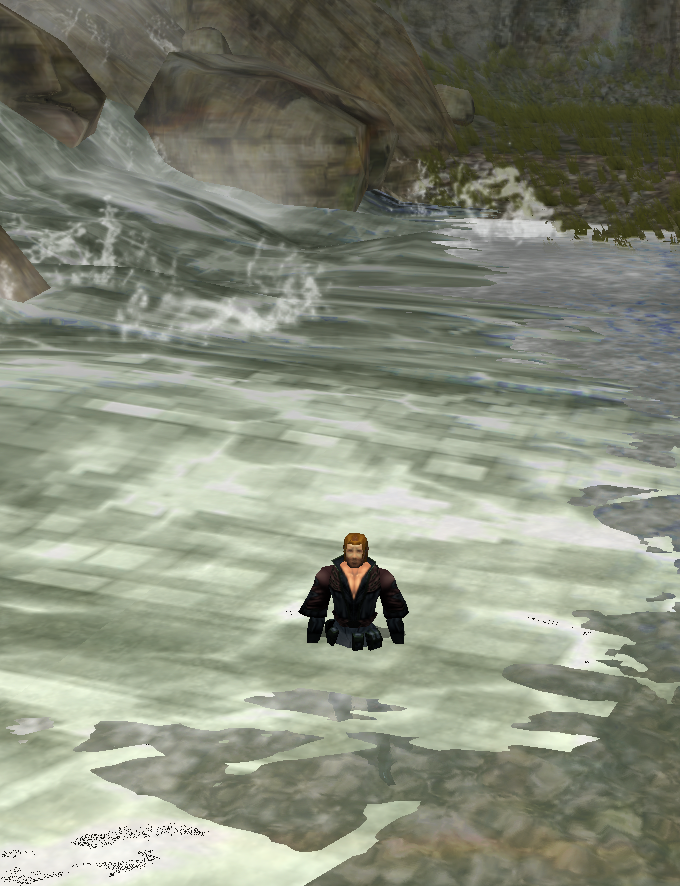
Here's a slideshow showing various stages with and without shader correction.
In the first image, we can see that the foamy water texture above the actual water texture is not transparent to dynamic objects.
Ignore the black error in the foam. This is an error with an emitter particle trying to negotiate dominance at the same Z-position.
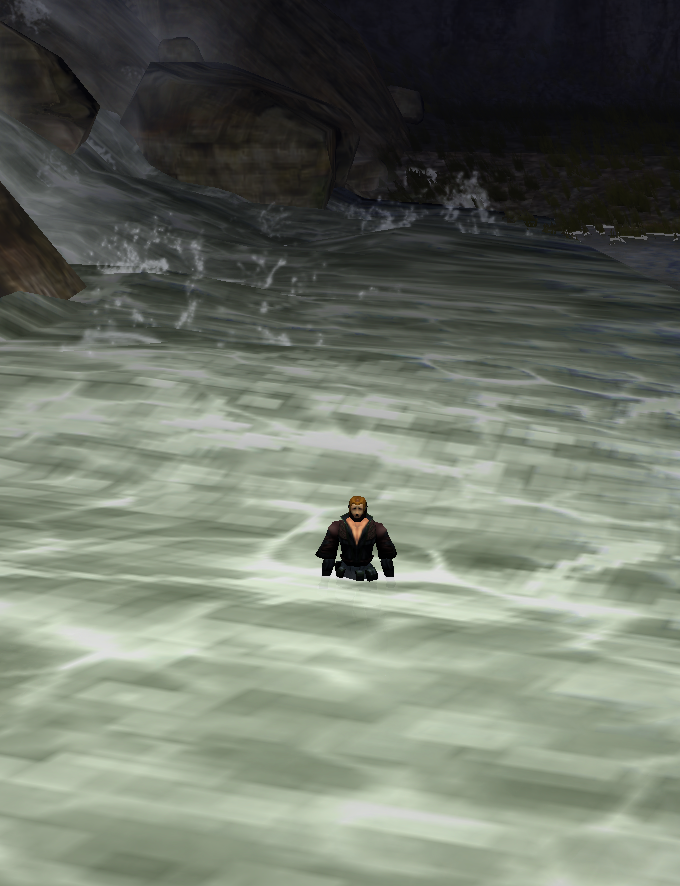
In the second image, we can see that the foam is now partially transparent to dynamic objects, as we can see a little bit of that black armor in the foam. However, the discard of low alpha values is now disabled.
In the third image, we get back our alpha discard, and retain the partial transparency to the dynamic model.
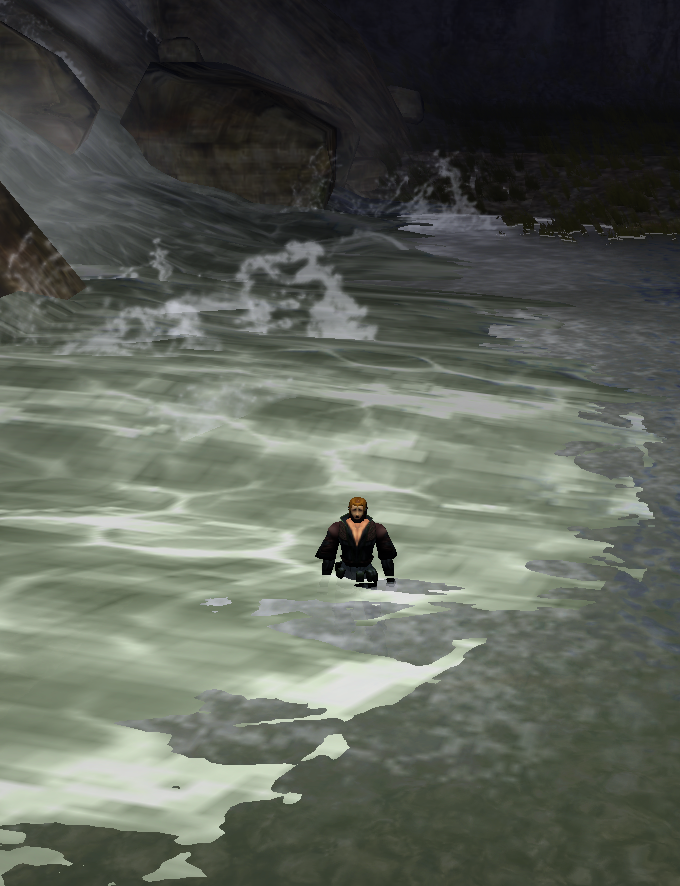
Granted this is not the best screenshot to use here, but you can imagine that while this is animating, the alpha value of the texture is changing around the player.
Obscuring view to the player but being able to see some of the rocks of the river bottom in front of the player is silly looking.