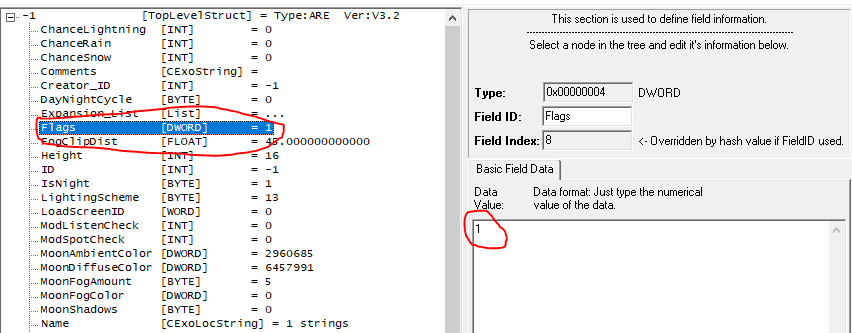
Shaders can interact with Area Flags (by default: Underground, Natural, interior) since they are presented to the shader. You can set additional flags past the usual 3 as well.
From the Bioware docs for reference:
Flags DWORD
Set of bit flags specifying area terrain type:
0x0001 = interior (exterior if unset)
0x0002 = underground (aboveground if unset)
0x0004 = natural (urban if unset)
These flags affect game behaviour with respect to ability to hear things behind walls, map exploration visibility, and whether certain feats are active, though not necessarily in that order. They do not affect how the toolset presents the area to the user
The DWORD value is 4 bytes (0 to 4294967296) allowing more flags. The maximum usable value needs testing however.
In the shader it is available as the variable "areaFlags", with definitions for the above values:
// Current area bit-flags #define NWAREA_FLAG_INTERIOR 0x0001 #define NWAREA_FLAG_UNDERGROUND 0x0002 #define NWAREA_FLAG_NATURAL 0x0004 uniform int areaFlags; |
Two ways of doing this; by using a GFF editor to edit the field "Flags" in the ARE file for the particular area, and saving the module without editing that area.
The second way is with a script to convert a blueprint of an area to JSON and edit in memory:
// Sets NWAREA_FLAG_* bitflags on an area by destroying and recreating the area.
// If bFromResRef is TRUE, then this function will create the area from the template
// resref of oArea instead of copying oArea
//
// Returns the resulting area object, or OBJECT_INVALID on error
//
// n.b. This function cannot be used on the module starting area or areas with players in them.
// n.b. This function is performance intensive as serializing/deserializing areas can be slow, sometimes in the order of seconds per area
object SetAreaFlags(object oArea, int nFlags, int bFromResRef = FALSE)
{
    location lStart = GetStartingLocation();
    if (GetAreaFromLocation(lStart) == oArea)
        return OBJECT_INVALID;

    string sResRef = GetAreaBaseResRef(oArea);

    if (nFlags < 0)
        nFlags = 0;

    if (bFromResRef)
    {
        json jARE = TemplateToJson(sResRef, RESTYPE_ARE);
        json jGIT = TemplateToJson(sResRef, RESTYPE_GIT);

        jARE = GffReplaceDword(jARE, "Flags", nFlags);

        int nResult = DestroyArea(oArea);
        if (nResult != 1)
            return OBJECT_INVALID;

        return JsonToObject(GffCreateArea(jARE, jGIT), lStart);
    }
    else
    {
        json jCAF = ObjectToJson(oArea, TRUE);

        jCAF = GffReplaceDword(jCAF, "/ARE/value/Flags", nFlags);

        int nResult = DestroyArea(oArea);
        if (nResult != 1)
            return OBJECT_INVALID;

        return JsonToObject(jCAF, lStart, OBJECT_INVALID, TRUE);
    }
} |
We just call ApplyAreaFlagShader() after ApplyStandardShader() in whatever shader we want to apply it to. For a shadow plane effect we do fswater, fslit_nm, fslit_sm, fslit_sm_nm, fslit which covers most materials. We like to have VFX still be colored.
uniform int areaFlags;

#define NWAREA_FLAG_CUSTOM_PLANE_OF_SHADOWS 8

int and(int a, int b)
{
    int result = 0;

    int i = 0x8000;
    while (i > 0)
    {
        if (a >= i && b >= i)
            result += i;

        if (a >= i)
            a -= i;

        if (b >= i)
            b -= i;

        i /= 2;
    }

    return result;
}

void ApplyAreaFlagShader()
{
    if (bool(and(areaFlags, NWAREA_FLAG_CUSTOM_PLANE_OF_SHADOWS)))
    {
        // BT.601 luma greyscale formula
        float luma = FragmentColor.r * 0.299 + FragmentColor.g * 0.587 + FragmentColor.b * 0.114;
        FragmentColor = vec4(luma, luma, luma, FragmentColor.a);
    }
} |