
The Audio tab of the Area properties looks like this; and will be explained here.
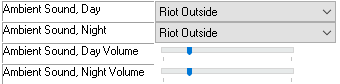
Ambient sound tracks are loaded from ambientsounds.2da and will play continually on a loop. Day and Night are timed based on the module settings.
The volume of the Day and Night tracks are changed here, which are also affected by the users Ambient Sounds volume slider.

This is a legacy EAX only supported setting. NWN:EE currently has no use for this field (all the RadSounds system was removed). Who knows - it might be replaced/upgraded into OpenAL, but currently this does nothing. At best it could be considered a nice description of the area sound as a quick reference. The lines reference soundeax.2da
There is no volume control for the music tracks - only one will ever play at once, and the volume is controlled by the options menu. There are ways of changing the music track (as well as playing/stopping it) with script commands.

This is the music track played during combat. It interrupts any of the usual Music tracks (the next two entries) and is references in ambientmusic.2da where the Resource column starts with "mus_bat_" (the stinger, while optional, is recommended).
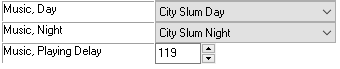
These are the standard day and night music tracks. The Music, Playing Delay comes into play when the tracks stop - it's how long it will take to start again. Author is unsure if it is also the delay to reintroduce the music after combat or anything else.
The transition from Day to Night or vice versa is done by fading out the current track and bringing the new one in, it's not entirely sudden.