Encounters are special triggers which essentially spawn a group of creatures onto the map when stepped on by a player (or their associates, if the player only tickbox is unchecked).
They use the UTE filetype.
...
The first point in the generated polygon is the location returned by GetLocation when used on the object. This also appears to be the "encounters default location" when trying to find a space to spawn creatures (if it fails it just uses this spot). You can find the initial point by using Focus On Object and zooming in - that is the point that is the encounters location/position.
You can copy and paste placed encounters (which copy any edits made); blueprints then can update every instance of them by selecting Update Instances under Advanced.
Spawn Points
The spawn point is optional (but highly recommended). If not placed it should "spawn them outside of LOS" according to the GFF info, but on further testing this could mean as little as being directly behind the player ("nothing personnel kid")seems to simply mean "I'm lazy and will spawn at GetLocation(oEncounter)". So please use encounter spawn points.
To place a related spawn point right click an encounter and select Add Spawn Point. Then place it down. This acts as an "anchor" for the spawn, although obviously one solo monster will spawn right on top of it. Note: There is no way to find these spawn points (or relate them to the parent encounter) since they are essentially just a "location" (they have no independent tag or anything).
...
If placed outside of walkable areas, it seems to default back to trying to spawn things as if no spawn point was used (ie; directly behind the player!).
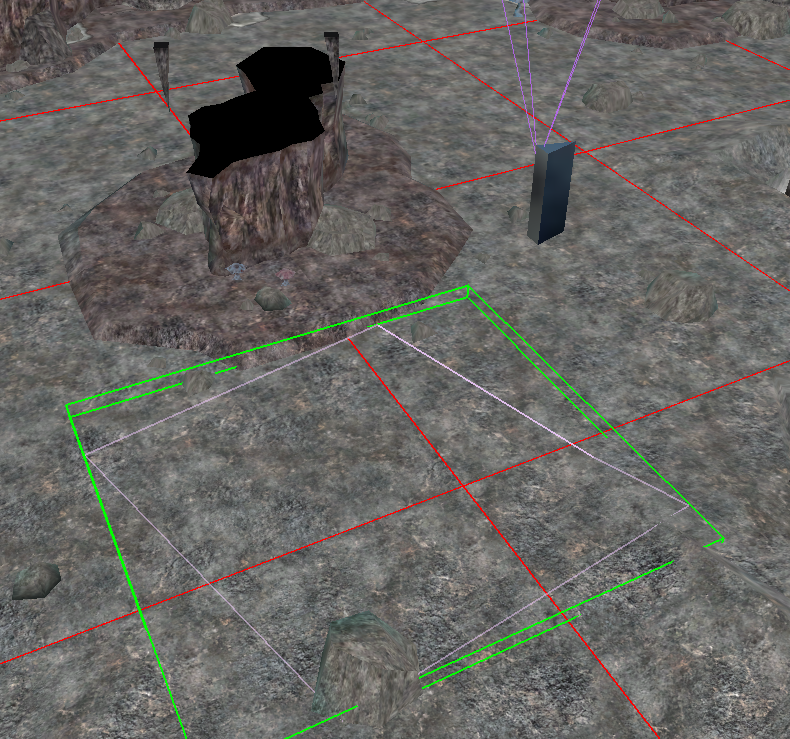 You can copy and paste blueprints (which copy any edits made) and blueprints can update every instance of them by selecting Update Instances under Advanced
Encounter Blueprint Creation
...
| Field | Value Type | Default | Description |
|---|---|---|---|
| Name | Text | Human readable name of the encounter used in the pallet palette and DM in-game lists | |
| Tag | Text (32 characters) | Tag of the encounter (usually 32 characters maximum). How to get an object by GetObjectByTag. | |
| Difficulty | Dropdown (encdifficulty.2da) | Easy | An entry from encdifficulty.2da - see below. This alters the challenge of the creatures spawned. Can be get with GetEncounterDifficulty and set with SetEncounterDifficulty in a script. Note all the Standard palette encounters appear to use "Normal" (which adds 2). Very Easy is 0, Easy is 1, Normal is 2, Hard is 5 and Impossible is 8. |
| Maximum Creatures | Number 1-8 | 8 | The absolute maximum amount of creatures to spawn. |
| Minimum Creatures | Number 1-8 | 2 | The suggested minimum amount of creatures to spawn. Note the minimum may be decreased down to 1 if a suitable CR creature isn't found. |
| Spawn Option | Single Shot Continuous | Single Shot | Single shot fires off once (unless re-enabled by a script). Continuous will allow Advanced options to have the encounter respawn (needs further testing) |
| Category | Toolset Category | Category the blueprint lives in. Unavailable on placed triggers. |
...
This provides a GUI to add creatures from the pallets palettes to the encounter. Each creature blueprint can only be in the encounter list once. You cannot for instance have both a "Unique" creature and a "Non-Unique" one of the same blueprint.
...
| Field | Value Type | Default | Description |
|---|---|---|---|
| Faction | Faction dropdown list | Hostile | One of the default or custom module-specific factions. It must be hostile to an entering creature to fire (even if the monsters spawned from it are not hostile). |
| Active | Tickbox | Ticked | If unticked it won't fire unless a script enables it using SetEncounterActive. Vice versa an already active encounter can be disabled with the same command later. |
| Encounter Respawns | Tickbox | Unticked | Only available if "Continuous" is selected for the Spawn Option. It allows a constantly repopulating encounter. |
| Respawn Time (Seconds) | Integer 1 - 32000 | 60 | In game seconds so pausing the game pauses this respawn timer. It is very likely to be affected by SetTime. |
| Number of Times To Respawn | Integer 0 - 32000 | 0 | The number of times this encounter should respawn. You can get it in a script with GetEncounterSpawnsMax and set it in a script with SetEncounterSpawnsMax. You can also even get the current spawn counter with GetEncounterSpawnsCurrent and set it with SetEncounterSpawnsCurrent. |
| Infinite Respawn | Tickbox | Unticked | If ticked Number of Times To Respawn is greyed out. For some reason this isn't a findable property in a script - unknown how it affects the GetEncounterSpawnsMax function. |
| Player Triggered Only | Tickbox | Ticked | On by default. This means a player character (not DM) will trigger this only. I don't think associates (eg; henchmen) would, but a possessed familiar might?If unticked then any creature can trigger it (henchmen, familiars etc.) but it needs a relevant PC nearby for the "encounter difficulty" to be correctly sorted so something spawns at all. It's assumed that only the PCs and their party members (henchmen, summons etc.) count. |
| Bluerpint Resref | Text (16 characters) | The filename of the blueprint. Only editable if doing Edit Copy of an original. You'd use this field in CreateObject if it worked with encounters. | |
| Update Instances | - | Unavailable outside of blueprint instances. This will update all the matching resrefs placed in the module, overriding any changes made to the placed ones (which create a duplicate copy of all the settings on an encounter). Handy if the blueprint one is authoritative. | |
| Variables | - | Encounters can have variables (int, string, float) placed on them as per any other object. |
...
At their simplest (one trigger and one spawn point) a create that is hostile to the encounter will make the encounter spawn. EG: You can have a "Defender" encounter which is actually triggered by a walking "Hostile" creature. Generally most encounters are set to Hostile and are triggered purely by PCs (see setting Player Triggered Only in the Advanced panel) although since a PC must be nearby anyway, the Player Triggered Only can be unticked in most cases, to account for henchmen or other NPCs wandering over it.
Generation of What Spawns
...
Calculating the "Party level" would be done (probably things in a certain distance) then it likely compares it to the monsters available and figures out a good fit for spawning with some randomness built in (for matching CR values).
Parties are likely assumed to be sized at 4 on average. So we go:
- PCs and relevant associate NPC Levels / 4 = "Player party level".
- eg; 5 members at level 10 = 50 / 4 = 12.5)
- Monster list is sorted High → Low
- Monsters are added to what is spawned if the CR is <= the required CR
- If we haven't reached the minimum, we add more until the minimum is reached using a lower CR
Some examples from testing:
- Player: Level 10
- Undead All spawn (Normal difficulty, so +2, 3-5 creatures), randomly chooses these, seems to be CR total: 15 (CR 5 on average)
- 1: Skeleton Chieftain (7), Wraith (5), Allip (3)
- 2: Revenant: (7), Wraith (5), Shadow (3)
- 3: Skeleton Chieftain (7), Ghoul Lord (5), Tyrantfog Zombie: 3
- 1: Skeleton Chieftain (7), Wraith (5), Allip (3)
- Player: Level 20
- Undead All spawn again:
- Lich (17), Vampire Rogue (13), Vampire Priest (13), Skeletal Devourer (13) = 56 CR total (CR 14 on average)
- Lich (17), Vampire Rogue (13), Vampire Priest (13), Skeletal Devourer (13) = 56 CR total (CR 14 on average)
- Player: Level 40:
- Lich (28), Demilich (24), Lich (17), Vampire Mage (16) Vampire Priest (13) - probably maxed out at the maximum 5
So what maths is behind this? Time to figure it out another time, because I'm bored testing right now.
Note: How many creatures spawn? Tellingly in the GFF document it has this note: "Recommended number of creatures. Maps to "Min Creatures" field in toolset, but is not a true minimum, because it is actually possible for the encounter system to spawn fewer than this number of creatures if it cannot find enough creatures to fit the level of the encounter."
...
The spawn points govern where things spawn and the furthest one from the triggering creature is chosen. If none exist the game will try to spawn creatures out of visible range. Expect very barmy results if this is used !since "out of visible range" usually means "behind the player".
A note on the GFF says: "The SpawnPointList is only saved out if the encounter has spawnpoints defined for it in the toolset.Spawn points define a set of locations at which the game may spawn in creatures belonging to the Encounter. If an Encounter has no defined spawnpoints, then the game will try to spawn creatures out of visible range of the creatures that fired the Encounter."
...