...
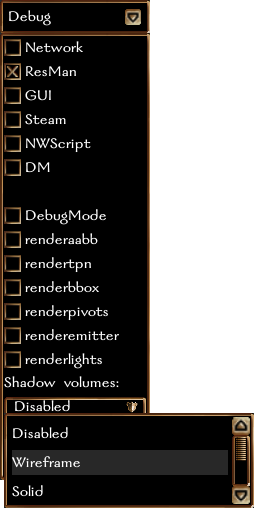
You can turn on similar shadow volumes on the debug panel from inside NWN:EE. You can also turn on a cross-hair marker for lights using the "renderlights" checkbox.
|
|
|
|---|
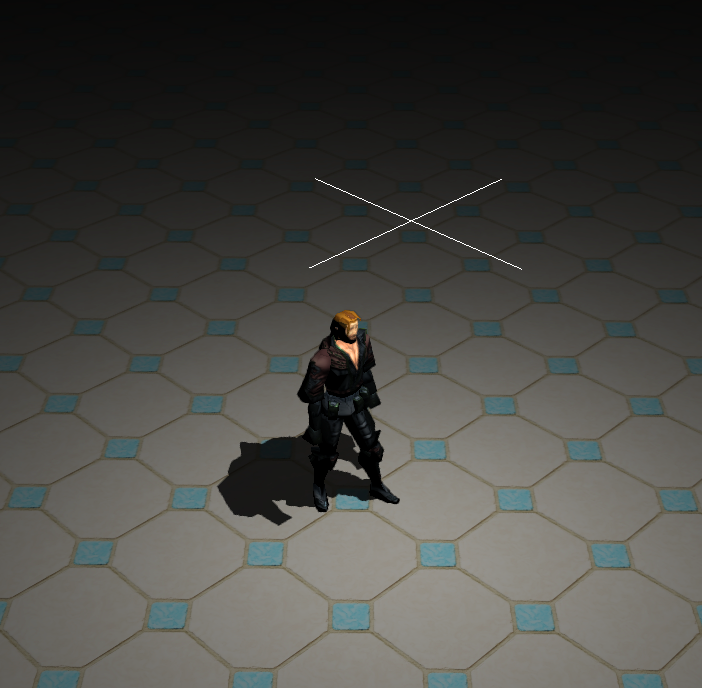
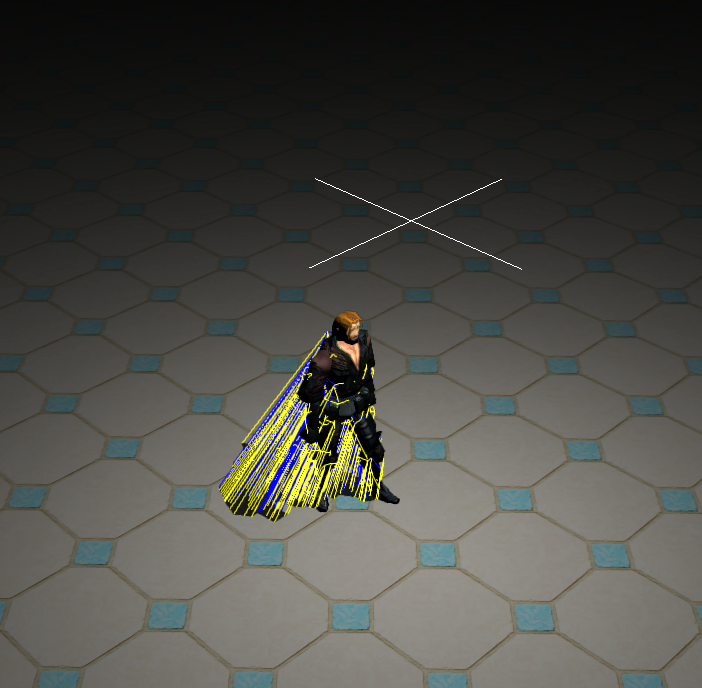
So far this all seems very intuitive because it stems from very simple geometry. However, shadow engines need to consider things like hollow spaces inside these shapes.
...
Another simple method often said to correct shadows is to reduce the complexity of the model. This only works for barely concave meshes to convex meshes and only if the pivot is inside or nearly touching the mesh to begin with. Let's take a look at a sphere produced in GMax. By default the sphere can be very detailed, but the pivot will bet be at the very bottom of there sphere touching the bottommost bottom-most vertex. The following image shows a bad sphere and a good sphere, but both cast good shadows. The bad sphere has the pivot technically outside the sphere, and the good sphere has the pivot inside the sphere. However, both spheres cast good shadows because the light is above the sphere, and the error draws back to the pivot, which is touching the sphere, so you never see it.
...
However, if we draw the pivot away from the mesh body and definitely place it outside the mesh, then we start to see really strange effects. As an example, I am standing inside this tube with my approximate light position marked by the cyan cross-hairs. The red-circled pivot belongs to the tube. Notice the shadow is now thrown to the other side and off the tile. Instead of projecting the shape of the outside of the tube, the shape of the hole in the tube seems to be projected. This shadow is wrong in every way except luminance.
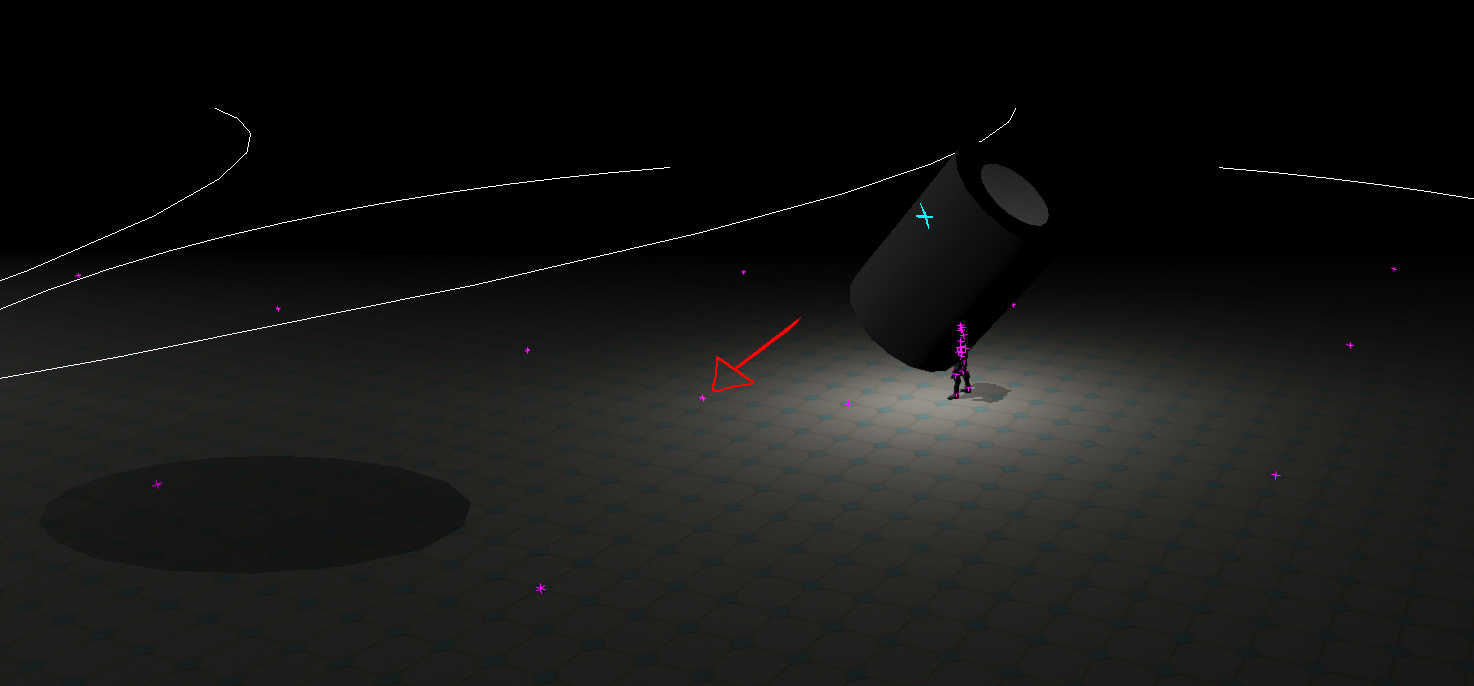
If the light source is place placed behind just one more face, there are instead two projections, both of which are wrong.
...
What even is happening in these cases? Let's look at the shadow volume mesh to find out.
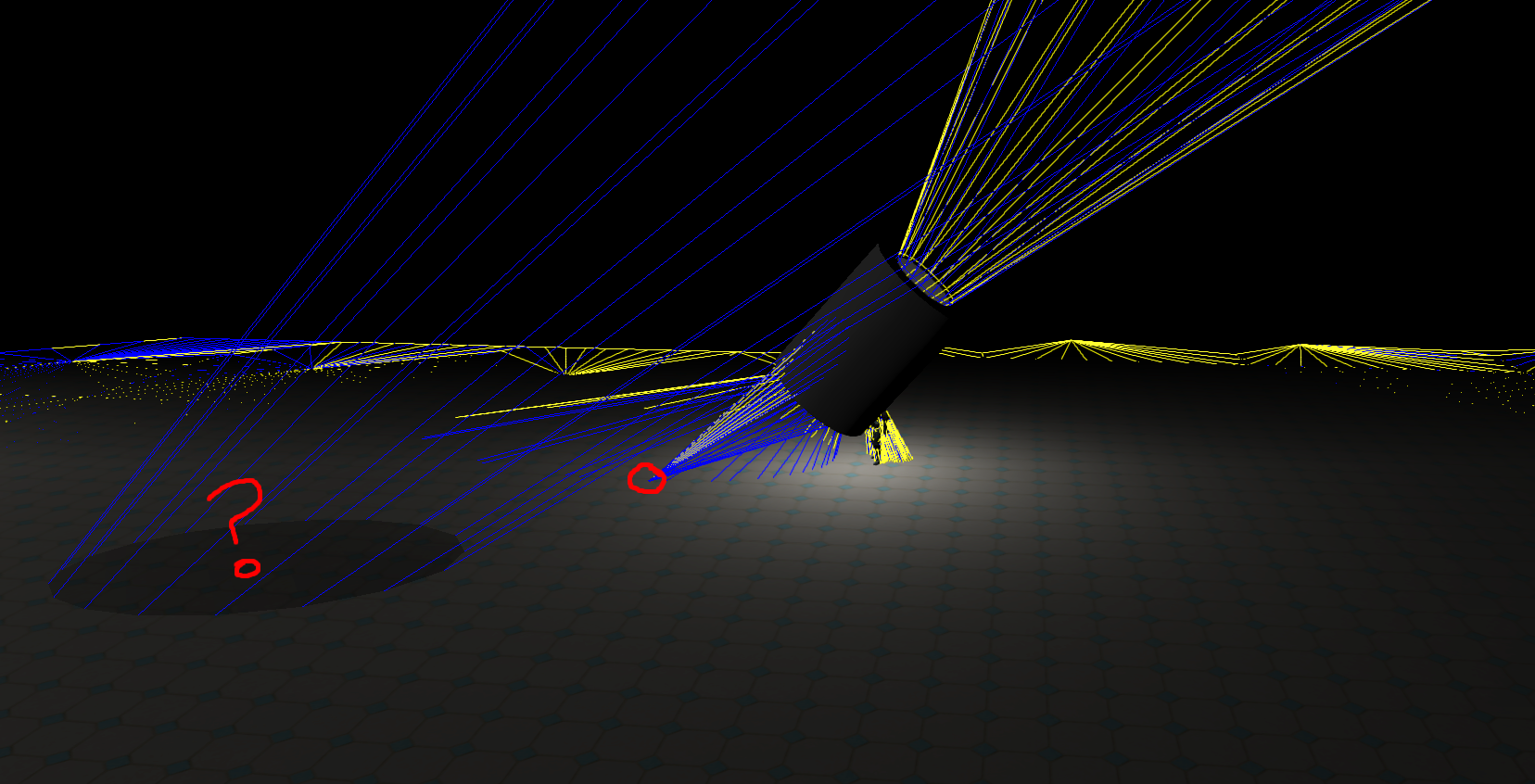
It looks like the shadow volume is projecting not only the pivot outside the mesh (circled in red) but also projecting backward from the pivot into space, then coming back through the floor to project somewhere else entirely? So very wrong.
In the case of a sphere, the fix is simple: just move the pivot inside the mesh if it causes an issue. However, the problem with a hulled tube is that there is no position inside the tube mesh which is behind all faces. In fact, there's a good chance that any position could only exist behind about a third or a quarter of the total faces.
To fix objects like this, they need to be split.
Think about the lowest number of meshes we would need to split this shape into so that there were X number of pivots that could exist behind all faces of the split. We could split out the inside, the outside, and the caps into four sections. However that leaves the inside as a concave tube which any point can only see half of. Likewise, the ends and the outside can be one mesh with a shared center.
So what we can do is split the tube into outside plus ends, and then split the remainder inside into two or three radial sections. This tube has 18 radial faces, so if we split it into three parts of 6 then we should be very safe. Each part is color coded in the image below (red, green, blue, and white).
...
To find the vector from the mesh origin to the face simply get the face center and the position of the mesh. Subtract the mesh origin from the face center. Normalize the vector to find the vector direction from origin to face.
| Code Block |
|---|
--Returns the vector direction from the center of iFace on oNode to the origin of oNodefn GetOriginToFaceDirection oNode iFace = ( local vFaceCenter = meshop.getfacecenter oNode |
...
iFace local vDiff = vFaceCenter - oNode. |
...
position normalize vDiff ) |
Determine if two faces point generally the same direction
The function "dot" used with two normal vector inputs will produce a value that can be used to determine if something is facing the same direction as another. If the value is negative, then they point in opposite directions. If the value is positive, they point in generally the same direction. If the value is 1, they have the exact same orientation, and if the value is -1, they have the exact opposite orientation. If the value is exactly 0, then the first normal is perpendicular to the second.
| Code Block |
|---|
--Returns 1 if vNormalA faces the same direction as vNormalB, otherwise returns |
...
0 fn GetIsFacingSameGeneralDirection vNormalA vNormalB = ( vNormalA = normalize |
...
vNormalA vNormalB = normalize |
...
vNormalB (dot vNormalA vNormalB) > 0 ) |
Determine if the origin is behind a face
If the vector from the origin to the face is pointing the same general direction as the face normal, then the origin is behind the face, otherwise the face is pointing at the origin, meaning the origin is in front of the face.
| Code Block |
|---|
--Returns 1 if origin of oNode is behind face iFace of oNode |
...
fn GetIsOriginBehindFace oNode iFace = ( local vFaceCenter = meshop.getfacecenter oNode |
...
iFace local vDiff = vFaceCenter - oNode. |
...
position local vNormalA = normalize |
...
vDiff local vNormalB = getfacenormal oNode |
...
iFace (dot vNormalA vNormalB) > 0 ) |
Simple First Test: Set the pivot to the average of all face centers minus their face normal
Assuming you have a good mesh to work from without multiple elements, concave hulls, overlapping faces, etc., this function alone will fix most simple meshes.
| Code Block |
|---|
--Find the average of the face centers, minus the normal of each face, and set the pivot to that position |
...
fn SetPivotToAverageFaceCenter oNode = ( |
...
local vSum = [0,0,0] |
...
local f |
...
for f = 1 to oNode.numfaces do ( |
...
vSum += (meshop.getfacecenter oNode f) - (getfacenormal oNode f) |
...
) |
...
local vAverage = vSum/oNode.numFaces |
...
local vDiff = vAverage - oNode.position |
...
meshop.movevert oNode #{1..oNode.numverts} (oNode.position - vDiff) |
...
oNode.position = vAverage |
...
) |
Second simple test: Check if any face still points at the origin
...
To do that, use this function to check each face using a function above.
| Code Block |
|---|
--Does a simple check to see if shadow pivot position is behind all faces |
...
--Does NOT check if there are overlapped faces from that position |
...
--Returns 1 if all faces on node oNode are in front of the pivot, or 0 if any one face is not |
...
--another position value can be specified in vPos, but if left empty will use the position of oNode |
...
fn |
...
CheckShadowPivot oNode vPos:undefined = ( |
...
if vPos == undefined then vPos = oNode.position |
...
local keepIt = true |
...
local f = 1 |
...
while f <= oNode.numfaces and keepIt do ( |
...
local vFaceCenter = meshop.getfacecenter oNode f |
...
local vPointToFace = normalize (vFaceCenter-vPos) |
...
local vFaceNormal = getfacenormal oNode f |
...
local fFaceDotNormal = dot vFaceNormal vPointToFace |
...
if fFaceDotNormal < 0 then ( |
...
keepIt = false |
...
) |
...
f+=1 |
...
) |
...
return keepIt |
...
) |
Snap verts to whole centimeters
...
Here are two functions to make rounding in GMax better.
| Code Block |
|---|
--Returns the nearest integer value to input value n |
...
fn roundNearestInteger n = ( |
...
if (n>0) then (floor (n + 0.5)) else (ceil (n - 0.5)) |
...
) |
...
--Rounds a vector to integer values for x,y,z coordinates |
...
fn roundNearestIntegerVec3 v = ( |
...
for i = 1 to 3 do ( |
...
if (v[i]>0) then (v[i] = floor (v[i] + 0.5)) else (v[i] = ceil (v[i] - 0.5)) |
...
) |
...
v |
...
) |
And here is a function which uses the previous function to snap your mesh to correct positions.
| Code Block |
|---|
--Snaps the mesh and all of its verts to the nearest integer values |
...
fn SnapMeshAndVertsToNearestInteger oNode = ( |
...
oNode.position = roundNearestIntegerVec3 oNode.position |
...
for v = 1 to oNode.numverts do ( |
...
local vert = getvert oNode v |
...
vert = roundNearestIntegerVec3 vert |
...
setvert oNode v vert |
...
...
)
) |
Your Next Step
If the second test failed, then you know you have more work to do in getting the pivot behind all faces. In addition to that, you also need to check that a ray drawn from the pivot outward can only ever hit one face. A simple test from pivot to each vert will tell you that. Gmax has some ray tracing functions, but they're inherently broken, failing when a backface is struck first. This issue may or may not be fixed in higher versions of Max. For this issue, there is some code I will share with a finished product at a later date. That code has a fully functional ray tracing function with a full report of the faces struck, including their details like normals and face indices.
Once you determine which faces are still offending, you can either move the pivot further, or in the case of overlapping faces or concave faces for which there is no simple fix, detach those faces to another mesh.
The code I will share simply takes all faces that fail the second code test above and puts them in another mesh, repeating the process until there are no more reductions to do.
An optional finished script instead crawls the pivot around through a network of lines through face normals trying to locate a position that will work within about 3x the bounding box size of the mesh. This works well for really big objects with somewhat complex shapes, but still requires split hulls for concave and overlapping forms.
I know these scripts work because they've worked wonders on the Crumbling Crypt set I started building in 2021. Hopefully I can simplify them to work for you too.
Additional Considerations Not Related to the Mesh
Light Node ShadowRadius Value
While everything so far presented here is mesh relative, there is one other issue that does come up sometimes, and that's lightsource related.
Light sources have two properties, Radius and Shadow Radius. By default, shadow radius equals light radius, therefore a torch with max radius 20m will also only cast a shadow to 20m, and a torch of only 2.5m radius also casts only a 2.5m shadow.
In most cases, people make their torch radius with multiplier x1, meaning the intensity is also set by the radius. A longer radius is effectively a stronger light. So a short radius light really wouldn't cast a long shadow anyway, right?
But let's investigate a deep pit in a DARK region where you're using a torch. If the torch max radius is 20m and your pit is 40m, then the bottom of your pit will be brighter than the shadowed section, which will look very odd.
You can fix that issue by modifying your torch lights. OC torches, rings and light effects are going through the file fx_light_clr.mdl. In that model you will see no shadow radius values for any of the lights. If you want your shadows in your world to reach the furthest extents, then you need a ShadowRadius value equal to the extent you want reached.
Take note that a longer shadow requires more drawing time. So setting your values to crazy high numbers will also make more work for the shaders. Likewise setting shadow radius lower will improve draw speed.
Tile Bounding Box
Another pit-related example can be used to examine the next case scenario. Imagine you have a deep pit in a well lit area, and you want the mesh along the pit to shade the pit all the way down.
To get this to occur, you need to have a correct pit-related bounding box. Light will not be drawn below the shadow-casting tile's lower bounds. So for example adjacent to your pit, you may have a flat floor tile with a lower bounds of around 0 elevation. This tile will not shadow very deeply into the pit next door.
To fix this issue, you can simply put a tiny mesh node way down below the tile origin. Place the mesh at the depth of your deepest pit, minus the height of your area height transition. That should work for almost all cases.