Shields - Small, Medium, Large and Tower.
| Table of Contents |
|---|
Changing to PLT Shields
The default shields are not awful but could be improved - there are 3 main item methods:
...
- Check every existing model and check which ones are "duplicates" - eg; ashto_011, ashto_012 and ashto_013 are the same model but reference different parts of the tower texture file.
- Using the silver / closest to grey DDS file we convert to PLT and divide up into layers:
- Metal 1 - primary metal area
- Metal 2 - any secondary metal areas
- Cloth 1 - primary wood area (eg wooden shields wood)
- Cloth 2 - secondary wood area
- Leather 1 - primary leather area (eg straps)
- Leather 2 - secondary leather area
- For shields with specific heraldry - we just copy over the DDS file to the new naming convention so if it is tower_010.mdl which is the daggerford heraldry we use that file naming convention for the main DDS
- Add icon PLTs (dummy when it's an existing item) and, for some reason, the toolset needs TGA files as well (to add to builders pack). Can use a 1x1 tga for this to save space. Example name: itower_001.tga / plt
...
- Keep the same model names, eg ashto - tower shields;
- This might retain full backwards compatibility. We simply have DDS files in use on the old models to override any PLT, and the same for icons
- If it does work we add the new shields as 001 and up, simple enough. Maybe some as 100 and up too (increase MaxRange). The Toolset seems to check for the TGA file to validate after all.
- is a bit dodgy - sure custom content that adds new shields technically will sorta load, but it will probably not work correctly since the "bitmap" field is ignored
- It also assumes a clean namespace which isn't always the case due to Bioware testing models 001 with some stuff sometimes
- New model names - this is a "clean break" but breaks all compatibility, eg: "shtow_" or similar
- Can copy ID's to retain the same blueprint compatibility - eg; 011 still is the silver shield variant, with DDS/TGA textures
- This helps due to the dodgy thing with bitmap field essentially becoming ignored
Decided: Going for keeping the same names to make the "override" version of overhaul a lot easier.
However there are some bugs (to be reported to Beamdog):
- The toolset only checks for "iNAME_001.tga" - yes only TGA - to display it in the dropdown even if it then loads a PLT file. No idea why since helmets only have .PLT files. Likely as bug (ie helmets are treated as "special")
- Since it expects a PLT icon however, if only TGA or DDS exist then...it just shows nothing! Weird, but acceptable...
- The game displays icons properly only in these cases:
- PLT: No TGA or DDS file exists
- DDS or TGA: These show in normal priority order
Solution to the above: Final client hakpacks have the PLT only or DDS only. For toolset use a developer has to use a Toolset Only hakpack/development folder set of TGA files to "impersonate" the appearances. These can be either simply 1x1 black TGA files, since they should never show in game, or better maybe even just have a pink X or other noticable iconography since the icon won't be really displayed in the toolset; example of one with DDS and TGA only:
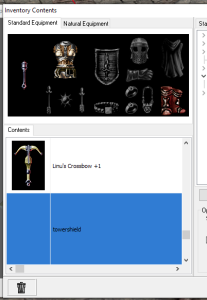
We could technically include some kind of PLT icon, maybe impersonating the model, so it makes it easier to view, but again only for development purposes.
Examples of Final Files (DDS and PLT)
Type is PLT if new PLT format and DDS if we're redoing an old item with full textures.
| Model ID | Type | Screenshot | Texture Name (Model) | Material Name and Files | Icon Texture Name (Game) | Icon Texture Name (Toolset only) | Source(s) | Notes |
|---|---|---|---|---|---|---|---|---|
| ashto_241.mdl | PLT | ashto_241.plt | m_op_ashto.mtr texture1 t_op_ashto_n.dds texture2 t_op_ashto_s.dds texture3 t_op_ashto_r.dds | iashto_241.plt | iashto_241.tga | |||
| ashto_063.mdl | DDS | ashto_063.dds | m_dag_twshld.mtr texture1 dag_twshld_n texture2 dag_twshld_s texture3 dag_twshld_r | ashto_063.dds iashto_063.plt (unused) | iashto_063.tga |
Example screenshot of one of Miqail's shields with PLT textures:
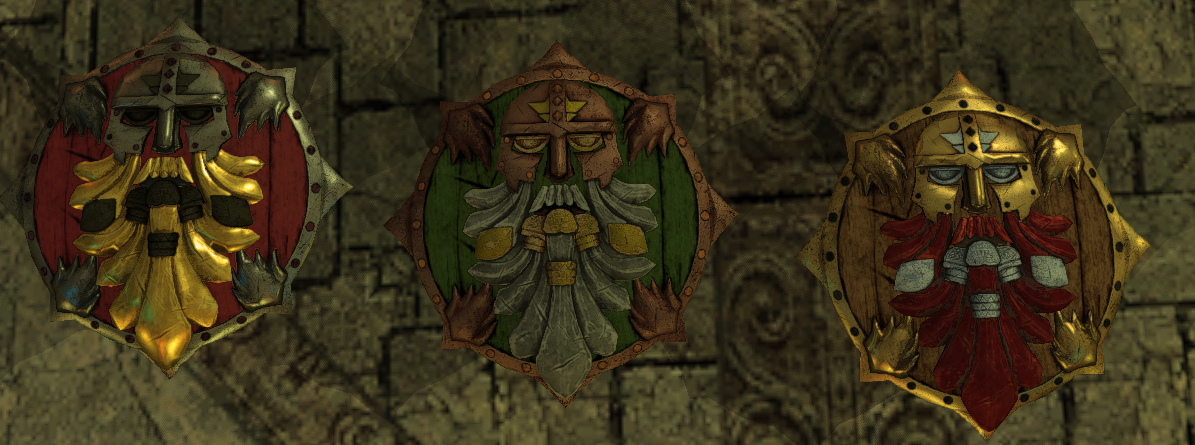
baseitems.2da information
Lines changed:
- The MinRange is left at 10 and MaxRange set to 255.
- Same ItemClass used
- DefaultIcon set to just the usual icon names without the numbers. This however probably isn't really needed (ie is never used by the game), if all the files work fine...
Texture Information
Material file: m_ItemClass.mtr
Textures: t_op_ItemClass_n.dds etc.
Shield Resources List
See subpages.