| Note |
|---|
This is a bare bones and rather old tutorial. This should be updated at some stage but the information may still be useful to people! |
Table of Contents
New Race
Download Extract all of the .2da files first :
| View file | ||||
|---|---|---|---|---|
|
Copy appearance.2da and racialtypes.2da to a new folder, name it whatever you want (Drow) in this case.
...
You will need this to define the text for your new race.
| Row | Desc |
|---|---|
| Drow | name of your race |
| Drowish | adjective (eg; orcish blade) |
| drowish | same, but lower case |
| Drows | plural name |
| Drow are blue with red eyes and worship Lolth. | description |
| You set out to better serve Lolth. | adventurer text |
Open racialtypes.2da with notepad. Go to that wiki page to see what each of the columns does. For any row where it says "stringref", put in a number, referring to the text you wrote in your .tlk table.
...
Set racial feat type column to the name of the feat file you made (RACIAL_FEAT_DROW), and racial type to (RACIAL_TYPE_DROW).
Under appearance column, set it to the number of the appearance entry you are about to make now.
Go to appearance.2da and open it with notepad. Copy paste the Elf line to the bottom, then set the id 871 if the previous entry was 870, etc. Don't forget to chance the appearance value in racialtypes.2da to this number. Name it Drow for name. Done for now. Model should be E (elf), but you can change it to c_ettin or something if you want to experiment and be an ettin. Has to be an actual model that exists in the game though.
Save these 3 files into a folder (appearance.2da, racialtypes.2da, racial_feat_drow.2da), then turn them into a .hak with the nwhak utility in your game installation folder.
Go Documents → Neverwinter Nights. Put the .hak in the hak folder, and the .tlk in the tlk folder.
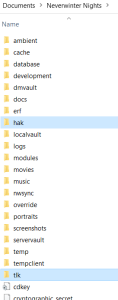
You can now use the race for your projects, but it is somewhat redundant currently and doesn't really do anything except have a different name, stats, and feats, and maybe a different model (ettin if you experimented).
(Make sure on Aurora to go edit → module properties → custom content, and then include the .hak and .tlk in your project for it to work).
This method is all you need to create races that have existing models. Crab race for example, or Tiger race.
Here are some example files for "test race": https://neverwintervault.org/project/nwnee/other/custom-races-sample
Making races with a new dynamic model is much harder.
New Dynamic Model
Step1- Use NWNExplorer to open the NWN files: https://github.com/virusman/nwnexplorer
...
c) I know (o=orc) and (e=elf) because these are the letters specified under the race column here:
| Race | ID |
|---|---|
| Dwarf | D |
| Elf | E |
| Gnome | G |
| Halfling | A |
| Half_Elf | H |
| Half_Orc | O |
| Human | H |
These are the letters for the races. As you can see, Human and Half-Elf both have H, because they use the exact same models.
...