...
Not all custom content has edgetiles. Not all tileset types can have fully functional edgetiles. And tilesets using edgetiles have a pattern of repeating tiles out from their edge that some builders do not like.
When edgetiles are used, they are indexed in a separate file from the SET file.
...
Edge tiles using the original content naming convention usually have row Z set aside for edgetiles. If you follow that convention, it will make finding edgetiles in your tileset hak HAK easier.
Edge tiles are not a requirement, and don't make sense in some situations.
...
Sourcelights are generally directional lights with a specific causative feature, like a torch or lantern or campfire on the tile. Sourcelights are also partially controllable with environment settings.
Sourcelights can also be bound to tile animations, so they can turn on and off by day and night settings, as well as activate and deactivate settings. For example, the forest tileset has torches and campfires that can turn on/off, allowing one tile to be used as multiple variants.
...
In custom content, the A-node was also used as a method to force transparent textures to render above dynamic content, such as player models and visual effects. This allowed transparent walkable water, glass windows, and display cases.
During early EE versions, the A-node stopped working. It did not return until preview version 8193.35 [2070a8b9].
The new A-node functionality is similar to the old version with all the same uses. It allows stuff like static object glass transparency, transparent foliage, and water that does not block legsleg visibility.
To set up an A-node, simply make a dummy node with the same name as the aurorabase, suffixed with "a". Parent to the aurorabase dummy node.
Any mesh parented by the A-node will be rendered in the dynamic drawing phase after static meshes. This improves transparency ordering. It does require more processor time.
Note that visual effect particles are still blocked by A-node transparent objects except where those textures have Alpha layer = 0, and where the shader uses the "discard" command to open a hole in the texture.
Tile Water Options
Water on tiles can be either walkable or not walkable, as determined by the walkmesh.
...
Shown below is an early river system subset by Merricksdad.
|
|
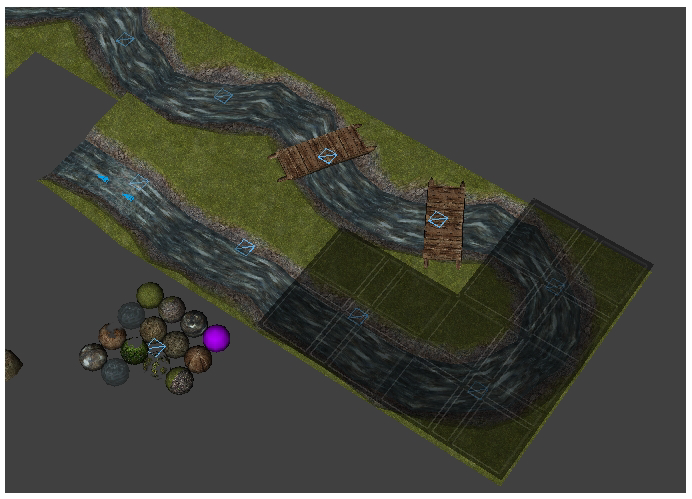
Notice in the river subset above, the river does not need to cross the tile at the tile edge center. It can be offset. However, in producing tiles like that, you then need extra tiles to snake the river across the tile, such as those shown with bridges.
...
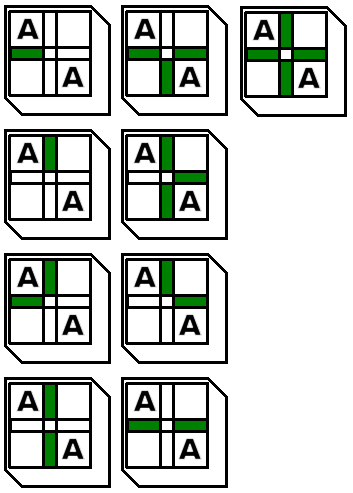
But if you want full diagonal raised terrain support, you also need these following tiles.
Common Issues Encountered With Tiles
Walking on a tile sends the player up to 15 meter elevation.
This is caused by a missing or broken walkmesh.
In network play, make sure that the walkmesh WOK file exists on the server.
If not in network play, check that the MDL file on the client includes an AABB section.
If the AuroraBase node is not set to Type = Tile, no walkmesh will be used. Additionally, when exporting from NwMax, no walkmesh will be produced.
If the issue only occurs at certain places of the tile, check that there are no gaps between faces of the walkmesh trimesh portion. Gaps are considered invalid space, 15 meter height, and surface material 0 = invalid.
If the issue only occurs at tile edges, check that the walkmesh goes all the way to 5 meters from center so that it touches the next tile exactly. No more, no less. Any gap can prevent walking to the adjacent tile, or make you fly up over the gap.
Corrupted walkmeshes can also have an AABB section which is invalid, missing entrynodes in the list and therefore sometimes throwing invalid index errors when trying to path over missing AABB branches, or index out of bounds errors when trying to read a later index.
My Walkmesh is visible during gameplay
If you can see your walkmesh during gameplay, that usually means you exported your walkmesh as Trimesh instead of AABB.
Make sure the AuroraWalkmesh modifier is applied in NwMax, or use the similar method in NeverBlender.
If you can walk on the tile and still see the walkmesh, make sure you don't have two copies of the walkmesh, one with a proper modifier and one as a Trimesh.
Walkmesh crashes GMax when I click on it
Gmax is a 16 bit system. It has very little ability to manage memory, and cannot use the full allotment on a modern machine. High complexity walkmeshes will kill GMax. Keep to 200 faces max. The program 3DSMax can handle more complexity than GMax.
If your walkmesh model is wrong in some ways, NwMax will hang while making the AABB data tree. If the process runs out of memory, it won't be able to muster the strength to tell you before it does.
When you click on the walkmesh, and the scene does not already have AABB data for that walkmesh calculated, NwMax for GMax will immediately attempt to make the AABB data. That's why it happens when you click on it.
Transparent parts are not transparent to players behind them
Tiles follow the rules for static geometry. They draw before all dynamic geometry.
You can get around this by using a few methods.
In NWN 1.69 you can use a-nodes (see above). Place your intended transparent parts under the a-node dummy.
In NWN EE a-nodes do not function until preview 8193.35.
In NWN EE preview 8193.35 you can either use a-nodes again, or you can use material commands to force transparency. Add these lines to your transparent texture material file at the top.
| Code Block |
|---|
transparency 1
sample_framebuffer 2 |
Common Issues Encountered With Tilesets
A tile group or feature does not show in the toolset
Your toolset options are defined by the ITP file paired with your SET file. If the ITP file was not updated after your group was added, then it won't contain the name of your new group.
Add the group to the ITP file manually using a GFF editor, or by importing the SET file into SetEditorBeta 0.85 and just hit the Save ITP button. (Do not hit the Save SET button, or it can corrupt your SET file in various ways).
| Note |
|---|
| Always make backups. |
Tile group or feature in the toolset cannot be painted into area
The ITP file stores the first tile filename related to the group as the handle to the group index. It doesn't store anything about the group otherwise.
If the ITP file does not have the correct filename, then it won't be able to find the group index associated with that filename, and therefore cannot paint the group because it doesn't exist.
Make sure to update your ITP file and try again.
Tile group or feature in the toolset works, but cannot be painted adjacent to other groups or features
Check that the SET file does not have Transition = 0 set. If it does, then an error is occurring when you try to paint the tile and it cannot identify the corner heights properly.
Even if you don't use a transition in your tileset, set the Transition value equal to at least 1.
When I place raised tiles, they are vertically offset from where I expect them
If you have merged or made tiles for your tileset which have a different transition value than the SET file, then the offset will be incorrect.
Measure the vertical offset in a model file, and then set that value in meters to the Transition value in the SET file header.
All offset tiles in a tileset share the same offset, so you can't mix different offsets.