...
The tool does attempt to find your installation. If it can't then direct it to the root install folder, eg it could be D:\Steam\steamapps\common\Neverwinter Nights\

The interface is generally mouse and keyboard driven, you can drill down into individual BIF (which essentially are like hakpacks but used for default game data), HAK, and override/development and other individual files in folders (music, ambient folders etc.). The tool will categorise files it finds in general terms.
You can open a file by double clicking on it (or open it by single click in the options). Note due to how some files will crash NWN Explorer do play safe if you're only looking to export.
Export
You can export an entire BIF or Hakpack to a folder, or an individual file out, with the right click menu. There are some issues with this:
- Newer file formats the game can use may not be recognised and may not properly export
- Do not rely on the "Export to ASCII" for MDL files, since this is known to be buggy, use Clean Models EE instead.
- Do not rely on it for exporting newer file formats (eg; JPG, MTR) since it may mangle the filename or extension, instead use neverwinter-nim tools.
A recommendation when exporting folders - the selector cannot create folders, so pre-create the folders you want to export to before you do so.
Search
Search is done, bizarrely, with CTRL + S as a little popup box in the bottom left. Press it again to search again. It doesn't support star search, but does do partial matches (eg; "_h.tga" finds everything ending in _h.tga, but "*.tga" won't find anything).
...
- General text - 2da, nwscript scripts (NSS), ini, txt, SET, SHD, TXI,
- NWN resources:
- DLG - Dialogue files
- GUI - GUI definition files
- MDL / WOK / DWK - only the older NWN 1.69 or earlier models. NWN:EE includes new information that crashes the viewer. It has a basic 3d viewer that is also buggy, but can do in a pinch.
- NOTE: The "Export to ASCII" is buggy as noted above.
- NCS / NDB - Compiled NWscript - although newer NWN:EE scripts may not load and be viewed properly
- SSF - Soundsets
- UTC, ITP, etc. - Blueprint files
- PLT - PLT textures
- General formats:
- TGA - Graphics file
- NWN DDS - specifically the weird old DDS files that are weird, modern DDS is not loaded
- With addons:
- MP3 (WAV) - With the fmod.dll in the program directory, it can load sound and music files and play them
It can technically load anything else (eg; MTR, JPG, etc.) but usually displays them as binary and may mangle the file extension it doesn't recognise.
Options
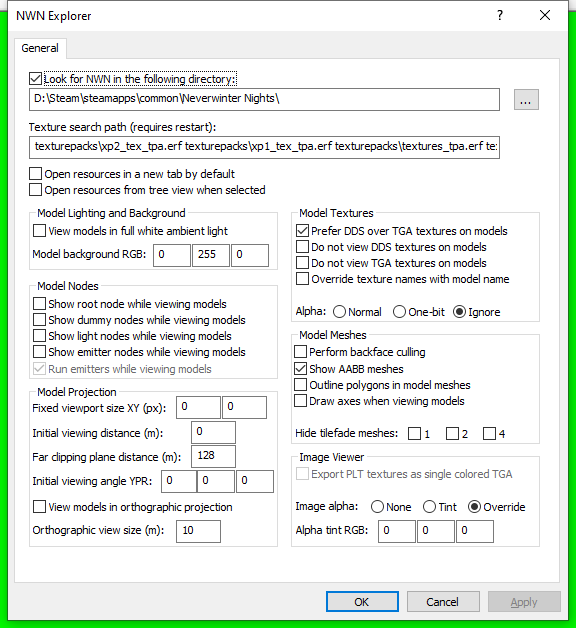
There are a variety of options - many of which are outdated or don't really work.
Texture search path options are no longer used in NWN:EE and can be ignored.
Open resources in a new tab by default can be useful if you're comparing files, but otherwise you can open things in new tabs when you right click them and the program may be prone to crashing if too many are open anyway.
Open resources from tree view can be useful for loading aspects more easily then double clicking but since opening certain files can crash it it's probably better to leave off.
The model viewer is the rest of the options and contains many which don't do much, if anything, but these may be useful:
- A good changes may be to alter the background (in the example set to green, like a green screen)
- You may want to toggle the Alpha and Image Alpha settings in some cases where it appears as if the entire model is see through (PLT based models especially suffer from this).
- The final one to enable may be the Prefer DDS over TGA textures on models since DDS is loaded above TGA, however of course it can't load normal DDS files so newer content might fail to load/crash.