...
For instance, create a new module called "my_mod" it generates a new temp0 folder, a my_mod.mod and my_mod.BackupMod file when it is saved. If you rename the temp0 folder to be exactly "my_mod" and go to Open it again, it will popup with a prompt; "A directory with the same name has been found. Do you want to open this directory as a module?" answer Yes and it doesn't need to unpack the .mod file. This option can be set as the default way to open a module in the Toolset Options.
Saving Modules
New Modules
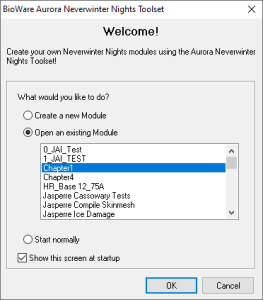
By default the first menu popup contains options to create a new module, open an existing module or "start normally" which basically does nothing. Select the Create a new module option or when in the toolset usually press the Create a new module icon on the toolbar  or go File → New or use the keyboard shortcut Ctrl + N.
Any of these opens the Module Creation Wizard.
Open Modules
The menu which opens by default is a good way to open modules usually. Alternatively use the Open Module toolbar icon  or go File → Open or use the keyboard shortcut Ctrl + O.
You can pass the full path and name of a module file and it will load it directly, useful for shortcuts to the main module you want to open: nwtoolset.exe "C:\folder\module name.mod"
Saving Modules
To save your module press the Save toolbar button  or go File → Save / Save As, or use the keyboard shortcut CTRL + S. The keyboard The save command is the top left "save" icon or CTRL + S. This save shortcut is the same in the Conversation Editor and Script Editor.
...