...
Example MTR c_ettercap.mtr - the top two lines force normal maps and specular/diffuse compared to leaving them blank, taken from the PBR demo module (bit more on default shaders used here: https://github.com/mtijanic/nwnee-shader-tutorials/blob/master/tut/material-fragment-shaders.md ). The values though will just be uniform for the model, as if we produced an entire specular/roughness map which was all uniform white or black or grey.
| Code Block |
|---|
customshadervs vslit_nm customshaderfs fslit_nm renderhint NormalTangents // Textures texture0 c_ettercap_d texture1 c_ettercap_n parameter float Specularity 0.02 parameter float Roughness 0.1 |
...
However having something that is "wet but solid" instead of water needs some testing. It sometimes also benefits from the diffuse file (main colours) being altered to remove shadows or lighten them up.
Some examples:
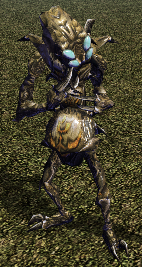
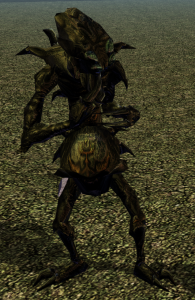
| Specular | Roughness | Picture | Description |
|---|---|---|---|
| 0.3 | 0.05 |
| Generally a bit "wet" but not quite good enough |
| 1.0 | 0.00001 |
| A metallic mess (note setting Roughness to 0.0 seems to recalculate it as if it wasn't set) |
There's a Metallicness value set in the shader too. We'll look at that another time...the shader defines it in inc_material.shd and seems to be auto generated anyway:
...