...
- Create an account on GitLab if you do not already have one: https://gitlab.com/users/sign_up
- In the top-right corner, you should see a + sign. From the dropdown, select "New project/repository".
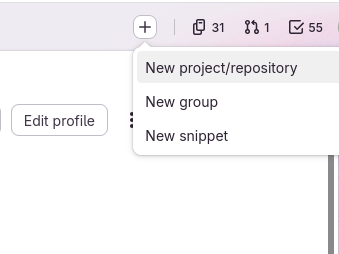
- From the new page, select "Create blank project". More documentation can be found here: https://docs.gitlab.com/user/project/
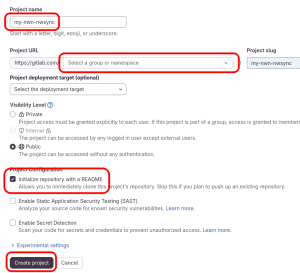
- Choose a project-name, and a visibility level.
- (select repority, enable push force)
Project clonning
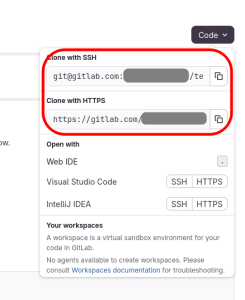
- From a folder of your choice on your computer, clone Clone the project on your computer, either with command-line, or TortoiseGit. The repository URL is in the dropdown black "Code" button. If you do not have a ssh-key, or don't know what it is, select "Clone with https"
Initial project configuration
...