...
Once you hit the Add button, or right click Root and hit Add, you get a new Journal Quest. This consists of the main information and a comment field:
| Item | Description |
|---|---|
| Name | This is the name of the quest. It can be a string reference or basic text, and appears in the players journal as the title of the entry. It cannot change later (unless SetTlkOverride is used) so use separate quests for longer or multi-faceted quests, and use RemoveJournalQuestEntry as noted below to remove one before adding the subsequent. |
| Tag | This is a case sensitive tag to use in the script commands and for the variables set for the journal (see further down) |
| Priority | The priority of the quest purely affects the ordering in the journal when the client orders by Priority. |
| XP | 0 or higher, this is the XP awarded for the quest. If the conversation option is used it's awarded automatically, else if scripted use GetJournalQuestExperience to award it. |
| Comments | This is a hand written comment which isn't visible to player but useful for builders to make notes about the quest. |
Journal Quest Entry

Hit Add on a quest itself to add a entry. These can be cut and pasted, but not dragged since the order is reflected by the ID.
| Item | Description |
|---|---|
| ID | ID of the quest entry. You need to keep track of these yourself (you can't retrieve them from the journal in any way) commonly Bioware used increments of 10 or 5 meaning additional entries or smaller updates are easier to "slot in". |
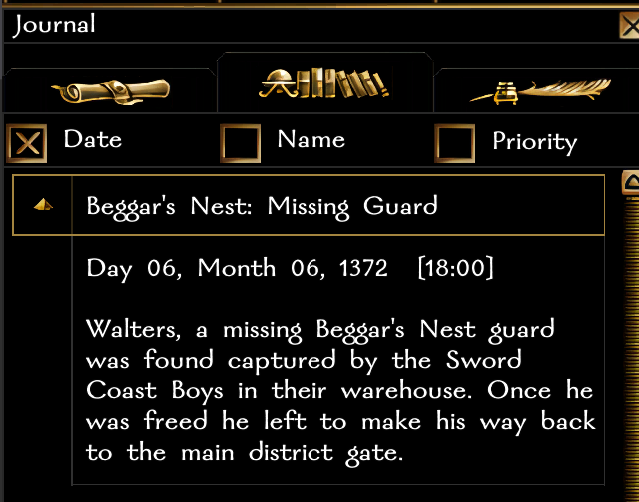
| Finish Category | If checked the journal entry will appear in Completed Quests tab instead of Quests tab, and essentially be marked as done. Completed Quests tab example:
|
| Priority | The priority of the quest purely affects the ordering in the journal when the client orders by Priority. |
Using Journal Quests
There are two ways to interact with journal quests; conversations (under Other Actions) and scripts.
...
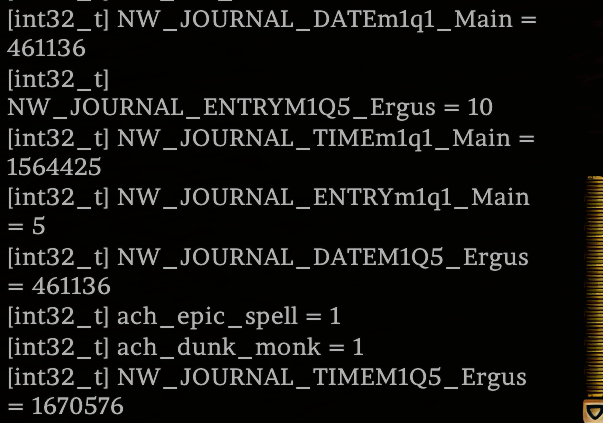
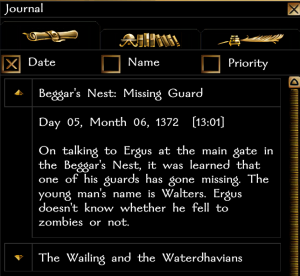
The example is shown in the screenshots underneath.
| Variable Prefix | Example with quest M1Q5_Ergus | Type | Example | Decoded Example | Notes | ||
|---|---|---|---|---|---|---|---|
| NW_JOURNAL_ENTRY | NW_JOURNAL_ENTRYM1Q5_Ergus | Local Integer | 10 | 10 | This is the state of the journal, by ID. This is the most useful variable to check a quests current progress. | ||
| NW_JOURNAL_DATE | NW_JOURNAL_DATEM1Q5_Ergus | Local Integer | 461136 | Day 5, Month 6, 1372 Calculation: Base Day: 1 Year: 1372 * 12 * 28 = 460993 Month: 6 * 28 = 168 (= 461161) Day: +5 = 461166 | This is the calendar day the quest was set. This is calculated by the amount of days since year 0. There are always 28 days and 12 months in a NWN year. Calculation: 1 + (Year * 12 * 28) + (Month * 28) + Day of the month. Pseudocode to convert back:
| ||
| NW_JOURNAL_TIME | NW_JOURNAL_TIMEM1Q5_Ergus | Local Integer | 1670576 | 13:01 Calculation (based on 2 hours per minute): Hours: 13 * 2 * 60 * 1000 = 1560000 Minutes: 1 * 60 * 1000 = 60000 (1620000) Seconds/Milliseconds: Total of 50576 left so must be 50 seconds, 576 milliseconds. | This is the time of the quest on that day. This is calculated by milliseconds in the day, so depends on the HoursToSeconds value the module has. NB: Hours are 0 through 23, minutes 0 through 59 and seconds 0 through 59, and milliseconds 0 through 999. Calculation: (Hour * Hours per minute * 60 * 1000) + (Minutes * 60 * 1000) + (Second * 1000) + Millisecond Pseudocode:
|
Script Functions
The main script functions are:
...
The date in the journal is automatic based on the in game clock, a nice touch.
Did you know?
- There is a "Picture" identifier for each quest suggesting Bioware at one point was going to allow a picture to be used against each quest. The picture is not fully coded however and is missing some relevant files, so doesn't work even if the number is changed.
- It doesn't appear the GUI or MDL files that remain have space for the picture so who knows what it'd have looked like!
- Bioware was going to code a way for DMs to add and edit journal entries. This was called "World Entries" and in fact the network functionality still remains as does the GUI information in jnl_wld_dm_new.gui but there is no available way to invoke it.