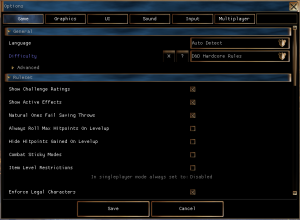

This is a summary of what the different game options do. Most are accessible in game as of later NWN:EE patches, if not then the settings.tml file in the documents folder will contain the settings which is simply a text file.
The Options Menu in NWN:EE 1.81 and onwards also has a search box in the top right for finding any setting named below.
settings.tml is generated by the game on first load with some sane defaults (noted below). The structure is a simple formatted file with all the headers to options being in square brackets, and setting elements underneath with tabs indenting them. For instance it should look like this:
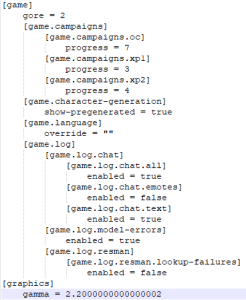
Below the "settings.tml name" is not formatted with all the relevant whitespace since some settings include a lot of whitespace.
| Option Panel Name | settings.tml name | Default Value | Options Panel Values | settings.tml values | Description and Notes |
|---|---|---|---|---|---|
| General | |||||
| Language | [game] [game.language] override = "" | Auto Detect | Auto Detect English French German Spanish Italian Polish | "" en fr de es it pl | Auto detect should detect the OS language and use that. Some languages change the audio, text and subtitles on movies. Some just change the text and subtitles on movies and keep English voices. Needs a game restart to fully take effect. Relates to the games \steamapps\common\Neverwinter Nights\lang\XX folder name if you want to find the files it swaps out. |
| Difficulty | [ruleset] difficulty = 1 | 1 (Easy) | Very Easy (not singleplayer accessible - server only) Easy Normal D&D Hardcore Rules Very Difficult | 0 1 2 3 4 | See NWN Difficulty Settings page for more information. Note servers have this set on the server end of course overriding this setting. In singleplayer you can change it at anytime during gameplay. |
| General - Advanced | |||||
| Show Pregenerated Characters | [game] [game.character-generation] show-pregenerated = true | true | Ticked Unticked | true false | Shows the .BIC files referenced in pregen.2da if ticked/true, else will not disaply them |
| Violence Level | [game] gore = 1 | 1 (Full) | Low Full Special | 0 1 2 | Low - removes blood VFX (see visualeffects.2da) and replaces some placeables with "lower violence" versions (see placeables.2da) Full - usual setting, normal visuals and placeables Special - Certain deaths are now "gory" and explode the creature into chunks with additional blood VFX Note the 1.69 "Violence Password" is no longer accessible in the game options panel. |
| Ruleset | |||||
| Show Challenge Ratings | true | Shows the challenge rating of monsters. This is calculated as:
If false the CR is hidden, making it harder for players to assess monster difficulty but may help RP / being more thematic especially if CR is not used for anything else. | |||
| Show Active Effects | true | Shows active effects (as per effecticons.2da) on creature descriptions. If false it will hide them (making it more difficult for players to see what spells and immunities are on them). | |||
| Natural Ones Fail Saving Throws | true | If true it will mean a saving throw can fail on a 1 regardless of the positive values. If false then it will save. This being true does make a 1 in 20 chance anyone will fail a particular save - in higher levels this means instant death saving throws can fail if you roll one on average 20 times. | |||
| Always Roll Max Hitpoints On Levelup | false | This will make it so a character who would roll, say, 1d10 to get HP that level, instead just gets 10. Since you can see the roll before cancelling the levelup, this is a timesaver in SP and in many cases can be enabled in MP as well to balance PCs who roll badly versus those who don't. | |||
| Hide Hitpoints Gained on Levelup | false | This will hide the notification of what HP is gained during a levelup, so it can't be cancelled and started again if too low, if you really want random HP on a MP server. | |||
| Combat Sticky Modes | false | Determines whether combat modes are turned off by movement. The standard behaviour is false, movement turns off combat modes. When the value is true, combat modes become sticky and not interrupted by movement. Combat modes are things like Power Attack, Expertise, etc. and this can help streamline combat. | |||
| Ruleset - Advanced | |||||
| Encounters Always Reset | |||||
| Validate Spells | This will check the servers list of spells ie spells.2da against what the client is saying. For instance if the client says that their Wizard can cast Harm, can they really? Should always be left enabled and is even set by default. | ||||
| Combat Max Attack Bonus | |||||
| Combat Max Damage Bonus | |||||
| Combat Max Saving Throw Bonus | |||||
| Combat Max Ability Bonus | |||||
| Combat Max Ability Penalty | |||||
| Combat Max Skill Bonus | |||||
| Logging | |||||
| Logging - Advanced | |||||
| Scripts - Advanced | |||||
| Vm Runtime Limits Instructions | 524288 | 131072 - 16777216 | This raises or lowers the instructions limit for scripts. It's recommended to keep this at the default value to stop any unrulely | ||
| Log Script Execution | Off | On Off | 1 0 | This will log to nwclientLog1.txt each and every script execution as a new log entry, eg: [0] Object: "Summoned Elder Air Elemental", Running Script: nw_ch_ac2 This is obviously very much going to spam the log file and should not be used in a production environment, but can be used to figure out rogue scripts you don't expect or the script execution order in a pinch in smaller test modules. | |
| Vm Profiling | Off | On Off | 1 0 | This will log to nwclientLog1.txt a list of the scripts in the module that were run, and their run count and total execution time, when the server is shut down. It is used to debug what scripts may cause hiccups and lag and usually only used on servers. | |
| Debugger Address | 127.0.0.1 | IP address | The IP address of of the debugger server, ie DebugServer.exe, for use with SpawnScriptDebugger. In the modern day with 2 monitors and easy alt-tab without crashing, leaving this as localhost (127.0.0.1) should be sufficient. | ||
| Debugger Port | 5122 | Integer | The port of the debugger server, ie DebugServer.exe, for use with SpawnScriptDebugger. You'd usually leave this on the default port which matches the default in DebugServer.exe | ||
| SQLite Tracing - Advanced | Added in 1.84.8193.23 | ||||
| Profile | Off | On Off | 1 0 | If enabled then the game will write to nwclientLog1.txt every time a nwscript sqlStep() takes more then the Profile Threshold Msec amount of time to run. | |
| Profile Threshold Msec | 800 | 0 - 60000 | If the time taken by a statement is over this amount it will log it to nwclientLog1.txt. Setting to 0 doesn't display every statement, only those taking 1ms or higher. | ||
| Stmt | Off | On Off | 1 0 | This will print every SQL statement run through sqlStep() to nwclientLog1.txt prefixed with "stmt: ". Do not enable in a production environment, but it can be handy to quickly trace malformed SQL in a pinch. | |
| Other | |||||
| Campaign Progress | [game] [game.campaigns] [game.campaigns.oc] progress = 7 [game.campaigns.xp1] progress = 3 [game.campaigns.xp2] progress = 4 | OC - up to 7 XP1 - up to 3 XP2 - up to 4 | This is how you unlock progress without actually ending the modules. If you want to access the last chapter of the OC set the progress to 7. The example settings.tml has them all unlocked. |
| Option Panel Name | settings.tml name | Default Value | Options Panel Values | settings.tml values | Description and Notes |
|---|---|---|---|---|---|
| Frame Limiter | |||||
| Enabled | Off | On, Off | If enabled the FPS limiter settings below are used. If disabled it'll use the most FPS possible. | ||
| Foreground Target Fps | 60 | 1 - 255 | FPS limit when the game is in the foreground and no radials or menus are open | ||
| Background Target Fps | 10 | 1 - 255 | FPS limit when the game is in the background - eg; you've clicked on your web browser (this usually pauses in SP) | ||
| Non Interactive Target Fps | 48 | 1 - 255 | FPS limit when:
It'd be recommended to set this to the same as Foreground Target FPS to keep a consistent FPS. |
| Option Panel Name | settings.tml name | Default Value | Options Panel Values | settings.tml values | Description and Notes |
|---|---|---|---|---|---|
| Option Panel Name | settings.tml name | Default Value | Options Panel Values | settings.tml values | Description and Notes |
|---|---|---|---|---|---|
| Voices Volume | [sound.voices] volume = 0.50000000000000000 | 0.50 | 0.0 - 1.0 | 0.0 - 1.0 | Volume of voices in the game. These are sound effects played during conversation dialog with the player and the voicesets that are used by creatures. |
| Music Volume | [sound.music] volume = 0.50000000000000000 | 0.50 | 0.0 - 1.0 | 0.0 - 1.0 | Volume of music in the game. See Sounds and Music. |
| main-menu-theme = "mus_theme_main" | mus_theme_main | Music file name | Not available in the Options panel, setting this can change the default music played by the main menu - it should be a bmu file name (without the file extension). Examples that may be suitable in the NWN:EE files (find them in the "mus" directory and play with any MP3 software to listen in advance):
It's not probably a good idea to use a battle theme here, those tend to get loud. | ||
| Sound Effects Volume | [sound.effects] volume = 0.50000000000000000 | 0.50 | 0.0 - 1.0 | 0.0 - 1.0 | Volume of sounds played in the game. Presumably also UI elements as well. See Sounds and Music. |
| 2D/3D Bias | [sound.3d] bias=1.0000000000 | 1.00 (as of 8193.18) | 0.10 - 1.90 | 0.10 - 1.90 | There are two types of sound sources in the game, and they're kind of like the two different models in the game, there's the 3d models, like game objects, that are positioned in a space that you can detect while you move the camera because of the illusion of depth, and 2d models in the game, like the UI elements, which are frozen front-facing and flat.(edited) The "3d" sounds are "environmentalized", and "imaged" to reflect their world positions relative to the camera, usually. Slider is volume bias of Environmental sounds (like voice lines, spell sounds etc) - the "3D" versus more direct sounds (UI Button clicks) which are "2D". |
| Option Panel Name | settings.tml name | Default Value | Options | settings.tml values | Description and Notes |
|---|---|---|---|---|---|
| Option Panel Name | settings.tml name | Default Value | Options | settings.tml values | Description and Notes |
|---|---|---|---|---|---|
| Client | |||||
| Player Name | "" | "" | Text field | Text field | Your player name to join servers with |
| Server | |||||
| Min Character Level | |||||
| Max Character Level | |||||
| Item Level restrictions | In singleplayer mode always set to: Disabled Known as "ILR" In multiplayer it toggles if a character needs a certain level to use a certain value of magical equipment. This is determined purely by itemvalue.2da | ||||
| Enforce Legal Characters | In singleplayer mode always set to: Disabled Known as "ELC". In multiplayer it toggles legal characters - those that adhere to the game rules, since both character generation and levelup are technically done client side and sent to the server for validation (which is ELC). | ||||
| Section | settings.tml name | Default Value | settings.tml values | Description and Notes |
|---|---|---|---|---|
| allow-player-pausing | false | true false | If true it will allow players to have DM-like powers to pause a server | |
| disallow-shouting | false | true false | ||
[server] [server.tweaks] [server.tweaks.power-saving] | clients-required-to-disable | 1 | Positive integer | The old server would sleep for 10ms each game update. This was fine on small servers but caused severe performance issues on large servers. We added a new config option called Clients Required To Disable CPU Sleep (under Game Options) with an integer value which can be used to toggle this behaviour back on. By default, the server will retain the old behaviour until one or more players join, then it will enter high performance mode without any sleeping. You can change this value to something that is greater than the maximum players allowed on your server if you never want the server to enter high performance mode. It is recommended this is set to 1 in the modern age of processors else can cause server lag and stuttering for players. |
| adminpassword | (N/A) | N.B. that this is likely to be redundant but for safety's sake it is worth setting an adminpassword anyway. In the original NWN, there were at times versions of NWServer released by the community which could remotely access a server in order to carry out administrative commands. Some servers were 'hacked' using such software, presumably where they hadn't set up a secure adminpassword. |