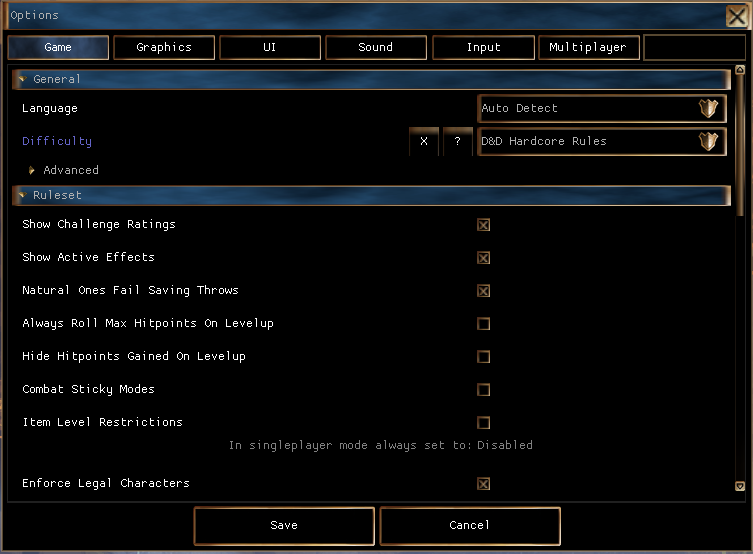
This is a summary of what the different game options do. Most are accessible in game as of later NWN:EE patches, if not then the settings.tml file in the documents folder will contain the settings which is simply a text file.
The Options Menu in NWN:EE 1.81 and onwards also has a search box in the top right for finding any setting named below.
settings.tml is generated by the game on first load with some sane defaults. The structure is a simple formatted file with all the headers to options being in square brackets, and setting elements underneath.
The headings below state the TML setting top level category, and the "settings.tml name" column shows the full path to that particular setting.
| Option Panel Name | settings.tml name | Default Value | Options Panel Values | settings.tml values | Description and Notes |
|---|---|---|---|---|---|
| Language | [game.language] override = "" | Auto Detect | Auto Detect English French German Spanish Italian Polish | "" en fr de es it pl | Auto detect should detect the OS language and use that. Some languages change the audio, text and subtitles on movies. Some just change the text and subtitles on movies and keep English voices. Needs a game restart to fully take effect. Relates to the games \steamapps\common\Neverwinter Nights\lang\XX folder name if you want to find the files it swaps out. |
| Option Panel Name | settings.tml name | Default Value | Options Panel Values | settings.tml values | Description and Notes |
|---|---|---|---|---|---|
| Option Panel Name | settings.tml name | Default Value | Options Panel Values | settings.tml values | Description and Notes |
|---|---|---|---|---|---|
| Option Panel Name | settings.tml name | Default Value | Options Panel Values | settings.tml values | Description and Notes |
|---|---|---|---|---|---|
| Voices Volume | [sound.voices] volume = 0.50000000000000000 | 0.50 | 0.0 - 1.0 | 0.0 - 1.0 | Volume of voices in the game. These are sound effects played during conversation dialog with the player and the voicesets that are used by creatures. |
| Music Volume | [sound.music] volume = 0.50000000000000000 | 0.50 | 0.0 - 1.0 | 0.0 - 1.0 | Volume of music in the game. See Sounds and Music. |
| main-menu-theme = "mus_theme_main" | mus_theme_main | Music file name | Not available in the Options panel, setting this can change the default music played by the main menu - it should be a bmu file name (without the file extension). Examples that may be suitable in the NWN:EE files (find them in the "mus" directory and play with any MP3 software to listen in advance):
It's not probably a good idea to use a battle theme here, those tend to get loud. | ||
| Sound Effects Volume | [sound.effects] volume = 0.50000000000000000 | 0.50 | 0.0 - 1.0 | 0.0 - 1.0 | Volume of sounds played in the game. Presumably also UI elements as well. See Sounds and Music. |
| 2D/3D Bias | [sound.3d] bias=1.0000000000 | 1.00 (as of 8193.18) | 0.10 - 1.90 | 0.10 - 1.90 | There are two types of sound sources in the game, and they're kind of like the two different models in the game, there's the 3d models, like game objects, that are positioned in a space that you can detect while you move the camera because of the illusion of depth, and 2d models in the game, like the UI elements, which are frozen front-facing and flat.(edited) The "3d" sounds are "environmentalized", and "imaged" to reflect their world positions relative to the camera, usually. Slider is volume bias of Environmental sounds (like voice lines, spell sounds etc) - the "3D" versus more direct sounds (UI Button clicks) which are "2D". |
| Option Panel Name | settings.tml name | Default Value | Options | settings.tml values | Description and Notes |
|---|---|---|---|---|---|
| Option Panel Name | settings.tml name | Default Value | Options | settings.tml values | Description and Notes |
|---|---|---|---|---|---|